DNS Health Check: A Practical Monitoring Guide

A successful A record lookup doesn't prove that DNS is healthy. It proves only that one resolver, from one network path, received one answer at that moment. Production outages often hide in the delegation chain, inconsistent authoritative servers, broken IPv6 reachability, stale glue, or a change that left the parent and child zones disagreeing.
A useful DNS health check therefore has to test resolution as users experience it, while also verifying the infrastructure that makes resolution possible. That means combining recursive lookups with authoritative-server checks, TCP tests, DNSSEC validation, change detection, and monitoring from more than one vantage point. The practical question isn't “does the record resolve?” It's “can independent resolvers reach the correct authoritative servers and receive consistent, valid answers every time?”
Table of Contents
- Understanding DNS Health and Delegation Chains
- Running Manual DNS Health Checks with CLI Tools
- Interpreting Results and Fixing Common Failure Modes
- Configuring Production-Grade DNS Monitoring Thresholds
- Automating DNS Health Checks with Fivenines
- Validating DNSSEC and Security Posture
Understanding DNS Health and Delegation Chains
A ping can succeed while DNS is already failing. The ping may use a cached address, a local hosts file, or an application connection that resolved the name earlier. Conversely, a DNS lookup can fail even when every server appears reachable, because the parent zone delegates the domain to nameservers that don't serve the expected child zone.
The chain matters more than the apex
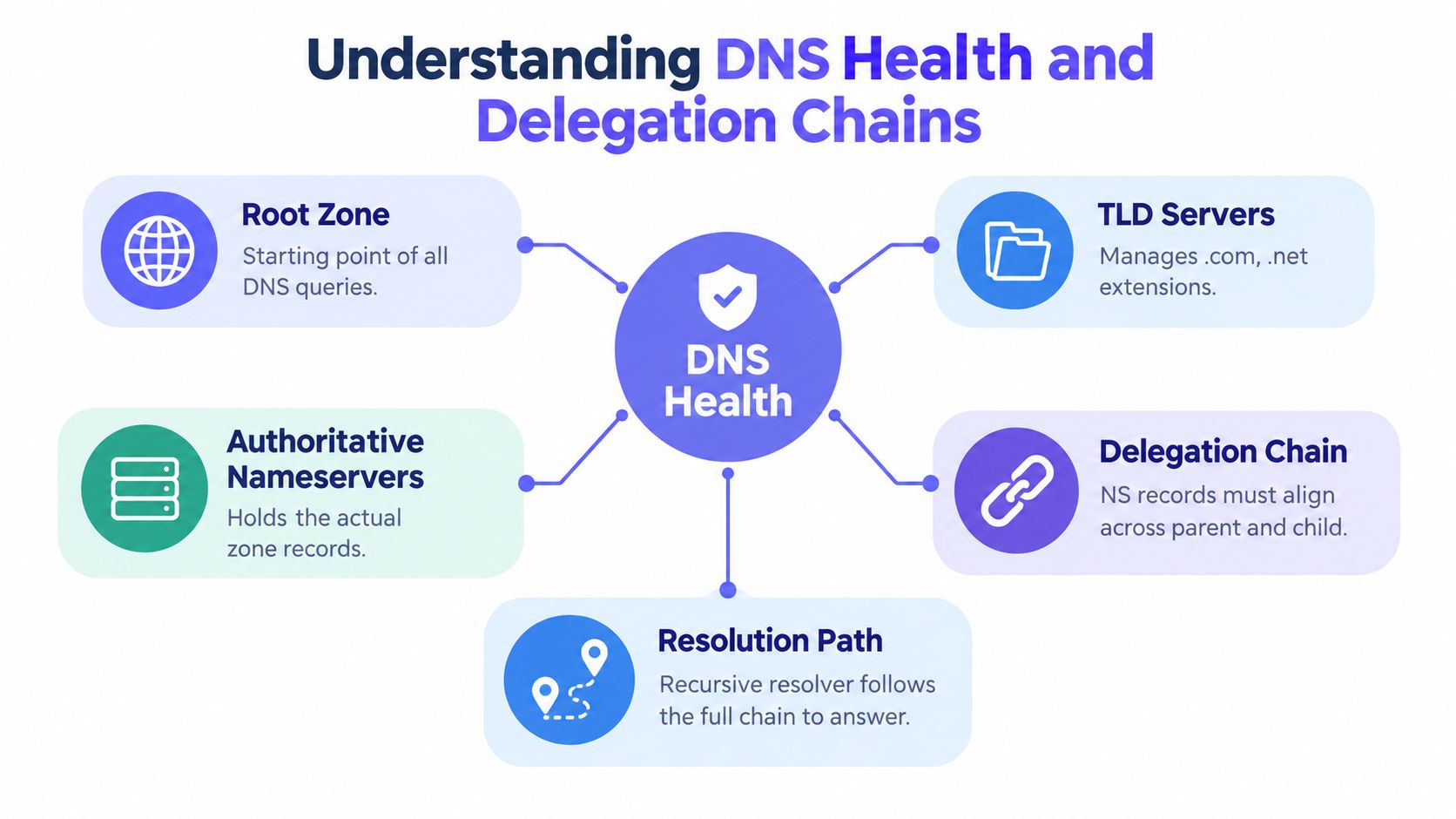
A recursive resolver normally follows a path from the root zone to the top-level domain servers, then to the authoritative nameservers delegated for the domain. Each handoff has to work. The parent must publish the correct NS set and usable glue where required, the child zone must contain matching NS records, and every listed authoritative server must answer consistently.
The DNS name resolution guide provides useful background on that recursive process, but production checks need to go further than explaining it. They should query the parent and child independently, contact every authoritative server directly, and compare the returned records and SOA data.
A basic apex check misses several failure modes:
- Parent and child mismatch: The registry or parent zone points to one nameserver set while the child publishes another.
- Lame delegation: A listed nameserver answers, but it isn't authoritative for the delegated zone.
- Stale glue: The parent still supplies an outdated address for a nameserver, sending resolvers to the wrong host.
- Partial authoritative failure: One server responds correctly while another times out or returns different data.
- Broken IPv6 path: AAAA records exist, but the nameserver cannot be reached over IPv6, so IPv6-capable resolvers encounter a broken path.
A large empirical study estimated a 3–6% accuracy gap when resolvability was inferred from passive data, and identified unresolvable NS records in the zone or parent as the most common failure mode. The operational implication is direct: passive success and one-recursive-resolver success aren't enough. A real check needs active queries across the whole delegation path. The study published in Computer Networks also supports checking IPv6 end to end, rather than treating AAAA presence as proof of readiness.
Practical rule: A domain is healthy only when the parent, child, authoritative servers, transport paths, and returned answers agree.
Running Manual DNS Health Checks with CLI Tools
Manual inspection should precede automation. Operators need to know which layer failed before turning a command into an alert, otherwise a monitoring system reports symptoms without identifying the broken handoff.
Start with a recursive baseline
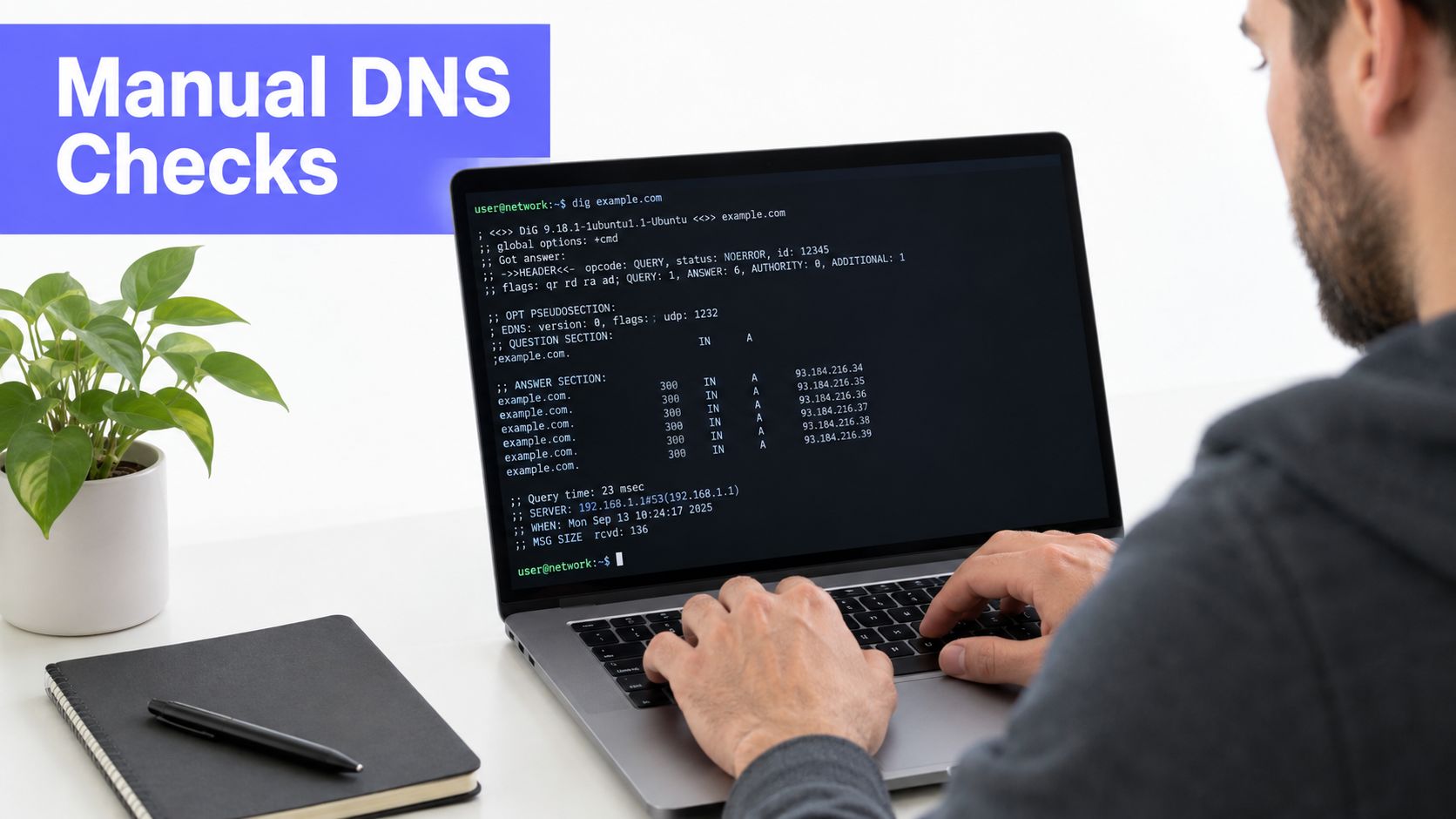
dig gives more useful output than a default lookup because it exposes status, flags, answer counts, authority data, and timing. A practical baseline uses a chosen resolver and requests the records relevant to the service:
dig example.com A +noall +answer +stats
The +noall +answer combination keeps the result readable, while +stats shows query time and server information. The same pattern can be applied to AAAA, NS, SOA, CNAME, MX, or TXT queries. Operators should record the response status, whether the answer is authoritative, and whether response time changes between resolvers.
A recursive result is only the first comparison point. To inspect the path, use:
dig example.com A +trace
The +trace option asks dig to follow the delegation from the root toward the authoritative servers. It helps reveal where the chain stops, whether the parent returns the expected NS records, and whether the final server provides an answer.
Query authoritative servers directly
After identifying the delegated nameservers, query each one explicitly:
dig @ns.example.net example.com SOA +norecurse
The @ syntax selects the server, while +norecurse prevents that server from hiding delegation problems by performing recursion. A healthy authoritative response should identify the zone as authoritative and return the expected SOA. Repeat the check for every delegated server, then compare the SOA serial, NS set, and service records.
TCP deserves its own test because large responses, DNSSEC data, and fallback behavior can expose transport problems that UDP-only checks miss:
dig @ns.example.net example.com DNSKEY +tcp
EDNS0 behavior can be inspected with:
dig @ns.example.net example.com DNSKEY +dnssec
These commands don't replace packet captures, but they quickly show whether the server handles the response size and DNSSEC-related data path expected by validating resolvers. Operators troubleshooting response delay can pair DNS timings with a network latency troubleshooting workflow to separate resolver delay from broader path instability.
A hostname can also resolve from the shell while the network path to an authoritative server remains unreliable. traceroute can help identify routing behavior, although firewalls and ICMP filtering limit its conclusions. For DNS-specific visibility, DNSViz can expose delegation and DNSSEC relationships graphically.
The following commands form a compact field checklist:
dig example.com NS +traceto follow delegation.dig @authoritative-server example.com SOA +norecurseto test authority.dig @authoritative-server example.com A +tcpto test TCP fallback.dig @authoritative-server example.com AAAA +dnssecto inspect IPv6-related and signed responses.- The same queries through more than one recursive resolver to identify resolver-specific behavior.
The video below provides a visual supplement to command-line DNS inspection.
Interpreting Results and Fixing Common Failure Modes
DNS troubleshooting improves when the response code is treated as evidence, not as a diagnosis. SERVFAIL says that a resolver couldn't complete validation or resolution. It doesn't identify whether the cause was DNSSEC, delegation, transport, or inconsistent authoritative data.
Delegation and change failures
A lame delegation often appears as a timeout, SERVFAIL, or a non-authoritative response from a server named by the parent. The repair starts at the parent. Confirm the published NS set, verify that each nameserver serves the zone, and remove or correct any delegation that points to an inactive service. The child zone must publish the intended NS records as well.
Stale glue creates a related but distinct problem. A parent can return an old address for a nameserver even after the nameserver's address changed. Resolvers then contact the wrong destination, sometimes producing intermittent behavior because different recursive caches hold different delegation data. The fix requires updating glue at the registrar or registry layer, confirming the new server answers authoritatively, and checking the chain again from an external resolver.
Change management causes more incidents than many teams expect. A verified analysis of 13 major DNS incidents from 2015 through 2025 found eight tied to misconfiguration or change-related failures, three to software bugs, and two to attacks. The analysis also found that no major DNS outage since 2019 was attack-driven. The DNS outage root-cause analysis supports a straightforward operational response: review DNS changes like production code, with peer review, staged rollout, rollback instructions, and post-change verification.
IPv6 and consistency failures
IPv6 checks need to test reachability, not merely record existence. A nameserver may publish an AAAA record while its firewall, routing, listener, or upstream path prevents queries from completing. Query each authoritative server over IPv6, compare response codes and latency with IPv4, and test TCP as well as UDP where the monitoring system supports it.
The most dangerous DNS result is a partial success. One authoritative server answering correctly can conceal a second server that returns stale data or fails only for a particular transport.
SOA serial mismatches are a useful change signal. A mismatch isn't automatically an outage, because secondary servers can legitimately update at different moments, but a persistent difference indicates a transfer or deployment problem. Check zone-transfer logs, authoritative configuration, and the server's view of the zone. If only some recursive resolvers fail, compare their upstream paths and validation behavior instead of changing records blindly.
Configuring Production-Grade DNS Monitoring Thresholds
Alerting needs enough sensitivity to catch a real outage without treating every lost packet as an incident. Research on active-active DNS resiliency describes monitoring intervals from 1 to 30 seconds, recommends 3 to 5 seconds for timely detection, and identifies 1 to 5 consecutive misses as a practical failure range. It also describes 2 to 3 failures as a balanced threshold and 1 to 10 seconds as a usable timeout range, with 2 to 3 seconds commonly recommended. The DNS monitoring guidance summarized by Geekflare captures those operational trade-offs.
A sensible default for a production service is a 3 to 5 second polling interval, a 2 to 3 second timeout, and an alert after 2 to 3 consecutive failures. That configuration reacts quickly while allowing a short transient interruption to clear. A tighter setting can fit a high-criticality service, but it should come with suppression, confirmation, and clear ownership.
| Parameter | Recommended Value | Trade-off / Risk |
|---|---|---|
| Polling interval | 3–5 seconds | Faster detection increases query volume and monitoring load |
| Consecutive misses | 2–3 failures | Lower values page sooner but amplify transient packet loss |
| Timeout | 2–3 seconds | Short timeouts expose latency quickly but can flag slow paths |
| Confirmation path | Multiple resolvers and regions | Wider coverage improves confidence but creates more results to correlate |
Test the resolver, not just the zone
A check from one recursive resolver can report healthy while users in another network receive SERVFAIL. A Computer Networks study found that 13.5% of DNS queries failed overall, with failure rates varying across domains and strongly influenced by recursive-resolver behavior. The DNS health research shows why monitoring should exercise both primary and secondary ISP-configured DNS servers rather than treating one resolver as universal truth.
The monitor should compare:
- Resolver outcomes: Status codes, answer contents, and validation results.
- Authoritative behavior: Direct responses from every delegated server.
- Geographic paths: Independent regions and network providers.
- Transport modes: UDP, TCP fallback, and IPv6 where applicable.
- Change signals: SOA serials, NS data, and unexpected record changes.
Teams should baseline normal response time and answer content before selecting alert thresholds. A performance baseline process helps distinguish an actual DNS regression from normal variation. Thresholds should be reviewed after resolver changes, nameserver migrations, CDN changes, and network-policy updates. A healthy alert identifies the failing resolver, location, record type, transport, and authoritative target, not merely the domain name.
Automating DNS Health Checks with Fivenines
Cron scripts and dig wrappers are useful diagnostic tools, but they become fragile monitoring systems. Someone has to maintain resolver lists, store historical output, implement retries, correlate failures across locations, and route alerts without paging the entire team for a single dropped packet.
A platform approach moves those concerns into a managed workflow. Fivenines provides DNS uptime checks from multiple regions and supports record types including A, AAAA, CNAME, MX, TXT, and NS. Its checks can also alert on DNS record changes, which matters because an unexpected answer can be a security or change-management event even when resolution remains available.
Manual scripts versus managed checks
A home-built script offers complete control. It can run custom queries, emit Prometheus metrics, and fit an existing incident pipeline. The cost is operational ownership. Teams must decide how to confirm failures, avoid duplicate alerts, track resolver-specific incidents, and preserve enough history to distinguish a stale cache from a broken delegation.
A managed monitor can make those decisions repeatable:
- Multi-region execution: A regional failure is less likely to be mistaken for a global DNS outage.
- Failure confirmation: Repeated checks reduce pages caused by isolated packet loss.
- Record-aware tests: The monitor can validate the expected response type instead of checking only reachability.
- Alert routing: Slack, Microsoft Teams, PagerDuty, email, SMS, and webhooks can receive different severities.
- Infrastructure as code: A REST API and Terraform provider allow monitors to follow the same review process as other infrastructure.
- Escalation controls: Delays, retries, and escalation paths prevent a transient lookup failure from waking every responder.
The important comparison isn't “automation or no automation.” It's whether a team wants to maintain monitoring behavior as application code or consume a defined operational service. A small environment may be well served by scripts and a simple alert sink. A multi-region SaaS platform or MSP usually needs consistent monitor configuration, ownership, and alert history across many domains.
The DNS monitoring tool overview describes the broader monitoring context. Whatever platform a team selects, the monitor should preserve raw evidence: resolver, location, query type, response code, returned data, timing, and authoritative target. Without that context, automation only makes an ambiguous alert arrive faster.
Validating DNSSEC and Security Posture
DNS availability does not prove that a domain is safe or correctly delegated. A name can resolve while its cryptographic chain is broken, certificate issuance is too permissive, or an abandoned subdomain still points to a decommissioned external service.
Start DNSSEC validation with the delegation chain. A validating recursive resolver must see consistent DS and DNSKEY relationships, valid signatures, correct inception and expiration times, and compatible algorithms. Query signed zones through validation-enabled resolvers, then alert on validation failure rather than checking only whether records exist. The Switch DNS Health Report checks name-server accessibility and .ch and .li domains, and verifies whether DNSSEC-signed names resolve through a validating recursive resolver. Its 2025 registry report reported a name-server accessibility error rate of 2.5% in 2025.
Extend checks beyond DNSSEC
CAA records limit which certificate authorities may issue certificates for a domain. SPF, DKIM, and DMARC records affect email authentication. Monitor each for unexpected removal, malformed syntax, and alignment with the organization's sending systems. These records do not prove secure certificate issuance or mail delivery, so an unexpected change still requires investigation.
Subdomain takeover checks need an inventory of DNS names and their external targets. A dangling CNAME can remain after a cloud application, hosting project, or SaaS resource is deleted. Flag records that point to an unclaimed service, then route remediation to the team responsible for the domain or application.
Threat monitoring also needs time-based analysis. A 2025 threat intelligence report from Infoblox recorded 100.8 million newly observed domains during the prior 12 months, with over a quarter classified as malicious or suspicious. It reported that 85.4% of newly discovered threat domains were identified before user interaction. The report also noted more than 7.6 million new threat-related domains over a three-month period, a 20% quarterly increase, and 3,000 to 10,000 zero-day domains per day with lifetimes under 72 hours. The 2025 DNS threat intelligence report shows why a one-time audit cannot cover the full threat surface.
A mature program combines continuous resolution checks with DNSSEC validation, CAA review, email-record change detection, subdomain inventory, and threat-intelligence correlation. DNS therefore serves as both an application dependency and a security control plane.
Fivenines provides multi-region DNS uptime checks, record-change alerts, configurable failure confirmation, and integrations for routing incidents to the right channels. Teams can use its API and Terraform provider to manage monitors as code, then visit Fivenines to evaluate its fit for DNS and infrastructure monitoring.