Setting Up Telegram Alerts for Infrastructure Monitoring

An outage starts with a familiar pattern. A database latency alarm fires, a container restarts, and an uptime check reports failure. Within minutes, the on-call Telegram chat fills with repeated messages, while the one alert that matters is buried underneath them. A bot can deliver infrastructure notifications quickly, but delivery alone doesn't make a paging system reliable.
Production-ready Telegram alerts need three controls: accurate routing, deliberate rate management, and security governance. Telegram has grown from 200 million monthly active users in March 2018 to more than 1 billion by March 2025, according to Telegram user figures published by Statista. That scale makes the platform a practical notification surface, but it also makes poor alert design more costly. A noisy bot becomes another channel engineers mute.
Table of Contents
- Creating the Bot and Extracting Chat IDs
- Configuring the Fivenines Integration
- Navigating Rate Limits and Alert Batching
- Securing Bot Tokens and Sanitizing Payloads
- Designing Escalation Workflows and Routing
- Troubleshooting Silent Failures and Delivery Issues
Creating the Bot and Extracting Chat IDs
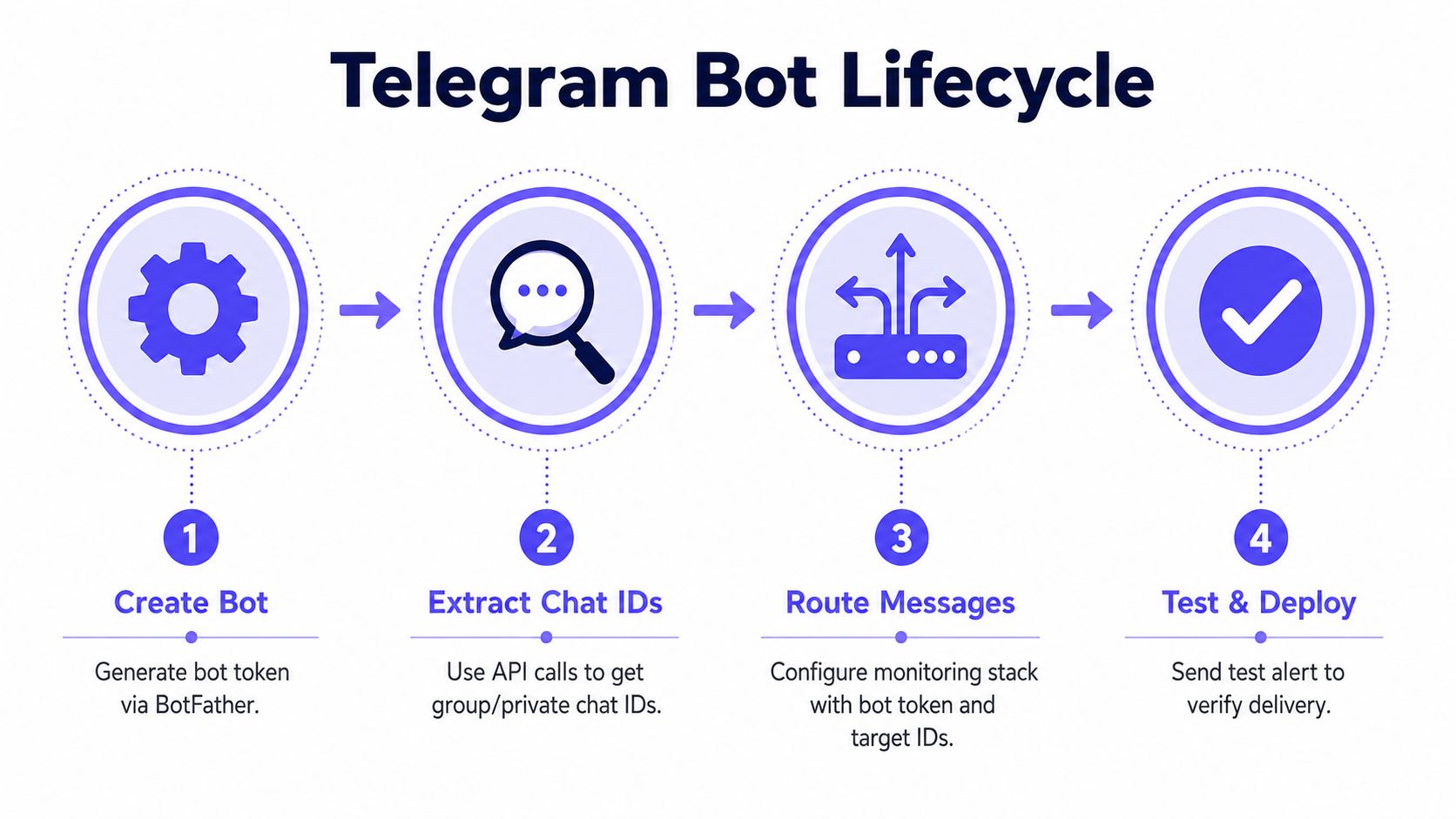
Alert fatigue starts before the first message is sent. If every warning, recovery event, and duplicate check reaches the same chat, engineers quickly stop treating the bot as a trustworthy signal. The bot should therefore be created with its intended audience and destination structure in mind, not added as an afterthought to an existing monitoring stack.
Telegram's Bot API, launched in 2015, provides programmatic accounts that can send messages, receive updates, and connect external services, as documented in the Telegram software background). The practical setup is straightforward:
- Open Telegram and find BotFather.
- Use
/newbotand choose a descriptive display name. - Choose a username that follows Telegram's bot naming requirements.
- Store the API token returned by BotFather in a secrets manager or protected credential store.
- Add the bot to the destination chat, then send a normal message there so Telegram generates an update the bot can inspect.
The token is a credential, not a label. Anyone who obtains it can operate the bot through the API, so it shouldn't appear in source code, ticket comments, screenshots, or shared documentation.
Finding destinations without third-party bots
A private chat, group, and channel each has a destination identifier. The safest general method is to use the bot's own update endpoint after the bot has received an interaction. The returned JSON contains a chat object and its id value. Private chats typically use a positive identifier, while group destinations commonly use a negative identifier. The sign matters when the monitoring platform stores the value exactly as Telegram provides it.
For a channel, the bot must have the ability to post. A public channel may also be addressable through its public username, while private destinations normally require the numeric chat ID. Teams shouldn't rely on unknown “ID finder” bots because adding an unnecessary third-party integration expands the exposure surface.
Practical rule: Create separate destinations for urgent pages, routine warnings, and team discussion. A clean routing model prevents message volume from becoming an incident of its own.
After extracting the IDs, send a controlled test message to each destination. Verify the bot can post, confirm the expected members can see it, and record which monitor class belongs in each chat. Teams that also need phone-based escalation can compare this design with sending an alarm to someone's phone, but Telegram should still be treated as one channel within a broader incident policy.
Configuring the Fivenines Integration
A bot token and chat ID only identify the sender and destination. The monitoring platform still needs rules that decide which event goes where, what context appears in the message, and whether the event should trigger an immediate notification or a quieter update.
In Fivenines, the integration workflow should begin with the notification settings rather than individual monitors. Add the Telegram credentials, select the intended destination, and use the platform's test function before attaching the channel to production checks. A successful test proves that authentication and basic delivery work. It doesn't prove that a monitor is enabled, that its template renders correctly, or that the right team receives the event.
Map monitors to operational ownership
Routing should follow responsibility, not convenience. Database latency belongs with the backend responders, while edge connectivity and host health belong with infrastructure operators. A single shared room can remain useful for major incidents, but it shouldn't be the default destination for every signal.
A practical configuration sequence looks like this:
- Authenticate once: Add the bot token through the integration's protected credential field.
- Choose a destination: Assign the relevant numeric chat ID to the notification route.
- Enable the right monitors: A workspace-level connection doesn't necessarily mean every monitor should notify through Telegram.
- Build useful templates: Include the monitor name, affected service, current condition, detection time, and a direct investigation path.
- Test an actual event: Trigger or simulate a noncritical condition, then confirm both formatting and routing.
Templates should provide enough context to support the first response without copying an entire log stream into a chat. For example, a container restart alert can identify the service and host, while a website failure can identify the check type and affected endpoint. CPU, memory, disk, and network values can be useful when the alert threshold itself doesn't explain the likely failure mode.
Fivenines can combine infrastructure metrics, uptime checks, cron monitoring, workflow automation, and Telegram delivery in one monitoring configuration. Teams comparing notification destinations can also review the related guidance on Microsoft Teams notifications before deciding which channel belongs in the incident path.
A Telegram message should answer three questions immediately: what failed, where it failed, and what the responder should inspect next.
Navigating Rate Limits and Alert Batching
Telegram isn't an unlimited event bus. The Bot API's documented delivery ceilings include 1 message per second to the same chat, about 20 messages per minute in a group, and about 30 messages per second across all chats, as specified in the Telegram Bot FAQ. Exceeding those thresholds can produce 429 errors, which means a system that emits one message per raw event may fail precisely when an incident creates the most correlated events.
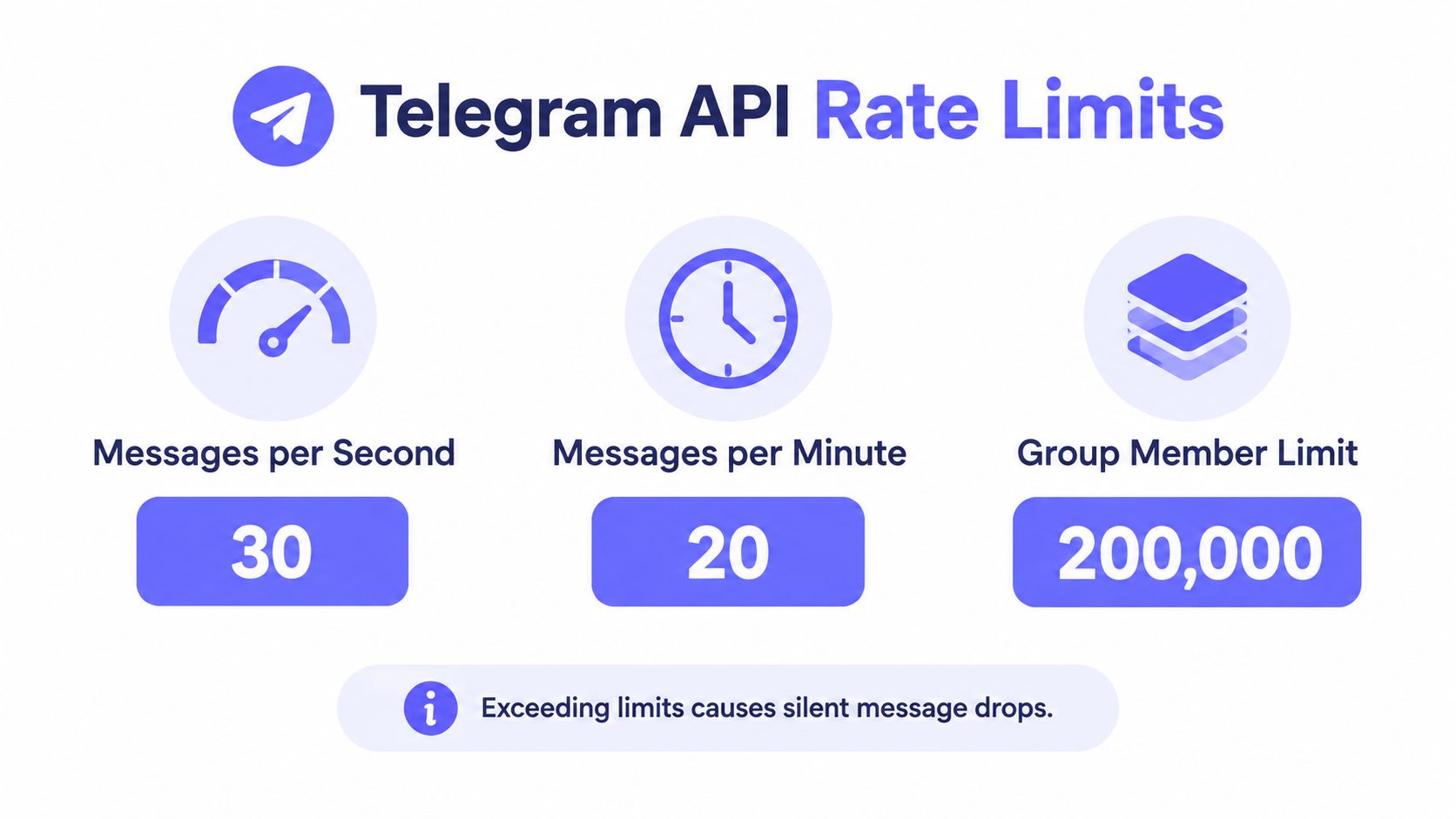
The group limit deserves special attention. A flapping interface, a failing dependency, and several affected services can all produce alerts in the same destination. Even if the global bot limit isn't reached, the group-specific ceiling can become the bottleneck. The result may be delayed delivery, rejected requests, or a stream so dense that responders can't distinguish primary symptoms from secondary effects.
Shape the stream before it reaches Telegram
Fivenines workflows should apply filtering and state logic before sending messages. The useful controls are not cosmetic. They determine whether Telegram represents an incident clearly or mirrors every change in monitoring state.
- Deduplicate related events: Treat repeated observations of the same condition as one active incident until recovery.
- Add cooldowns: Suppress repeated notifications from a flapping check for a defined operational interval.
- Batch correlated failures: Combine several affected services into a summary when they share a likely dependency.
- Separate urgency levels: Send critical failures immediately, while routing lower-priority telemetry to a quieter destination or digest.
- Preserve recovery state: Send a clear recovery notification so responders know whether the incident remains active.
A digest isn't appropriate for a confirmed critical page, and immediate delivery isn't appropriate for every threshold crossing. The right policy depends on whether a responder must act now, investigate during working time, or review the event later.
Capacity is part of reliability. A notification system that ignores delivery ceilings has no dependable behavior during a cascading failure.
Telegram documents an optional paid broadcast path that can raise the ceiling to 1000 messages per second for qualifying bots with 100,000 Stars and 100,000 monthly active users. That option doesn't remove the need for deduplication, routing, or escalation design. Most infrastructure teams should first reduce unnecessary events and protect the urgent path. The practical patterns described in real-time alerting guidance fit that objective because they treat delay, grouping, and escalation as workflow decisions rather than message formatting choices.
Securing Bot Tokens and Sanitizing Payloads
Telegram alerting creates a second data path out of the monitoring environment. A message may contain internal hostnames, private addresses, deployment details, stack traces, customer identifiers, or fragments of configuration. The Telegram FAQ explains that users can block bots, and Telegram's bot-based integrations can handle private data through API-driven flows. That makes a minimum-privilege model necessary for operational use.
The bot should receive only the permissions needed for its destination. A broadcast channel may need posting access, while an incident group may need a different interaction model. There is no operational justification for granting broad administrative access merely because the bot needs to deliver messages.
Treat the payload as an external surface
The safest template is the smallest one that supports triage. It should identify the condition and provide a controlled path to investigate, rather than reproducing raw telemetry.
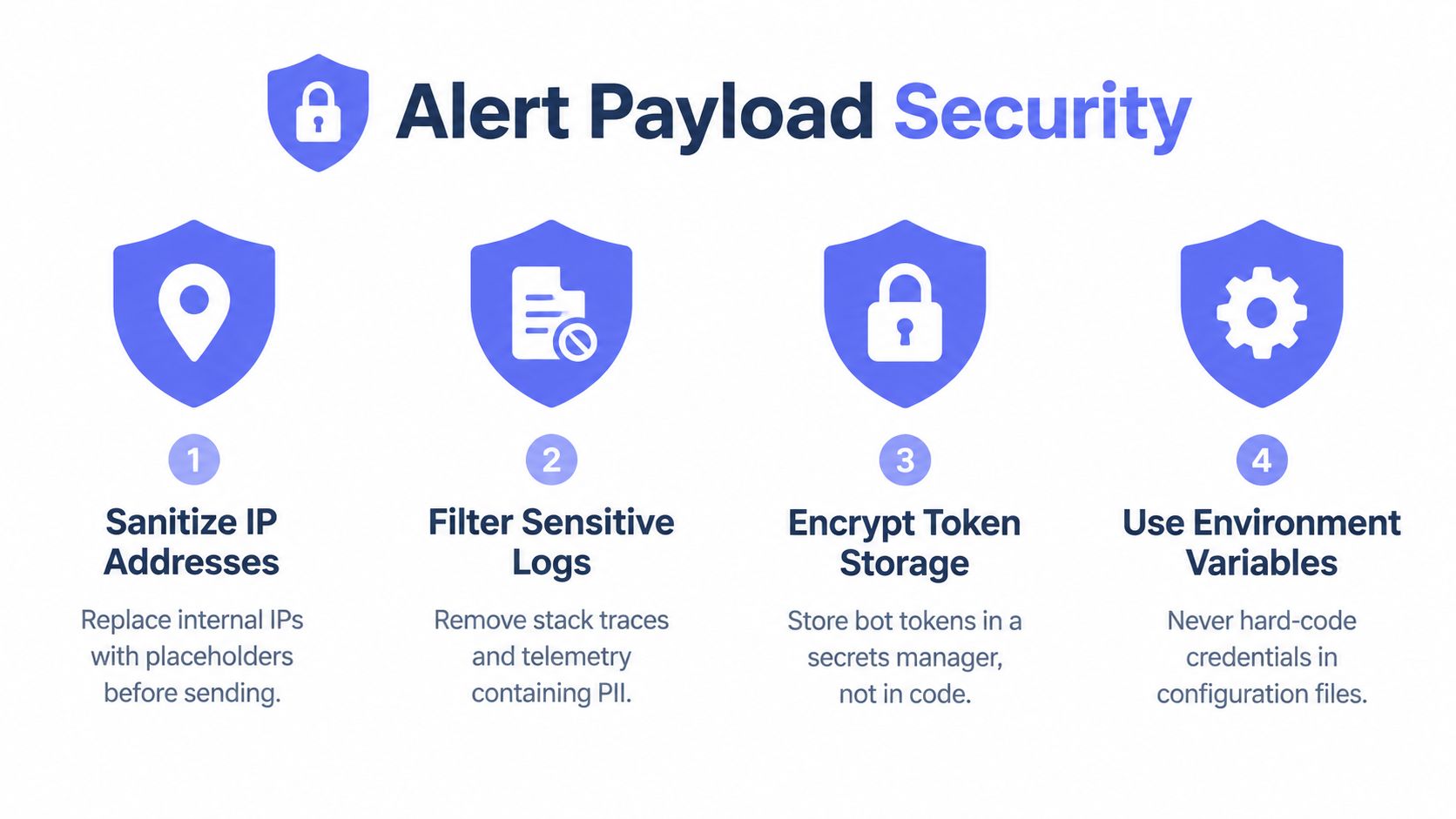
- Sanitize addresses: Replace internal network details with service or host labels where the exact address isn't required.
- Filter logs: Remove stack traces, request bodies, credentials, tokens, and customer data from notification templates.
- Protect credentials: Store the bot token in a secrets manager or protected integration field, never in application code.
- Use environment-backed configuration: Keep destination identifiers and credentials outside committed configuration files.
- Review links: Ensure investigation links don't expose unauthenticated dashboards or sensitive query parameters.
A message such as “database latency above threshold on production database service, inspect the internal dashboard” is usually safer than copying a full error payload. The alert can point responders toward authenticated tooling while keeping the Telegram message useful for initial coordination.
Separate delivery from diagnosis
Telegram should announce the incident, not become the permanent system of record for sensitive investigation data. Retention, membership changes, forwarded messages, and personal devices all affect how widely an alert may travel. Teams handling regulated incidents should define which fields may leave the monitoring platform and which must remain behind authenticated access controls.
The same discipline applies to webhooks. A webhook can carry structured event data into a controlled router, but it still needs authentication, validation, and payload minimization. The principles in webhook notification design are relevant when Telegram is one downstream destination among several.
Security baseline: If a responder doesn't need a field to decide the next action, that field shouldn't be in the Telegram payload.
Designing Escalation Workflows and Routing
A reliable Telegram design separates visibility from responsibility. A general operations group can provide shared awareness, but a critical page needs a named on-call path and a clear fallback when nobody responds.
Warning-level telemetry belongs in a low-interruption channel. Examples include capacity trends, certificate reminders, and recoverable service degradation. Critical events, such as confirmed host failure or a user-facing outage, should reach the on-call destination with a concise message and an escalation rule.
Use destinations as policy boundaries
Groups support discussion and coordination. Channels work better for one-way broadcasts where replies would obscure the alert stream. A team can use both, but the destination should reflect the behavior expected from recipients.
A practical routing model might look like this:
| Event class | Telegram destination | Response expectation |
|---|---|---|
| Routine warning | Operations updates channel | Review during normal workflow |
| Service degradation | Service owner group | Investigate and assess |
| Confirmed outage | On-call group | Acknowledge and respond |
| Unacknowledged critical page | Secondary responder or management route | Escalate according to policy |
Escalation delays should match the incident playbook. If the primary responder doesn't acknowledge a critical alert within the organization's defined window, workflow automation can notify the secondary responder or a management destination. The exact delay isn't a Telegram feature. It's an operational policy that the monitoring platform must enforce.
Routing also needs ownership boundaries for MSPs and hosting providers. Each client or service group should have a destination with controlled membership, rather than placing unrelated customer alerts into one large room. That arrangement reduces accidental disclosure and makes mute decisions safer.
The key design test is simple: can an engineer identify the owner and urgency without reading the entire chat history? If not, the workflow needs stronger severity filters, better templates, or a different destination structure.
Troubleshooting Silent Failures and Delivery Issues
A successful test message doesn't prove production reliability. It only proves that one credential, one destination, and one request worked at that moment. Silent failures usually come from a broken link elsewhere in the chain, such as a rotated token, an incorrect chat ID, a disabled monitor, a removed bot, or malformed message formatting.
Telegram may return 401 Unauthorized when the token is invalid, and 400 Bad Request when the request or formatted payload is invalid, as described in the PRTG Telegram notification troubleshooting guide. These responses should be captured in integration logs instead of discarded after the notification attempt.
A production verification checklist
- Credential check: Confirm the stored token is current and has no accidental whitespace.
- Destination check: Verify the chat ID belongs to the intended user, group, or channel.
- Membership check: Confirm the bot remains in the group and retains permission to post.
- Monitor check: Confirm the specific monitor has Telegram delivery enabled.
- Template check: Test Markdown or other formatting with escaped special characters.
- Recovery check: Verify both failure and recovery events arrive.
- Failure-path check: Review logs for HTTP errors, rejected requests, and rate-limit responses.
If a group receives nothing, recheck membership and posting restrictions before changing the template. If a private user stopped receiving messages, the bot may have been blocked. If several monitors fail simultaneously, inspect the token and integration service before debugging each monitor separately.
Teams building broader notification architectures may also benefit from this overview of how real-time notifications work, especially when Telegram is combined with other delivery paths. The objective isn't to maximize channels. It's to ensure every critical event has a tested route, an owner, and an observable failure mode.
Fivenines combines server metrics, uptime checks, cron monitoring, workflow routing, retries, and escalation with Telegram delivery in one infrastructure monitoring platform. Teams can use it to build filtered Telegram alerts instead of sending raw event noise, then visit Fivenines to evaluate the integration and start with the monitors that matter most.