HetrixTools vs Fivenines: Which Fits Your Infrastructure?

HetrixTools and Fivenines overlap on uptime checks, server metrics, process visibility and scheduled-job monitoring. The useful question is which platform fits the infrastructure you operate. HetrixTools combines those capabilities with blacklist monitoring and a free starting plan. Fivenines is worth evaluating when you need Docker container state, a Proxmox cluster view and configurable incident workflows.
I'll be upfront: I'm writing this for the FiveNines blog, so take the comparison with appropriate skepticism. That said, I'll try to be honest about where each tool makes sense, because recommending the wrong tool helps nobody.
For a quick side-by-side feature breakdown, see our full HetrixTools vs FiveNines comparison.
 FiveNines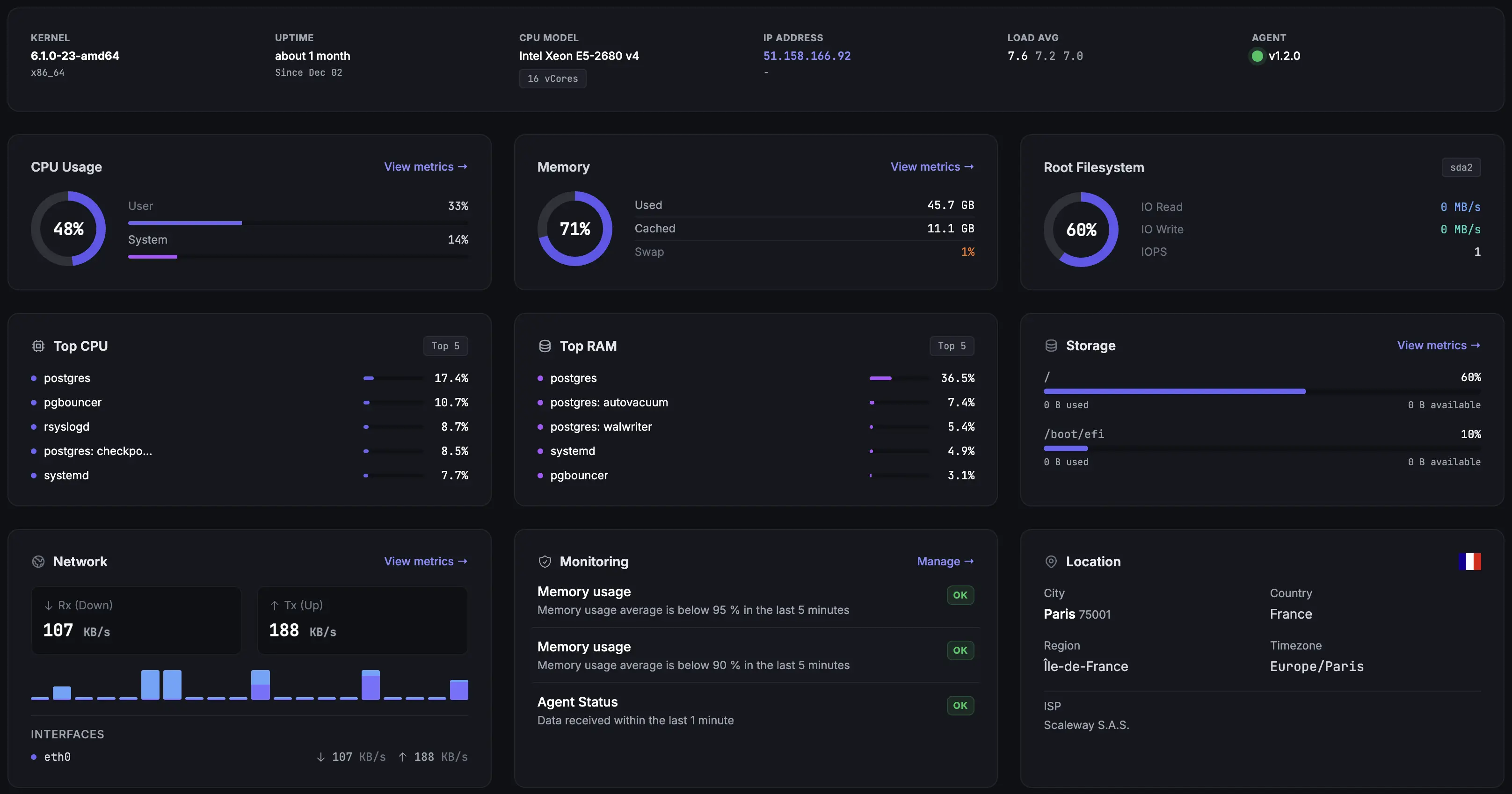
What HetrixTools already covers
HetrixTools is more than an external uptime checker. Its server agent reports resource usage, and its server monitoring includes running processes, service checks and port checks. Public status pages and cron monitors are also available. If these functions already cover your operation, their presence in another product is not a reason to switch.
Blacklist monitoring is a separate reason to keep HetrixTools. It checks IP addresses and domains against blacklists and can alert you to a listing. Fivenines does not provide this service. A team responsible for mail infrastructure should retain a blacklist-monitoring service even if it moves its server monitoring.
The free HetrixTools uptime plan includes 15 uptime monitors, one-minute uptime checks and an attached server agent for each monitor. It requires an account login at least once every 90 days. Check those conditions against how you will operate the account, especially if you expect monitoring to run unattended for months.
Cron monitoring is not a Fivenines-only capability. HetrixTools supports cron schedules, timezones and grace periods for expected pings. Likewise, seeing a process consume CPU or checking whether a service is running does not require a move away from HetrixTools.
When Fivenines is worth evaluating
Start with the view you are missing during an incident. Fivenines combines host metrics with container and cluster information, then connects alerts to incident workflows. The trial should show whether that information helps your team investigate a real workload and route its alerts.
For Docker, Docker container metrics include per-container CPU, memory and network usage, alongside state such as exit codes, OOM kills, healthcheck status and restart loops. For virtualization, Proxmox monitoring discovers nodes, VMs, LXC containers and storage through the Proxmox API. That is a different view from installing an agent inside each guest and reading separate host charts.
Other workloads can matter too. Fivenines supports GPU monitoring for NVIDIA utilization, temperature, VRAM and power draw, plus collectors for supported databases and services. Include only the collectors you actually need in the evaluation; a longer feature list is not evidence of a better fit.
Fivenines Cron job monitoring monitors success and failure pings and alerts on missed or late check-ins according to the configured schedule and grace period. If you migrate existing checks, recreate each schedule, timezone and grace period, update the ping URL and test both a successful run and an alert.
Use custom views to bring the metrics your team needs into one dashboard. Customer-facing status pages serve a different purpose: service availability and incident communication. Both products offer status pages; a custom domain on a Fivenines status page requires Pro or above.
FiveNines offers a 14-day trial rather than a permanent free plan, and it does not include blacklist monitoring. If IP reputation is your primary concern, FiveNines isn't the right tool.
Differences to test on a real workload
Use a representative host or cluster and write down what a useful result looks like before installing another agent. These checks make the comparison more concrete.
Collection interval. HetrixTools' Linux agent samples metrics every three seconds by default and sends data each minute. Fivenines collects server metrics every 60 seconds by default; custom intervals down to five seconds are available on request. Sampling, upload and external uptime-check intervals are different things. Do not choose on the assumption that a default Fivenines installation collects more frequently.
Container and cluster context. Check whether you can identify the affected container, see its failure state and relate it to host resource use. In Proxmox, check node and guest state, storage and quorum. Judge the value against your current troubleshooting workflow rather than assuming that every virtualized workload requires a new platform.
Vulnerability information. Fivenines scans supported Linux host packages for CVEs, with summary counters available on all plans. Per-package detail requires Pro or above. Pro and above also includes CVE scanning of Debian, Ubuntu and Alpine OS packages in container images. Host results depend on advisory coverage for the detected distribution and release; no findings on an unsupported release is an absence of data, not an all-clear.
Alert handling. With monitoring workflows, Fivenines combines triggers, conditions and notification steps. Test the path from an alert to the intended recipient, incident updates and recovery. Include any status-page publication you need, and check that your chosen plan supports the required channels and limits.
Compare pricing using the same inventory
HetrixTools' free uptime plan includes 15 uptime monitors and attached server agents. Its Professional uptime plan is $9.95 per month for 30 uptime monitors and 30 server monitors. Fivenines offers a 14-day trial with no credit card required, followed by a paid plan to keep monitoring active. The dollar and euro prices are not a currency-adjusted comparison.
With monthly billing, FiveNines costs €19 per month for Starter with 15 monitors, €49 for Pro with 50, or €99 for Business with 100. Prices exclude VAT where applicable. Servers, uptime checks, tasks and network devices share the plan’s monitor allowance. See the current pricing for annual billing and Enterprise options.
Count each kind of monitor before comparing totals. Five servers, five uptime checks and five scheduled tasks use 15 Fivenines monitors. Starter external uptime checks have a minimum two-minute interval; Pro supports one-minute checks. HetrixTools includes one-minute uptime checks on its free plan. Compare equivalent intervals, notification needs and quotas rather than the headline monitor count alone.
How to test a switch before committing
1. Inventory the existing setup. List server agents, uptime checks, scheduled jobs, notification recipients and public status pages. Separate blacklist monitoring from the rest, and retain access to historical HetrixTools reports.
2. Run a limited pilot. Install Fivenines on a representative workload while the existing checks remain active. Validate the Docker or Proxmox information that motivated the evaluation, then test an alert and its recovery with the intended recipients.
3. Recreate configuration deliberately. Match endpoint methods, expected responses, check intervals and locations. Reconfigure cron schedules and ping URLs. Move status-page components and public links only after testing. Installing an agent does not import your HetrixTools history or configuration.
Which tool fits your operation?
Keep HetrixTools if its uptime, server, process, service and cron monitoring meet your needs, especially when the free plan or blacklist monitoring matters. Evaluate Fivenines if Docker failure context, a Proxmox cluster view, vulnerability information and incident workflows justify a paid platform for your team.
Using both can also make sense: retain HetrixTools for blacklist monitoring while evaluating Fivenines for containers, clusters and incident handling. Decide which system owns each alert so that duplicate notifications do not create confusion.
Ready to test that fit? Start a 14-day Fivenines trial with one representative workload, then compare the result against your current setup before expanding.
Features, plan limits and prices checked on 23 September 2026 against the official product documentation and current plan configuration. This comparison is published by Fivenines.