Nginx Test Configuration File

The change looks harmless: a path adjustment, a new virtual host, a certificate renewal. It goes out after hours, the reload command returns, and the site appears to be up. Then requests start failing because the certificate file was moved earlier that day. NGINX can't use the new configuration as expected, and the person on call is left separating a configuration problem from a service problem.
An NGINX configuration test helps catch syntax errors and inaccessible files before a reload, but it can't confirm that the deployed service will behave correctly for real users. That distinction matters anywhere configuration changes affect traffic, including load-balancing setups. A dependable release checks three things: whether the directives parse, whether referenced resources can be opened, and whether the live service behaves as intended.
Table of Contents
- The 2 a.m. Config Push and Why Testing Matters
- Running nginx -t and the Supporting Flags
- Testing in Staging and Wiring It Into CI
- Why a Green Test Is Not a Green Deploy
- Reading and Fixing the Most Common nginx -t Errors
- Putting It All Together and Monitoring the Result
The 2 a.m. Config Push and Why Testing Matters
A production change can be syntactically tidy and still fail for a practical reason. The certificate path is wrong, an included file isn't available, or a log location can't be opened. NGINX's -t option is useful because it checks directive syntax and attempts to open files referenced by the configuration, not just whether the text resembles valid configuration. The NGINX guide to managing configuration files describes this behavior and the separate roles of testing and reloading.
That separation is deliberate. Testing examines the candidate configuration; a reload tells the running service to apply it. When a reload succeeds, NGINX can start new workers and gracefully retire old ones, allowing existing requests to be handled during the transition. But a successful test doesn't guarantee that the new routes, upstreams, or access rules will work for clients.
Operational rule: Treat
nginx -tas a configuration-integrity check, not as proof that a release is safe.
The mistake that costs teams most is collapsing “the file parses” and “the change is deploy-ready” into one green status. A better release gate distinguishes syntax, referenced files, and runtime behavior. The test covers the first two; external checks and service observation cover the third.
When a bad configuration reaches production, the problem isn't that NGINX lacks a test command. It's that the team asked that command to answer more than it can. Build the test into a release process that checks the exact candidate, blocks a reload when validation fails, and verifies the service after the change is applied.
Running nginx -t and the Supporting Flags
At 2 a.m., a green nginx -t can still precede a broken release. The command checks the configuration NGINX reads, so start by making sure it is reading the candidate you intend to deploy.
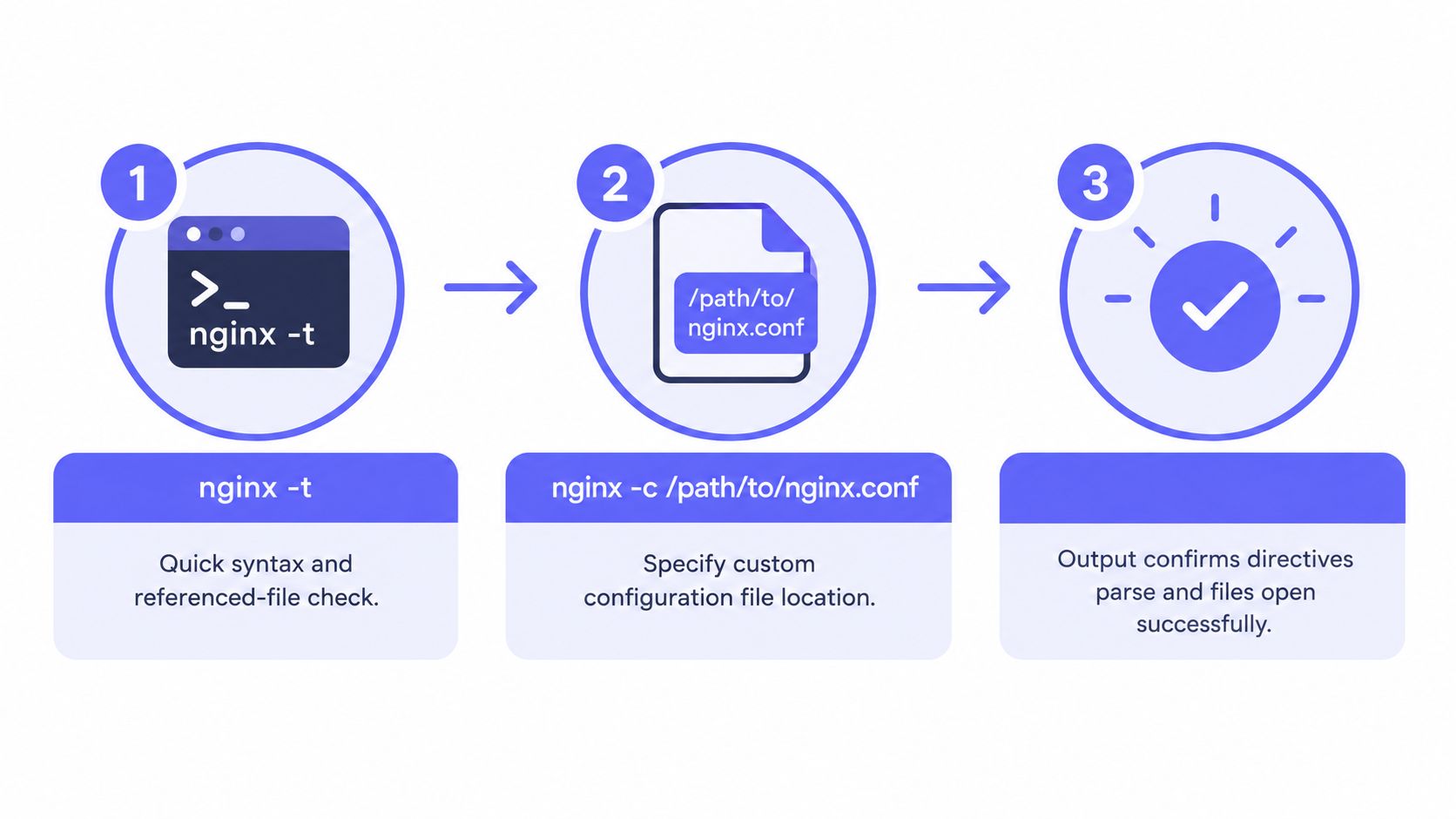
For the default configuration, run:
nginx -t
A successful test reports that the syntax is OK and the test is successful. On failure, inspect the error output for the file path and problem. In automation, capture stderr and the exit status so the failure is visible and can stop the job.
For a candidate file outside the default path, specify it explicitly:
nginx -t -c /path/to/nginx.conf
A host may have multiple NGINX installations or a custom build prefix, so a bare command can test the wrong configuration. Use nginx -V to inspect build details, including the --conf-path= value, and confirm which binary the service runs. The NGINX command-line switches documentation describes these options.
The commands serve different purposes:
nginx -tchecks syntax and attempts to open referenced files.nginx -t -c /path/to/nginx.confperforms that check against a specified configuration.nginx -Ttests the configuration and prints the full configuration, including included files, to standard output.
Use -T to inspect the assembled configuration or create an audit artifact. Its output can expose sensitive settings, so restrict access to logs and saved artifacts. The option has been available since NGINX version 1.9.2. Capture the output only where its contents can be protected.
For systems that generate configuration frequently, batch validation rather than starting a separate NGINX process for every fragment. Render a complete candidate from the same inputs, then test that assembled file with the production binary and its matching modules. This reduces repeated setup and catches errors that only appear when generated fragments are combined.
A passing test means NGINX accepted the candidate and opened its referenced files at test time. It does not prove that clients will reach the intended server block or that an upstream will respond.
Testing in Staging and Wiring It Into CI
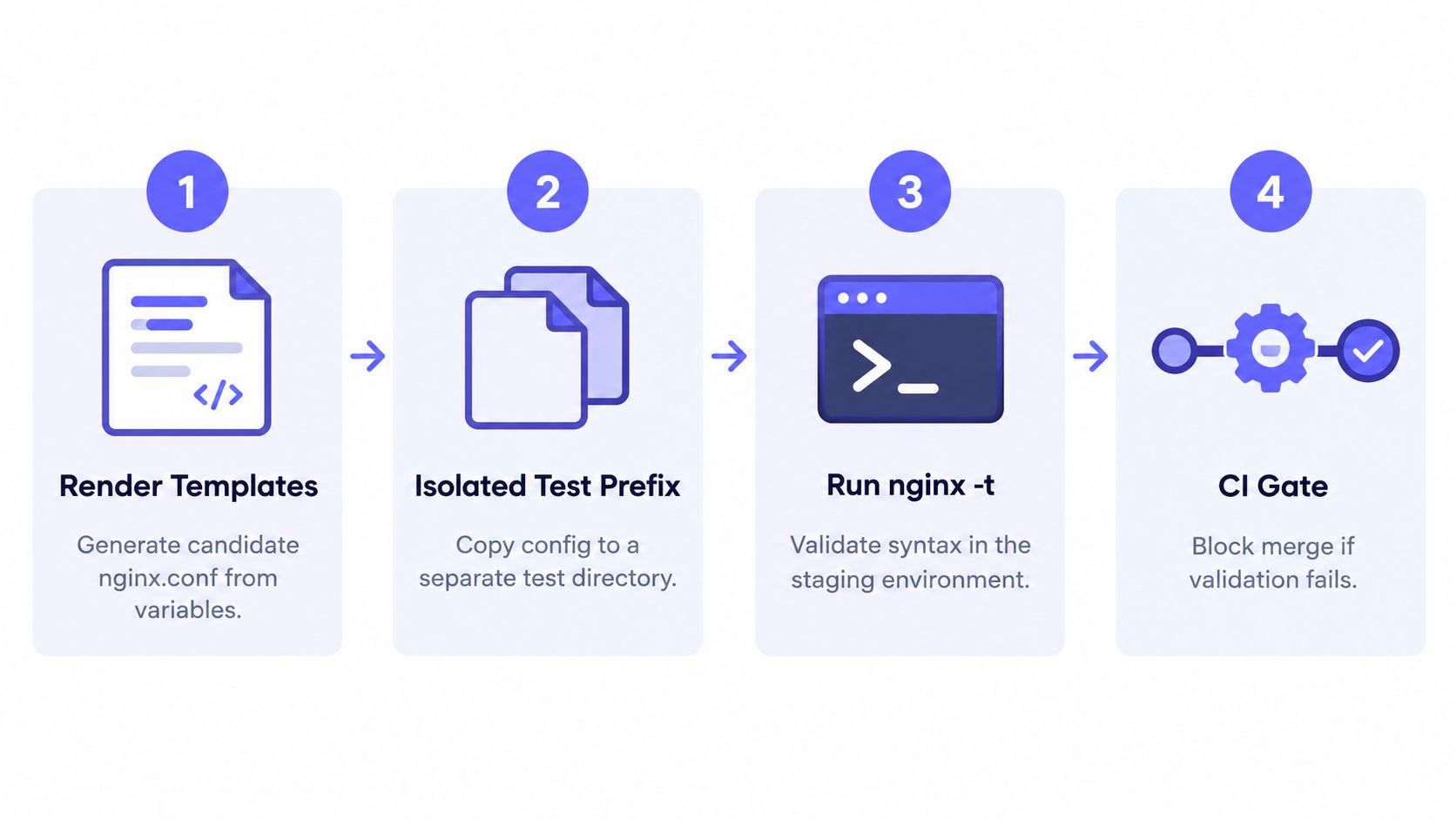
A local test is a useful first check. A release pipeline makes it repeatable. The pipeline should generate a complete candidate configuration, test it in an environment that matches production, preserve enough output to diagnose failures, and block promotion unless validation succeeds.
A practical flow looks like this:
- Render templates into a candidate configuration using the deployment's actual variables.
- Copy the candidate to an isolated test prefix so validation doesn't accidentally inspect the live file.
- Run the production NGINX binary and image against the candidate with
nginx -t -c /path/to/nginx.conf. - Capture stderr and the exit code, fail the job on a non-zero result, and surface the relevant error lines in the build output.
- Save
nginx -Toutput as an access-controlled artifact when reviewers need the fully expanded configuration. - Promote and reload only after validation passes, then check service status and an external health endpoint.
Testing inside the same container image used in production matters. A laptop or generic CI runner may have different modules, include files, paths, permissions, or build options. A candidate can pass there and fail in the runtime image because the two environments aren't equivalent.
For GitOps-style deployments, make the rendered configuration test a pull-request check. Keep the test result and relevant stderr visible to the author, and prevent promotion when the check fails. Teams using configuration-management tools can apply the same rule to generated files; a practical introduction to Ansible can help teams structure that automation.
The pipeline shouldn't reload NGINX just because template rendering finished. Rendering creates the candidate; testing decides whether it's eligible for promotion. That separation makes failures easier to reproduce and keeps incomplete or invalid output away from the live configuration.
Why a Green Test Is Not a Green Deploy
nginx -t can pass while users still see a broken service. It verifies configuration syntax and attempts to open referenced files, but it doesn't prove that an upstream is reachable, a certificate will be trusted by clients, the intended server block will handle a request, or authentication rules behave correctly.

The gaps are operational, not theoretical. A route can direct traffic to the wrong backend. A certificate file can open successfully but present a chain clients don't accept. A change can expose an unintended server block, or an include can be valid in isolation but scoped incorrectly in the assembled configuration. Runtime limits, including exhausted file descriptors, can also undermine a reload even when configuration validation passed.
A reload is designed to check and apply the new configuration without replacing healthy workers when the configuration is invalid. If it succeeds, NGINX starts new workers and gracefully retires the old ones. That's a controlled transition, not a guarantee of zero downtime or correct application behavior. The NGINX guide to reloads explains the mechanism, but doesn't establish a universal success-rate or latency benchmark. Outcomes depend on the configuration and operating environment.
Close the gap with checks outside the configuration parser:
- Probe the service externally from client locations, and test a representative HTTP request rather than relying only on a local process check.
- Watch the error log during the reload window for configuration and connection problems.
- Confirm the process transition so the team knows the intended service applied the change.
- Test application behavior such as routing and authentication through the public or staging endpoint.
A 403 troubleshooting guide for NGINX can help when a service responds but denies access unexpectedly. The release rule is straightforward: validate configuration integrity with nginx -t, validate behavior with synthetic checks, and alert on both signals independently. Neither check can stand in for the other.
Reading and Fixing the Most Common nginx -t Errors
Error output is useful, but the reported line isn't always the line that caused the problem. A missing semicolon or brace earlier in a block can make NGINX complain at a later directive. Read the surrounding block and inspect the referenced file before changing the line number blindly.
| Error message | Root cause | Fix |
|---|---|---|
unknown directive |
A misspelled directive, an unavailable module, or often a missing semicolon on the preceding line. | Check the previous directive and its punctuation, then confirm the needed module exists in the NGINX build. |
No such file or directory for an include or certificate |
The path is wrong, a symlink points somewhere unavailable, or the NGINX process can't access the file. | Check the resolved path and permissions, then correct the reference or restore access. |
a duplicate listen or conflicting server name |
Copied server blocks define colliding listeners or names. | Review the related server blocks, remove the unintended duplicate, and test the assembled configuration again. |
bind() ... failed |
The requested listening address or port can't be bound by the process or environment. | Check which service owns the listener and whether NGINX has permission to use it, then correct the conflict or bind target. |
A file-not-found error doesn't always mean the file is absent. A symlink can be broken, or a parent directory can prevent access. Check the complete path from the NGINX process's perspective rather than relying on a quick visual check in a shell with different permissions.
For a duplicate listener or server name, inspect the full configuration, including included files. nginx -T can reveal collisions that aren't visible in the file currently open in an editor. After fixing the source, rerun the test against the exact candidate that will be deployed.
Don't trust the pointer alone. Read the surrounding block, then test the corrected assembled configuration.
Putting It All Together and Monitoring the Result
A safe configuration release is a chain of checks, not a single command. Render a candidate, validate it locally or in an isolated environment, run the same test against the production image in CI, and retain the expanded configuration when it's useful for review. Reload only after validation passes, then confirm the service from outside the host.
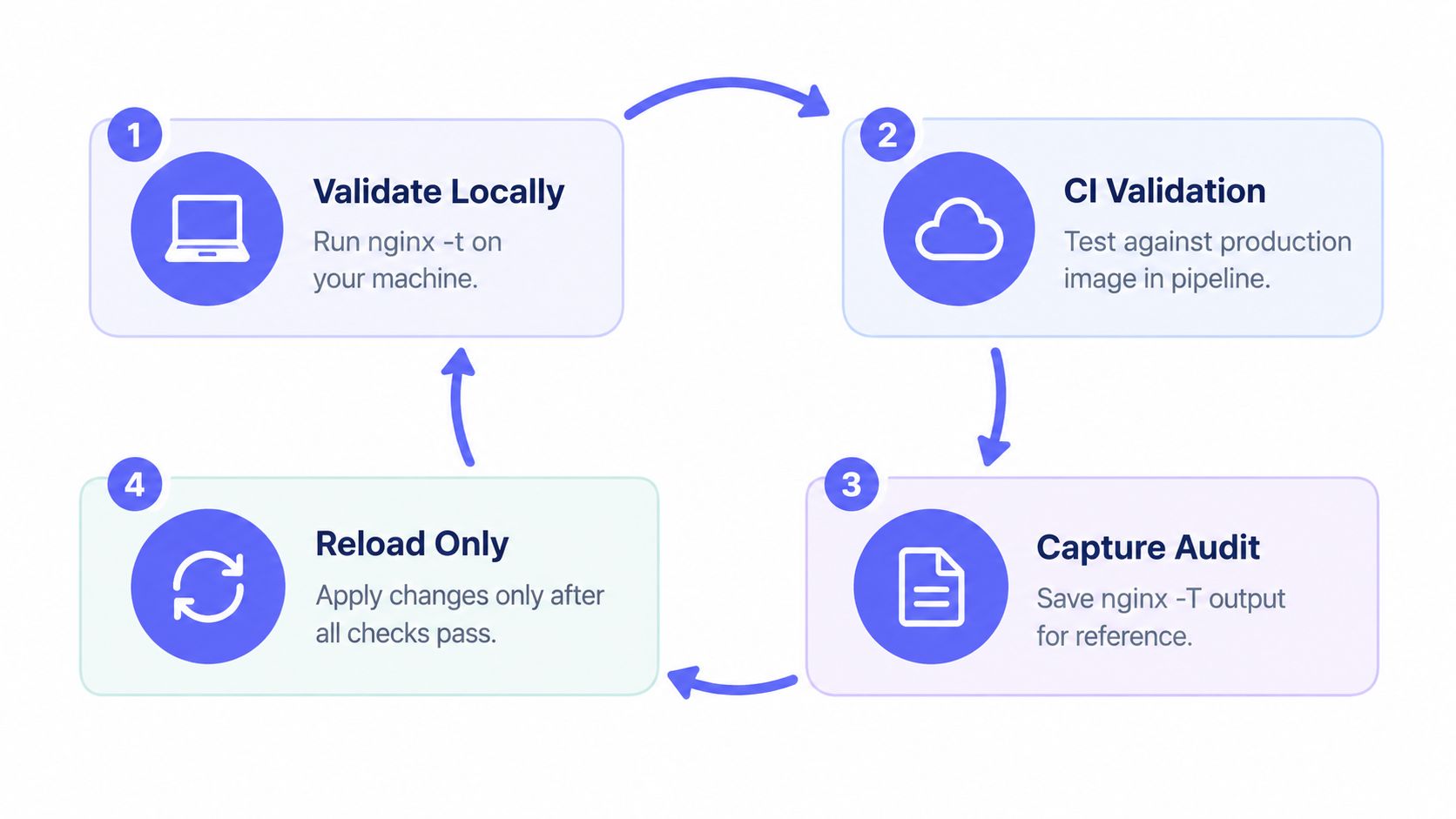
Monitoring closes the loop. Alert on the reload command's exit status so a failed application attempt doesn't disappear into a deployment log. Also alert on synthetic uptime checks from outside the server, because process health alone can't establish that clients can reach the expected service. For a broader view, monitoring best practices can help teams decide which service and infrastructure signals to track together.
A compact runbook checklist:
- Render: Generate the complete candidate configuration.
- Test: Run
nginx -t -cagainst that exact file in the production image. - Review: Capture
nginx -Twhere an access-controlled audit artifact is appropriate. - Apply: Reload only after the test succeeds.
- Verify: Check the process, error logs, and an external synthetic request.
Fivenines combines Linux server and network monitoring with external uptime checks, helping teams see infrastructure health and service reachability together. Use it alongside configuration validation to monitor what happens after an NGINX change, then visit Fivenines to see whether it fits your release and incident workflow.