Remote Legal Assistants: How to Hire and Manage Them


You're in a small legal office where every attorney is doing two jobs at once. One minute you're reviewing strategy, the next you're fixing a filing format, chasing a medical record, or checking whether a deadline got calendared correctly. That's the pressure point where remote legal assistants start to make sense, not as a trendy staffing idea, but as a practical way to keep the work moving without piling every administrative task onto billable people.
A remote legal assistant is, in plain terms, a paralegal or legal assistant who works virtually, full time or part time, and handles work like legal research, document preparation, case management, e-discovery, and administrative support from outside the office, as the American Bar Association describes remote legal assistants. The shift away from physical offices became mainstream during the 2020 pandemic disruption, and it stuck because cloud collaboration, e-filing, video conferencing, digital case systems, and secure document exchange made legal-support work easier to separate from location.
The market is already large and established. In the United States, the broader paralegal and legal assistant occupation had a median annual wage of $60,970 in May 2023 and a projected 1% employment growth from 2023 through 2033 in the same ABA-cited labor context, which tells you this is a steady profession, not a speculative niche. By the end of this guide, you'll have a clear way to define the work, screen candidates, set access rules, and manage performance without guessing.
Table of Contents
- Why Law Firms Rely on Remote Legal Assistants
- What a Remote Legal Assistant Actually Does
- Skills to Screen For and How to Interview Candidates
- How LatHire Can Help
- Hiring Channels, Pricing, and Contract Terms
- Confidentiality, Ethics, and Security Obligations
- Onboarding, Tools, and Measuring Performance
- Sample Job Description and Hiring Checklist
Why Law Firms Rely on Remote Legal Assistants
The pattern is familiar. A three-attorney firm starts the morning with a client call, a pile of unsigned forms, two filing deadlines, and a stack of records that still need to be organized. By lunch, the attorneys have spent half the day on tasks that keep the firm alive but don't need their judgment, and substantive legal work gets pushed into the evening.
The work moved because the tools moved
Remote legal support became viable because the legal workflow itself became digital. Cloud-based collaboration, electronic filing, video meetings, case-management systems, and secure file transfer made it possible for support staff to work well without sitting in the same office. The American Bar Association's framing matters here, because it places remote legal assistants inside a familiar legal-support role rather than inventing a new category.
That's why the hiring conversation should start with task fit, not with location. If the work depends on records, templates, databases, and structured communication, there's usually a remote path. If it depends on physical presence in court or in an office holding paper files, it's a different story.
The wage and workforce data also show why firms can't treat this as a throwaway gig role. The occupation is sizeable, wages are established, and employment is relatively stable, so firms are hiring into an existing professional labor pool. In practice, that means there's enough talent to be selective if you define the role well.
What this guide helps you do
By the time you're done, you should be able to separate work that belongs with an attorney from work that belongs with a support role, decide whether to hire in-house, freelance, or through an agency, and build a process that doesn't collapse once the first person starts. That's the operational win.
What a Remote Legal Assistant Actually Does
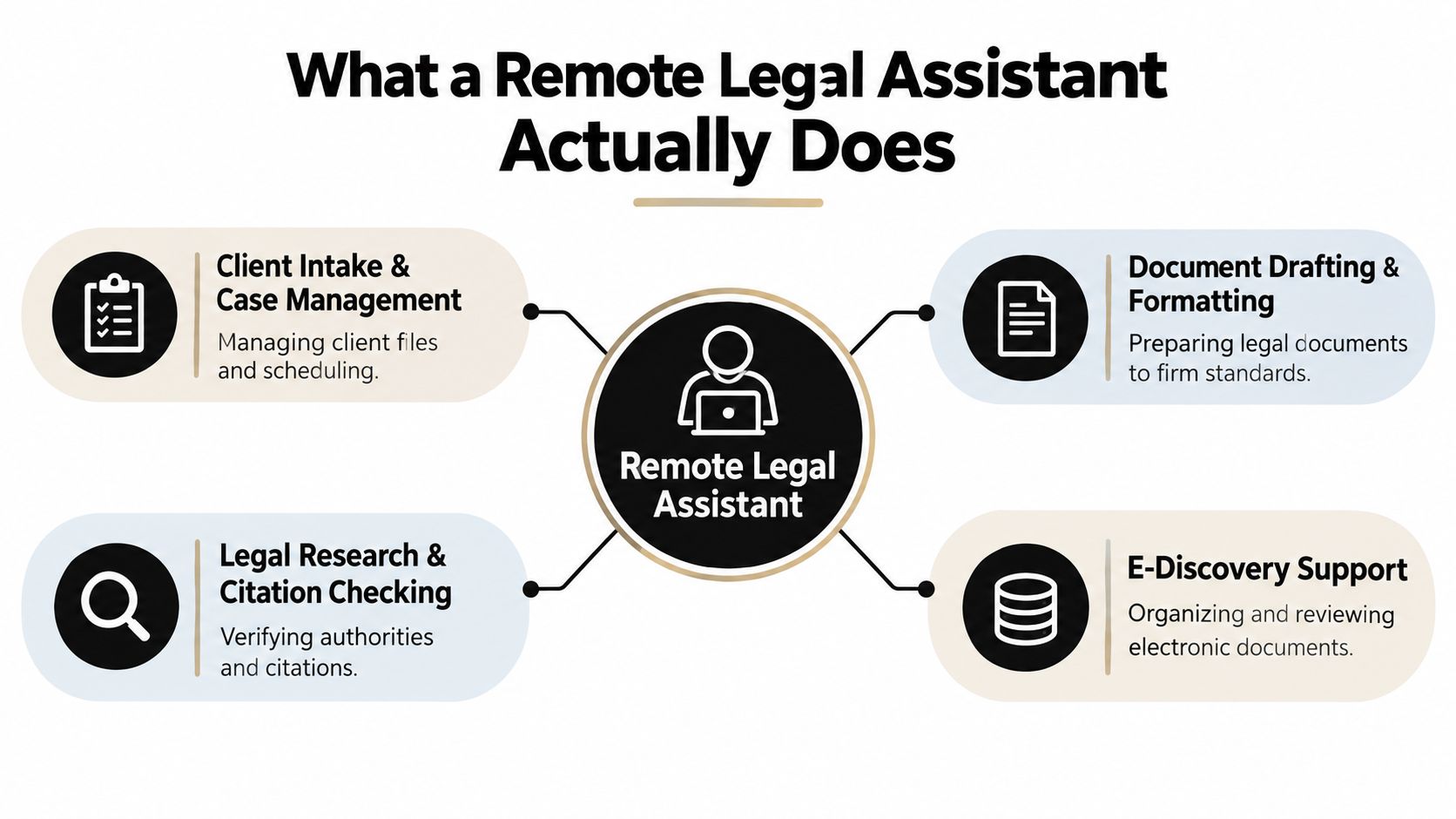
A remote legal assistant handles the work that keeps a matter moving between attorney touchpoints. The job is less about “helping out” and more about keeping files organized, deadlines visible, and routine tasks done in a way the attorney can trust.
Core workflows that fit remote work
Client intake and case management usually includes gathering facts, updating matter records, and checking that the file is complete enough for the attorney to use. A common task is entering new-client details into the case system and flagging missing documents. This work often needs moderate attorney oversight, especially when the facts determine whether the firm can take the matter.
Document drafting and formatting covers routine letters, cover pages, clean copies, table formatting, and document cleanup for attorney review. A practical example is turning a rough attorney note into a firm-standard letter or motion draft. The assistant can handle much of the mechanical work, while the attorney still reviews substance before anything leaves the firm.
Legal research and citation checking can be done remotely when the assistant works from digital research tools and source documents. A typical task is checking whether authorities are cited correctly in a draft or confirming that a quoted paragraph matches the original source. This work needs closer supervision, because a clean format can still hide a weak legal assumption.
E-discovery support works well remotely because it is built on digital records and repeatable review steps. An assistant might organize documents by issue, tag obvious privilege concerns, or prepare a review set for attorney sampling. For anything that affects case strategy, attorney oversight stays heavy.
Calendaring and deadline tracking is the kind of process that benefits from consistency. One missed date can create a serious problem, so the assistant needs firm rules for reminders, verification, and escalation.
Administrative support includes billing admin, file maintenance, follow-up emails, and keeping the matter record current. That sounds simple, but it is often where firms lose time because the work is repetitive and easy to postpone.
Practical rule: if a task can be broken into a checklist, checked against source documents, and approved by an attorney at the end, it usually fits remote support better than attorney time. A legal assistant works like stage crew in a theater. The audience sees the performance, but the show depends on quiet, disciplined work behind the curtain.
A useful way to measure this work is to set your own baseline before you change the process. If summarizing a document usually takes one amount of time and the new workflow cuts that down, you can see whether the change is worth keeping. The same logic applies to e-discovery review and other repetitive tasks. For teams that want a clearer process map, this workflow automation guide is a useful reference for thinking about repeatable work in steps.
Skills to Screen For and How to Interview Candidates
A good remote legal assistant doesn't just “help.” They protect time, reduce rework, and keep matter files orderly enough that attorneys can trust them. The easiest way to miss that person is to screen for friendliness alone and ignore judgment, discipline, and confidentiality habits.
Must-have skills versus trainable skills
Must-have skills are the ones that are expensive to fake. Look for legal terminology, document preparation, confidentiality discipline, clear written communication, and calendar management. If a candidate can't keep a timeline straight or write a clean client-facing email, the rest won't matter much.
Trainable skills are the ones you can teach once the fundamentals are in place. Your practice-management software, your naming conventions, and your jurisdiction-specific procedures belong here. A strong hire should learn those quickly if they already understand how legal work flows.
Test the work, not just the interview answers
A short paid work sample is better than a long conversation. Ask for a deposition excerpt summary, a cover-letter draft, or a chronology built from a set of facts. Those samples reveal whether the candidate can sort priorities, write clearly, and spot what matters versus what's noise.
Good interview questions should probe judgment, not just task familiarity. Try these:
- Deadline conflicts: What do you do if two attorneys give you overlapping deadlines?
- Client pressure: How do you respond when an angry client asks for legal advice?
- Escalation: What kinds of issues do you send to the attorney immediately?
- Remote discipline: How do you keep confidential files secure at home?
- Quality control: What do you check before handing a document back for review?
Red flags show up fast if you know what to listen for. Vague answers about confidentiality, reluctance to use secure tools, weak examples of deadline management, or an attitude that suggests they'll “figure it out later” usually become actual problems later.
A strong candidate doesn't just say they respect confidentiality, they can explain how they'd behave when a family member, personal device, or urgent message creates a risk.
Reference checks that actually help
Don't stop at “they were great.” Ask prior attorneys whether the candidate followed instructions, escalated problems early, handled deadlines without reminders, and understood the boundary between support work and legal advice. You want patterns, not compliments.
How LatHire Can Help
If you want a faster route to a vetted candidate pool, LatHire is worth considering. It's an AI-powered hiring platform that connects U.S. and Canadian companies with pre-vetted Latin American professionals across technology, marketing, sales, and operations, and it uses proprietary AI assessments, skills evaluations, and human-led background checks to curate a talent pool of more than 800,000 candidates. For firms that need help screening options quickly, that combination can shorten the search without forcing you to build a full recruiting function in-house. For legal-specific hiring, HireParalegals focuses on remote legal assistants, paralegals, and intake specialists. Firms considering this option can assess candidates against practical requirements such as prior law firm experience, bilingual client communication, familiarity with case management software, and availability during the firm's working hours.
Where it fits, and where it doesn't
LatHire makes the most sense when you want to import an existing job description or generate one with AI, match with candidates quickly, and get support on HR, payroll, benefits, and legal compliance. It also supports flexible engagement models and validated profiles, which matters if you're comparing a long-term hire against project support or trying to staff across time zones.
If you want a deeper look at the role itself, their page on virtual legal assistants is a useful starting point because it helps you see how the role is usually framed in practice.
| Hiring channel | Best use case | Strengths | Trade-offs |
|---|---|---|---|
| Direct hire | Long-term internal ownership | More control, deeper cultural fit | More recruiting work |
| Freelancer | Short projects or overflow | Fast to start, flexible | You do more screening and supervision |
| Agency or platform | Faster access to pre-vetted talent | Less admin, easier replacement path | Less direct control than a direct hire |
For a small firm with uneven intake or seasonal spikes, a platform like this can reduce search friction. For a firm that wants total control over recruiting and onboarding, direct hire may still be the better operational fit.
Hiring Channels, Pricing, and Contract Terms
A remote legal assistant can look affordable on paper and still become expensive if the channel does not fit the work. A solo lawyer with occasional overflow needs a different setup from a litigation team handling records, deadlines, and sensitive documents. Choose based on volume, confidentiality risk, and the management time you can really spare.
Hiring channels compared
| Channel | Typical Cost | Vetting Depth | Speed to Start | Confidentiality Safeguards |
|---|---|---|---|---|
| Specialized legal staffing agency | Higher, often bundled with recruiting and replacement support | Strong | Fast | Usually better structured |
| Freelance marketplace | Wide range, often lower upfront | Variable | Very fast | Depends heavily on you |
| Direct hire from paralegal networks | Varies by experience and geography | Moderate to strong if you screen well | Slower | Depends on your process |
| Outsourcing firm | Often packaged monthly or by scope | Moderate to strong | Fast | Usually standardized |
The wage benchmark matters because it gives you a reality check on pricing. The broader paralegal and legal assistant occupation had a median annual wage of $62,890 in May 2025, or about $30.24 per hour, according to the Bureau of Labor Statistics Occupational Employment and Wage Statistics page for paralegals and legal assistants. You do not have to match that figure in every arrangement, but offers that sit far below a credible market range often signal thinner screening, weaker support, or sloppy security habits.
The broader labor outlook is still active, and the Bureau of Labor Statistics projects about 404,900 jobs in 2025, with little or no net employment change from 2025 through 2035 and about 40,800 openings each year from replacement demand. That supports patient hiring, not rushed hiring.
Contract terms that protect you later
The agreement should describe the work in plain terms. Spell out scope, confidentiality, data-handling rules, termination terms, and offboarding steps before access begins. If the arrangement runs through a contractor, say who owns the work product and how communication should happen.
Classification also matters. Whether the assistant is an employee or an independent contractor affects supervision, tax treatment, and access design. That is an operational and legal choice, not just a billing choice.
Manager's rule: if you cannot explain why a person needs access to a specific file, folder, or system, they probably do not need that access yet.
For firms that want clearer expectations from the start, a service agreement should read like an operating document, not a vague promise. Set measurable task standards, document who can see what, and keep records that show why access to client files was appropriate after the fact. A useful reference point is service-level agreement monitoring, because the same habit of defining and checking expectations applies here.
Confidentiality, Ethics, and Security Obligations
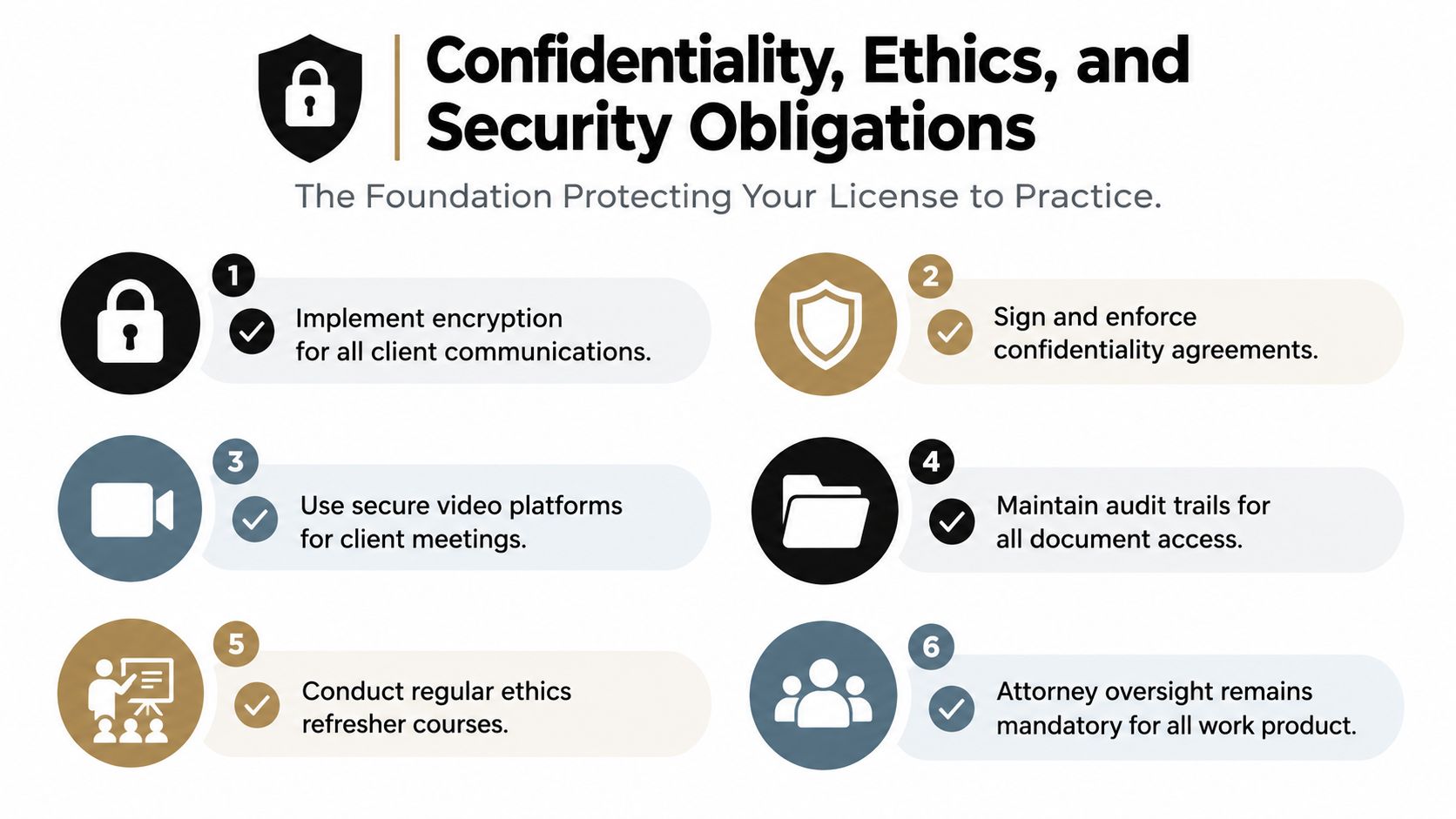
This is the section that protects your license to practice, not just your files. Attorneys remain responsible for supervising nonlawyer assistants, including virtual staff, and for protecting client confidentiality. Remote work doesn't reduce that duty, it just spreads the risk across more devices, networks, and homes.
Supervision duties do not shrink just because the assistant works from home.
Build access around tasks, not convenience
Start with least-privilege permissions. A person handling intake doesn't need blanket access to every shared drive, and a document formatter doesn't need unrestricted visibility into every matter if the task doesn't require it. Broad shared-drive access is easy, but it's not the same thing as control.
The New York County Lawyers Association recommends secure transmission to remote computers, tested backup procedures, physically separated workspaces, VPN use, multifactor authentication, strong passwords, and written work-from-home protocols, all of which point in the same direction. Standardize the controls, then enforce them consistently.
A defensible setup should include:
- Multifactor authentication: reduces the chance that one stolen password becomes a breach.
- Encrypted transmission and storage: protects data in motion and at rest.
- Managed devices: keeps security under firm control.
- Current patches and malware protection: closes obvious technical gaps.
- Tested backups and remote-wipe capability: gives you a recovery path if something goes wrong.
- Explicit bans on unsecured Wi-Fi and uncontrolled personal devices: removes avoidable risk.
Keep an audit trail
Logging matters because remote work makes after-the-fact proof harder unless you build it in. Keep records of who accessed each matter, what was changed, which automation or template was used, and which attorney approved the final work product. Train assistants on confidentiality obligations, review permissions periodically, and require immediate incident escalation when something looks wrong.
The offboarding step should be just as deliberate. Revoke access, recover firm-owned devices, confirm the return or deletion of firm data, and document the closeout. A firm that treats offboarding casually usually discovers the weakness after the relationship has already ended.
The ethics conversation also connects to secure retention practices, because old files and unneeded copies create hidden exposure. A useful companion piece is data retention policies, since deletion discipline is part of confidentiality discipline.
Onboarding, Tools, and Measuring Performance
A remote legal assistant can still stumble if onboarding is loose, access is incomplete, or no one defines what good work looks like. The firms that get better results treat onboarding like a controlled rollout, not a welcome email and a shared password.
The first 30 days should feel structured
Start with access, confidentiality training, and a walkthrough of the core systems during the first week. In weeks two and three, assign one supervised matter task, review the output, and correct the process, not just the document. By the final week, the assistant should be handling repeatable work with clear escalation rules.
That approach matches how legal work already operates. A 2025 labor measure reported that telework was routinely allowed for 58.2% of workers in legal occupations, and the BLS source groups together lawyers, paralegals, legal assistants, judges, mediators, and court reporters. That does not mean every role is fully remote, but it does show that remote-capable workflows and tooling are already part of legal operations.
A useful way to think about onboarding is as a checklist with proof attached. If a step is missing, you should be able to see the gap right away.
Measure the tasks, not the hope
Break work into repeatable units such as intake classification, privilege-tag preparation, chronology building, citation checking, and document summarization. Then track median cycle time, rework rate, exception rate, and attorney acceptance rate before and after process changes. A firm might baseline intake classification at a median cycle time of 4 hours with a 12% rework rate, then target 3 hours and 8% after the first quarter. If the numbers do not move, the process probably did not change either.
Those baselines give you a fair comparison across in-house staff, freelancers, and agencies. In-house help can be easier to coach day to day, freelancers can be faster to start, and agencies can bring process depth, but all three need the same scorecard if you want a real comparison instead of a gut feeling.
A clean audit trail matters because remote work makes after-the-fact proof harder unless you build it in. Keep records of who accessed each matter, what was changed, which template or automation was used, and which attorney approved the final work product. That gives you a simple answer if someone later asks whether access to client files was appropriate.
| Onboarding area | What to set up | Why it matters |
|---|---|---|
| Access | Case management, email, document system, calendar | Prevents day-one delays |
| Training | Confidentiality, escalation, file conventions | Reduces avoidable mistakes |
| First assignment | Small, supervised, well-defined task | Reveals process gaps early |
| Measurement | Baseline and follow-up metrics | Shows whether the role is working |
For a practical rollout structure, use onboarding best practices as a reference point. Then pair that structure with a simple pre-hire and post-hire checklist so responsibilities, tools, and review points are written down instead of left to memory.
Sample Job Description and Hiring Checklist
Job Title: Remote Legal Assistant
Summary: Support attorneys with case management, document preparation, calendaring, client communication, and administrative workflows while following firm confidentiality and security procedures.
Responsibilities
- Manage intake and case files: Keep matter records complete and organized.
- Prepare and format documents: Produce clean drafts and firm-standard documents for attorney review.
- Track deadlines and calendars: Maintain reminders and escalate conflicts early.
- Support research and citation checks: Verify references and formatting before review.
- Handle administrative follow-up: Update files, send routine messages, and keep records current.
Required Qualifications
- Legal support experience: Shows familiarity with law-firm workflows.
- Strong written communication: Reduces back-and-forth and client confusion.
- Confidentiality discipline: Protects client information in remote settings.
- Calendar and document skills: Keeps deadlines and files under control.
Preferred Qualifications
- Experience with your case-management software
- Practice-area familiarity
- Spanish language ability if your client base needs it
- Prior remote legal work
Tools and Security Expectations
- Firm-approved devices and accounts only
- Multifactor authentication required
- No unsecured Wi-Fi or uncontrolled personal devices
- Documented backup and offboarding compliance
Working Arrangement
- Remote, supervised role
- Hours aligned to firm needs
- Attorney or manager approval required for final work product
Pre-hire checklist
- Define the exact tasks first: You can't hire well if the scope is fuzzy.
- Choose the hiring channel deliberately: Different channels carry different trade-offs in cost, speed, and control.
- Draft the contract terms up front: The agreement should cover scope, confidentiality, and offboarding.
- Prepare the access plan before day one: Security should be ready before files are opened.
Post-hire checklist
- Complete confidentiality training: The assistant needs your rules, not assumptions.
- Set up multifactor authentication: This is basic protection, not an optional extra.
- Limit access by role: Give the minimum needed for the assigned work.
- Assign one supervised first task: This shows whether the process works in real life.
- Record baseline metrics: You can't improve what you never measured.
A firm that defines tasks, controls access, and measures outcomes gains the advantage remote legal assistants offer. A firm that skips those steps inherits risk, rework, and avoidable exposure. If you want a better grip on your own distributed operations, use the same discipline you'd use for uptime, access control, and workflow visibility, then adapt it to the legal side of the business.