Server Monitoring Uptime: A Practical Guide

A server can answer every check on schedule while customers cannot finish the task they came for. That gap is where most server monitoring uptime programs fail, not because teams lack dashboards, but because the checks measure reachability instead of usable service.
Table of Contents
- The Moment Everything Looked Green and Customers Still Complained
- How HTTP, TCP, ICMP, and DNS Probes Actually Work
- Uptime Is Not the Same as User-Visible Availability
- Check Frequency, Failure Confirmation, and Multi-Region Probing
- Alert Governance as the Real Hard Problem
- Status Pages, SLA Reporting, and Where Alerts Actually Land
- Building a Reliable Uptime Program in 90 Days
The Moment Everything Looked Green and Customers Still Complained
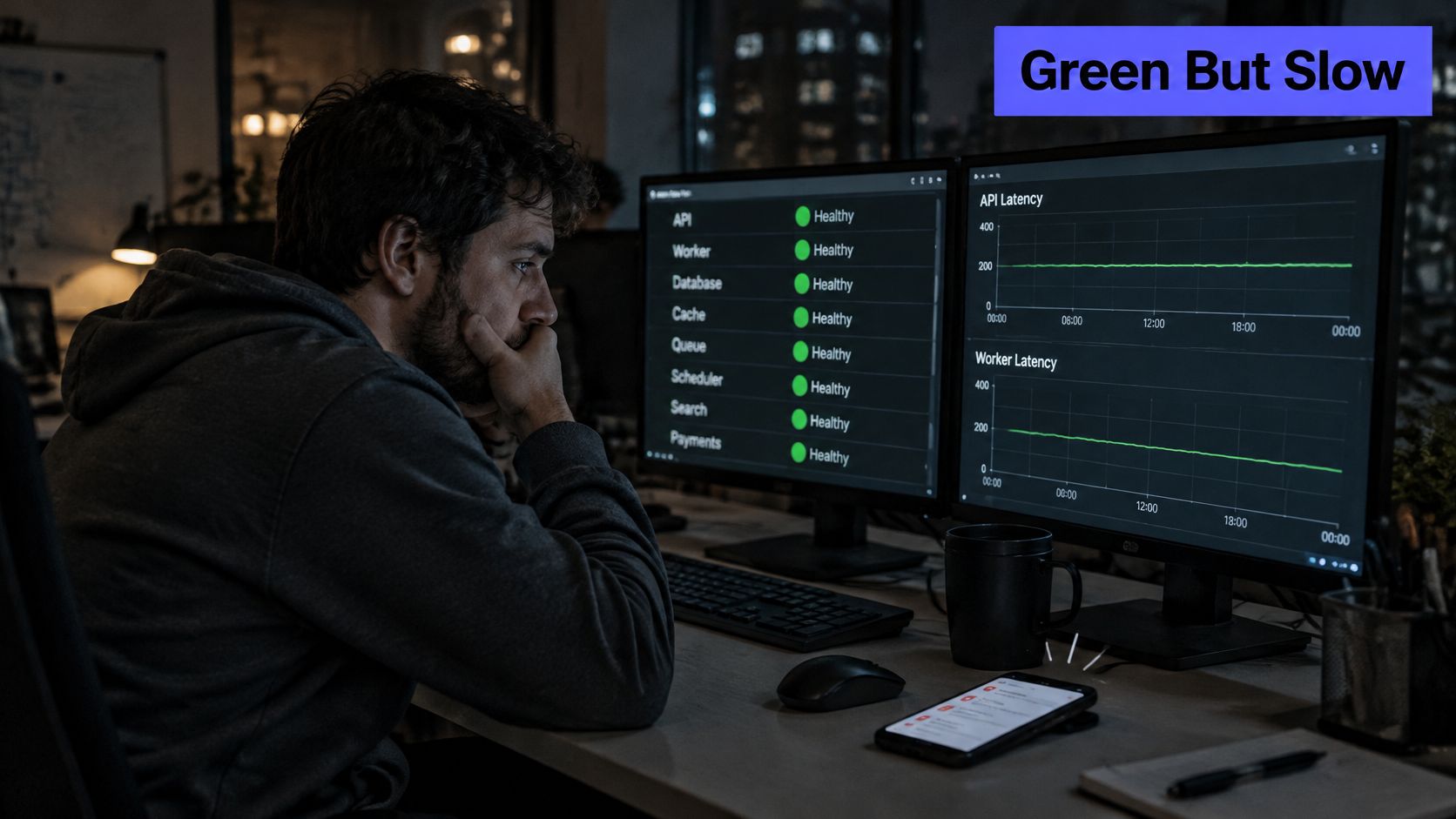
The on-call phone stays quiet. CPU graphs look calm, the homepage returns success, and the uptime widget shows green across every host. Then support forwards a thread of tickets about slow checkouts, failed logins, and carts that empty without explanation.
That pattern repeats across SaaS, hosting, and managed service environments. A load balancer accepts connections, yet a database pool is exhausted behind it. A marketing page loads quickly, while the identity provider times out for one region. The server is up in the narrow technical sense. The service is not available in any sense customers care about.
Why Green Dashboards Mislead
Traditional checks often stop at the easiest question: did something respond? They don't ask whether the response was correct, fast enough, complete, or reachable from where customers sit. A cached error page, a broken checkout dependency, and a regional routing fault can all hide behind a successful probe.
A green check proves only that the probe succeeded. It does not prove that a customer completed a journey.
A stronger approach starts with a small set of probes tied to real journeys, confirms failures from independent locations before paging, and governs alerts so each page demands action. Teams that make that shift stop arguing with customers about whether an incident exists. They detect the failure customers feel, route it to an owner with useful context, and can explain afterward exactly who was affected and for how long.
How HTTP, TCP, ICMP, and DNS Probes Actually Work
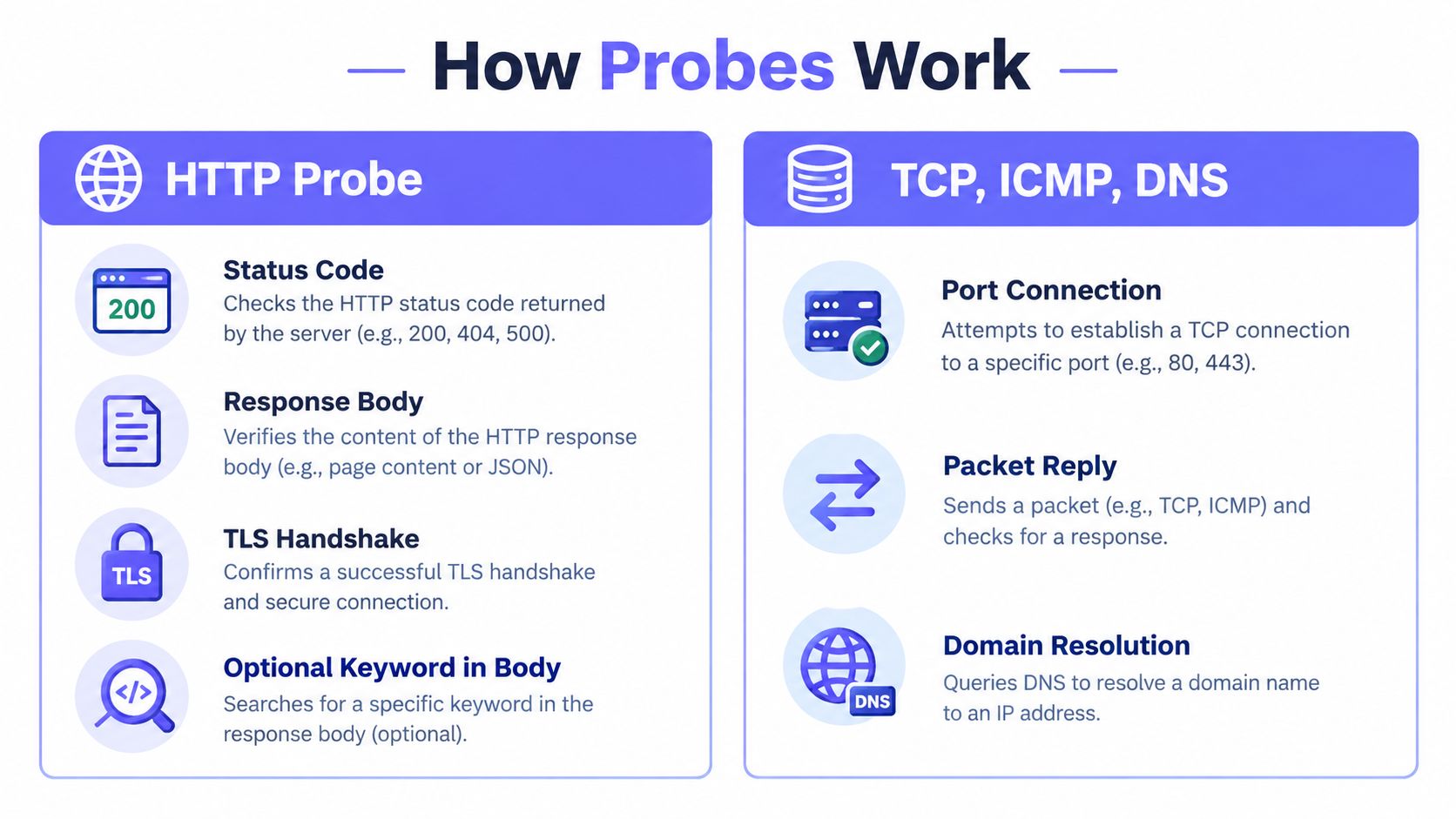
Each probe type answers a different question, and confusing those questions creates blind spots. Layered coverage works because a failure at one layer looks different from a failure at another. The goal isn't to run every probe everywhere. It's to place the right probe at each boundary where a distinct failure can occur.
HTTP and HTTPS Probes
An HTTP probe requests a URL and evaluates the result. Depending on configuration, it can verify the status code, response time, TLS handshake, certificate validity, headers, and whether an expected keyword appears in the response body. That keyword check matters because broken applications often return a successful code alongside an error page.
An HTTP probe resembles asking a clerk a specific question and reading the answer. A generic homepage check still has limits, since cached content can succeed while authenticated workflows fail. Critical endpoints therefore need checks that exercise representative application paths without creating unsafe side effects. Those active, scheduled tests form part of synthetic monitoring for critical endpoints and user journeys, which complements internal telemetry rather than replacing it.
TCP, ICMP, and DNS Probes
A TCP probe opens a connection to a defined port. It confirms that a process accepts connections on that port, which suits databases, mail services, SSH, and custom protocols. It's closer to ringing a doorbell than asking for a document. The service may accept the connection and still reject authentication, return corrupt data, or stall immediately afterward.
An ICMP probe sends an echo request and waits for a reply. It signals that a host is powered on and routable, and it can expose packet loss or network path problems. It says almost nothing about application health. Some networks also rate-limit or block ICMP, so a failed ping doesn't always prove a service outage.
A DNS probe checks that a name resolves to expected records. It catches expired zones, broken provider configuration, and incomplete propagation before customers report that a site has vanished. DNS success from one resolver doesn't guarantee success everywhere, which is why resolver and region diversity matter for public services.
Practical rule: Use the lowest-level probe that isolates a layer, then add a higher-level probe that proves the layer does useful work.
Choosing the Right Probe for Each Service Layer
| Probe Type | What It Tests | Best Use Case | What It Misses |
|---|---|---|---|
| HTTP/HTTPS | Status, body, TLS, response time | Websites, APIs, health endpoints | Deep workflow failures behind a healthy response |
| TCP | Port accepts a connection | Databases, SSH, custom services | Authentication, protocol logic, data correctness |
| ICMP | Host reachability and packet reply | Network path and host presence | Process, application, and content failures |
| DNS | Name resolution and records | Public domains and provider changes | Server and application behaviour after resolution |
A public checkout service might combine DNS, HTTPS with keyword validation, and TCP checks for a payment dependency. An internal database needs TCP coverage plus host metrics, not a public HTTP check. Matching probes to failure layers keeps the set small, understandable, and diagnostic when several signals change at once.
Uptime Is Not the Same as User-Visible Availability
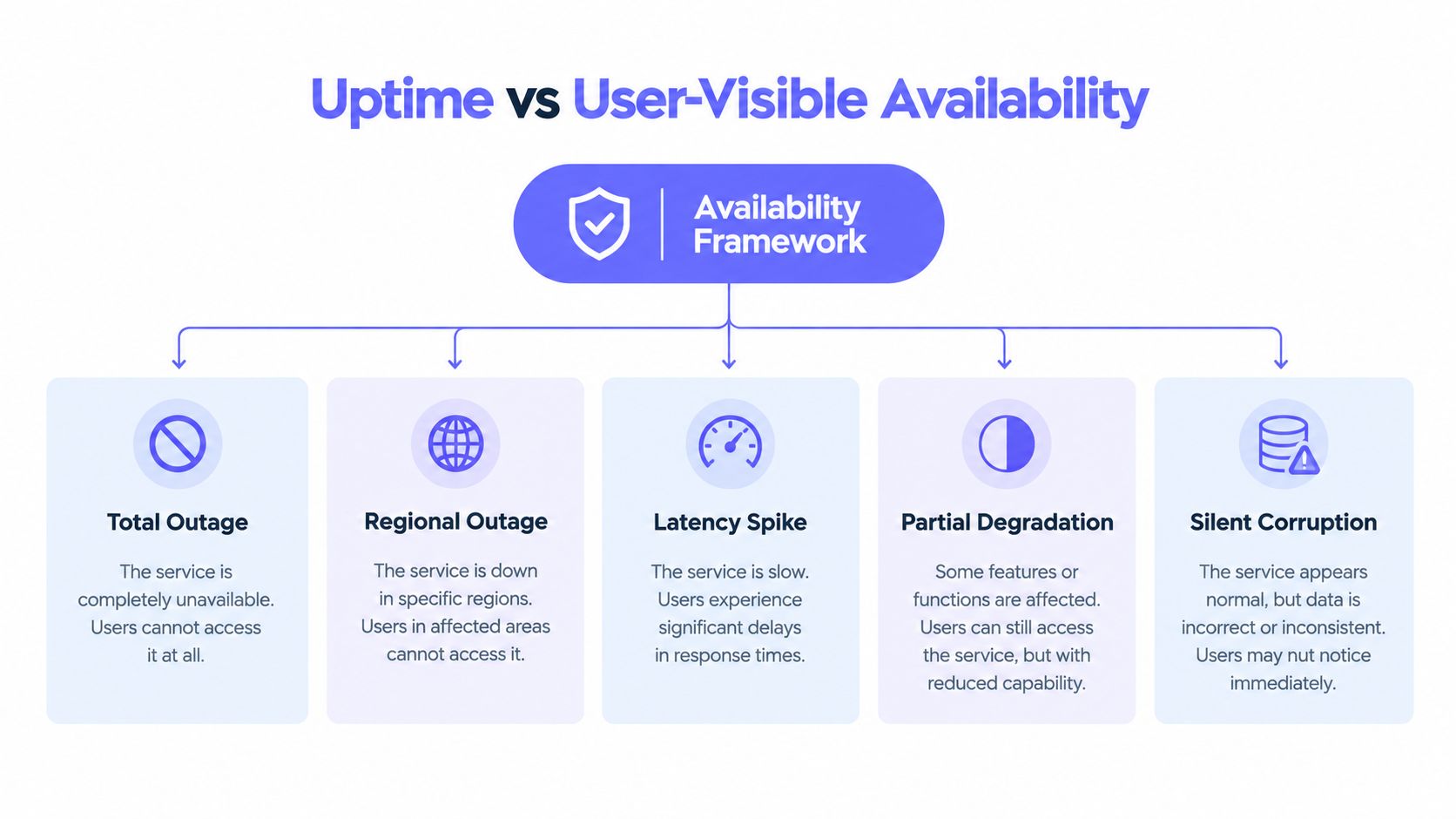
Uptime asks whether a component operated during a defined window. User-visible availability asks whether people could complete meaningful work during that window. The distinction explains why infrastructure teams and customers can look at the same incident and reach opposite conclusions.
The separation between the two measures becomes clearer in the framework below.
Outages remain common even as severity improves. In Uptime Institute's 2024 Global Data Center Survey findings, 53% of operators had experienced an outage during the preceding three years, while only 9% of incidents documented in 2024 were classified as serious or severe. Less severe does not mean invisible. Partial failures still create failed transactions, support tickets, and lost trust.
Five Failure Modes That Need Different Signals
- Total outage: Every region fails the primary journey, so confirmed external checks should page immediately.
- Regional failure: One geography, provider, or network path fails while others succeed, requiring region-segmented reporting instead of a global average.
- Elevated latency: Requests succeed too slowly for practical use, so response-time thresholds and percentile views matter more than success alone.
- Degraded functionality: Core pages load, but search, uploads, checkout, or notifications fail, which journey-specific probes expose.
- Error-budget burn: Small recurring failures erode reliability before a dramatic outage, making trend and rate-based alerts valuable.
Synthetic checks show whether a controlled journey works from selected locations. They don't show every browser, device, ISP, or customer segment. Pairing them with real user monitoring of actual customer sessions helps teams verify whether synthetic success matches lived experience, especially during regional or dependency failures.
The short walkthrough below reinforces why availability definitions need to follow the customer path rather than the server inventory.
Adding more checks doesn't automatically improve this picture. Twenty probes against the same cached homepage still miss a broken login. Poorly chosen checks multiply notifications while leaving partial failures unmeasured. A better selection method starts with three to five journeys customers value most, maps each journey to its dependencies, then assigns one primary availability probe and only the diagnostic probes needed to isolate likely faults.
Availability definitions also need plain boundaries. Teams should state which regions count, what response qualifies as success, how degraded periods are classified, and whether approved maintenance is reported separately. Without those rules, a percentage looks precise while hiding the decisions that produced it.
Check Frequency, Failure Confirmation, and Multi-Region Probing
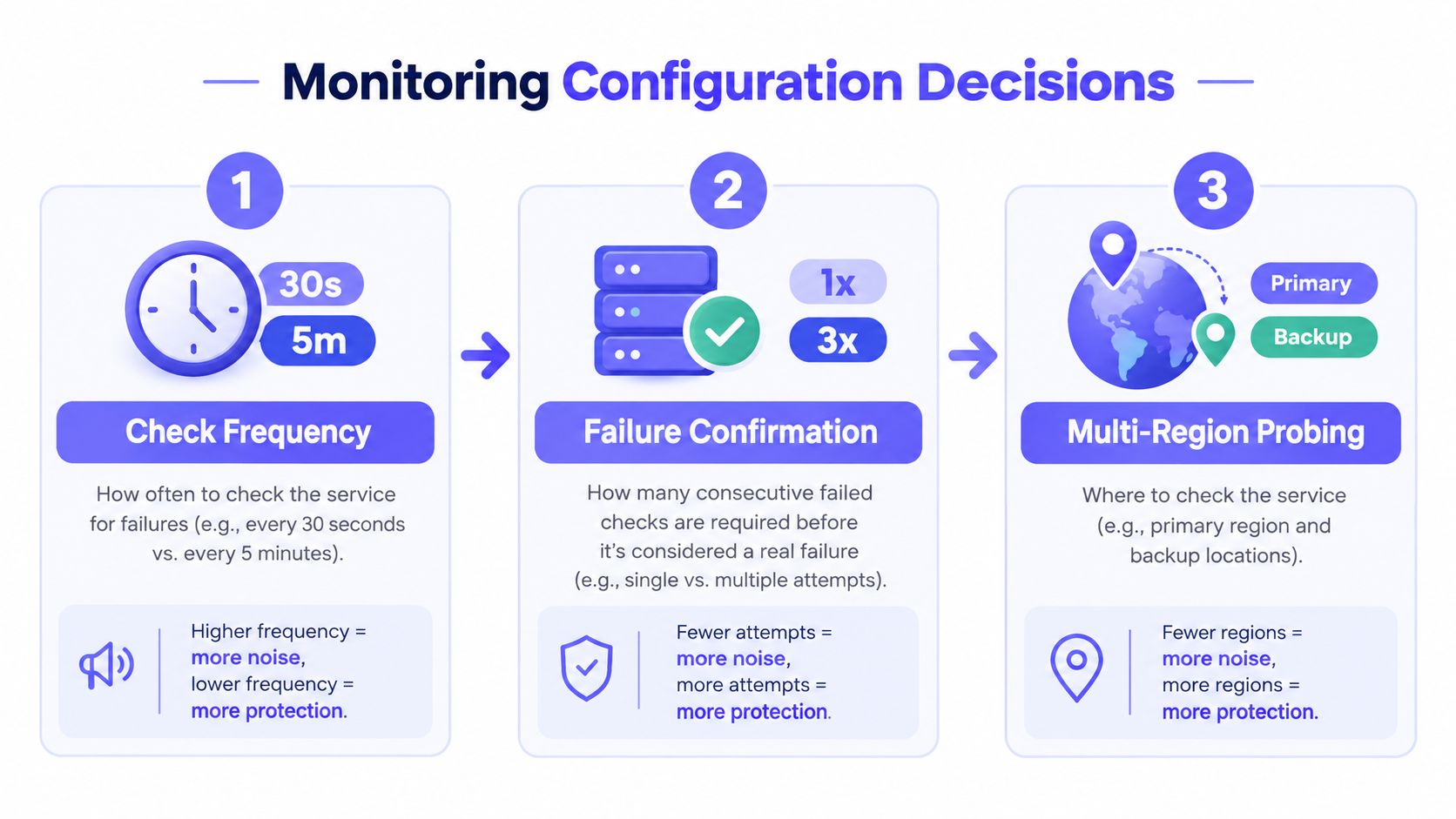
Frequency, confirmation, and region selection form one design decision. A fast check with weak confirmation creates pages for transient network blips. A slow check with strict confirmation stays quiet but detects real outages late. Criticality should determine the balance, not habit or a vendor default.
The configuration flow below frames those trade-offs as connected choices rather than isolated settings.
Choosing a Check Interval
Customer-facing login, checkout, and API services usually justify 30-second or one-minute checks because detection delay directly extends impact. Lower-risk internal tools can often run at five-minute intervals, reducing probe load, data volume, and notification pressure. Marketing pages and documentation usually sit between those poles, depending on contractual commitments and traffic value.
Shorter isn't always safer. Very frequent checks can hammer fragile endpoints, distort response-time data, and surface brief disturbances that resolve before anyone can act. They also create more opportunities for a single probe location to misreport a routing problem as a customer outage.
Response-time thresholds need the same care. A threshold set near normal peak latency will fire during ordinary load. A threshold set far beyond the point where customers abandon a task will stay silent during meaningful degradation. Baseline behaviour by region and time of day gives thresholds a defensible starting point.
Confirming Failure Before a Page
One failed probe is a clue. Repeated failure from independent locations is evidence.
A practical confirmation policy requires consecutive failures, agreement from at least two regions, or both, before a page leaves the system. The exact rule should reflect risk. A payment endpoint may page after rapid confirmation from two locations, while a batch service can wait for a longer sustained failure. Recovery should also require success confirmation so flapping services don't generate alternating down and up messages.
Confirmation creates a deliberate delay, and that delay has a cost. The benefit is credibility. Responders learn that a page usually means customers face a real problem, so they acknowledge faster and investigate with more urgency. Policies should be visible in incident records, showing when the first failure appeared, when confirmation completed, and when notification was sent.
Designing Multi-Region Coverage
At least two geographically diverse probe locations are necessary for public services, and three often provide a clearer vote during provider or routing incidents. Locations should reflect actual customer concentration rather than technical convenience. A service used mainly in Europe and North America gains little from probes clustered in one cloud region on another continent.
Regional results shouldn't collapse into a single pass or fail too early. If one region fails persistently while others succeed, the incident may affect a defined customer segment and still merit escalation, but with severity and messaging scoped to that segment. If all regions fail together, the likely fault sits closer to the service, its provider, or a shared dependency.
Cause patterns reinforce the need for external verification. In Uptime Institute's annual outage analysis of 2023 survey results, four in five respondents believed their most recent serious outage could have been prevented through better management, processes, or configuration. Internal host health alone can't catch every configuration or network symptom. Independent probes test the path customers use and provide a second opinion when internal systems insist everything is normal.
Probe design differs by failure mode. Total-outage detection needs fast multi-region agreement. Regional detection needs per-region thresholds that don't get outvoted by healthy locations. Latency detection needs sustained response-time rules, not a single slow sample. Treating those as separate policies prevents one generic rule from doing every job badly.
Alert Governance as the Real Hard Problem
Collecting signals is comparatively easy. Deciding which signal deserves to interrupt a person, which team owns it, when escalation stops, and how success gets measured is harder. Weak governance turns monitoring into a source of risk because responders mute channels, batch-acknowledge pages, or stop trusting the system entirely.
Alert overload is not hypothetical. One 2025 analysis reported that SRE teams receive more than 2,900 alerts per month, with roughly 72% classified as non-actionable noise. Volume at that scale trains exactly the behaviour reliability programs need to avoid. People protect their attention first, and genuine incidents compete with routine noise.
Measuring Alert Quality
- Actionability rate: The share of alerts that lead to a real intervention, fix, or deliberate escalation.
- Duplicate rate: Repeated notifications for the same underlying incident or symptom.
- Acknowledgment delay: Time between notification and a named responder taking ownership.
- Escalation success: Whether unacknowledged alerts reach the next responsible person within policy.
- Incidents found without an alert: Customer reports or manual discoveries that expose coverage gaps.
Those indicators should be reviewed by service and owner, not only as a platform-wide average. A healthy global rate can conceal one noisy integration that dominates a small team's nights. Alerts with persistently low actionability need redesign, demotion to a ticket or chat channel, or removal.
Making Each Page Worth Interrupting Someone
Every paging alert needs an owner, a runbook, and a clear statement of customer impact. The payload should include the failing journey, affected regions, first failure time, recent deployments or changes when available, and links to relevant host or application telemetry. A message that only says a server is down forces the responder to reconstruct context under pressure.
Repeated symptoms should group under one parent incident. If DNS failure triggers website, API, and login alerts, responders need one coordinated incident with supporting signals, not three competing pages. Modern automated incident detection and correlation workflows can support that grouping, but ownership rules still determine whether correlation reduces work or merely hides detail.
Hiring and skills planning also affect governance because escalation quality depends on responders who understand service ownership, procedures, and incident communication. Teams assessing those capabilities can use a reliability-focused interview prep guide from nexus IT group as one reference for structuring conversations about operational judgement, without treating interview answers as a substitute for exercised runbooks.
Governance for Small Teams and MSPs
Continuous staffing isn't realistic for many MSPs, hosting providers, and solo operators. Governance therefore has to be explicit about business hours, on-call rotations, retry intervals, and delayed notifications for lower-severity conditions. A degraded internal report can wait for morning. A confirmed customer checkout outage cannot.
Maintenance windows should suppress expected noise during planned work, with automatic expiry so checks don't remain muted indefinitely. Escalation policies should stop after a defined chain and record failure to reach anyone as an operational problem in its own right. Post-incident reviews should ask whether the alert was timely, actionable, correctly routed, and sufficiently informative. If the answer is no, the alert itself becomes corrective work, equal in importance to the service fix.
Status Pages, SLA Reporting, and Where Alerts Actually Land
Monitoring that stays inside an engineering dashboard creates a second job during every incident. Support teams ask for updates, customers open duplicate tickets, and account managers improvise explanations. A status page turns the same incident record into a public timeline with affected components, current state, and recovery updates.
A useful status page isn't a marketing badge. It records incidents, distinguishes degraded performance from total outage, and shows maintenance before customers discover it. A well-run status page as an operational communication tool reduces inbound questions because customers can verify impact without waiting for a support reply.
Aligning Probe Definitions With SLA Language
SLA reporting fails when contracts and probes define availability differently. Teams need to map the service window, qualifying downtime, maintenance exclusions, regional scope, and credit rules onto measurable probe results. Contractual availability and customer-observed availability should both remain visible when exclusions create a meaningful difference.
For example, a provider SLA may cover network and power while excluding application defects. Customers still experience the application defect as downtime. Reporting only the contractual figure invites disputes. Reporting both explains what the contract covers and what users endured.
Routing Alerts by Audience and Severity
Different channels serve different purposes:
- Slack, Microsoft Teams, Discord, and Telegram: Team visibility, discussion, and lower-severity notifications.
- Email: Durable records, summaries, and audiences outside the immediate response channel.
- SMS and Pushover: Urgent off-hours delivery when chat notifications are likely to be missed.
- Webhooks: Ticket creation, workflow automation, and integration with internal systems.
Platforms such as Fivenines consolidate uptime checks, server metrics, white-label status pages, and multi-channel alerting into one operational surface. REST APIs and Terraform providers also let teams manage monitors, maintenance windows, and routing as code. That makes uptime policy reviewable in version control, which matters when an SLA dispute or audit asks who changed a threshold and why.
Building a Reliable Uptime Program in 90 Days
A credible rollout doesn't require a platform migration on day one. It requires sequencing. Coverage comes first, then alert quality, then public accountability and automation. Reversing that order usually produces polished status pages fed by unreliable checks.
Days 1 to 30. Inventory and Probe Design
Teams list public services, internal dependencies, owners, and the customer journey each service supports. Each critical journey receives a primary availability probe, supporting layer probes, multi-region execution, and a written confirmation rule. Certificates, DNS records, cron jobs, and key third-party dependencies belong in the same inventory because they cause customer-visible failures without taking a server offline.
Days 31 to 60. Alert Governance
Duplicate alerts get grouped or removed. Every paging alert gains an owner, runbook, severity definition, and escalation path. Teams track actionability, acknowledgment delay, and incidents discovered by customers, then tune thresholds and delays based on evidence. Off-hours routing gets tested deliberately, including unacknowledged escalation and maintenance-window expiry.
Days 61 to 90. Communication and Automation
The status page launches with component definitions that match probe boundaries. SLA reports are reconciled against incident history, including maintenance and regional events. Monitor definitions move into APIs or Terraform where practical. Smaller organisations planning that automation work may find a small business cloud automation guide from Bruce and Eddy useful as background on treating infrastructure changes as repeatable code rather than manual console work.
The programme is working when pages create owned incidents, customers learn about failures from the provider first, and post-incident reviews rarely ask why monitoring missed the problem.
Other healthy signs are quieter rotations, fewer duplicate tickets during incidents, and SLA reports that match customer experience closely enough to survive scrutiny. The final test is simple. During the next partial failure, the team should know which journey broke, which regions are affected, who owns the response, and what customers have been told, without assembling that picture from five tools under pressure.
Start with the journeys customers cannot afford to lose, then put confirmed multi-region checks, governed escalation, and transparent status communication behind them. Fivenines brings server metrics, HTTPS, TCP, ICMP, and DNS uptime monitoring, white-label status pages, and multi-channel alerts into one platform built for teams that need dependable coverage without an enterprise rollout.