Docker API Monitoring: Endpoints, Metrics and Alerts

The application is timing out, the Docker host still responds, and the dashboard shows containers as running. An operator opens the logs, spots a restart, and discovers that the monitoring system retained neither the preceding memory pressure nor the deployment event. Meanwhile, nobody has checked whether the collector's daemon access also permits administrative actions.
Docker API monitoring needs to answer more than whether the daemon responds. A production setup must establish who can reach it, distinguish expected containers from healthy workloads, and retain enough evidence to explain failures afterward. Security comes before collection, and useful alerts depend on connecting state, resource usage, and change history.
Table of Contents
- Locking Down API Access Before You Poll
- Docker Engine API Endpoints Worth Polling
- Setting Up Agent-Based Collection Step by Step
- Container Metrics to Collect and Dashboard
- Alert Rules for Real Container Failures
- Keeping Docker Events as Incident Evidence
- Pilot on One Host Before Choosing Build or Buy
Locking Down API Access Before You Poll
An open Docker API isn't just another monitoring port. The collector connects to the same control plane used to administer containers, so treating connectivity as the only requirement creates an avoidable security risk.
Docker defaults to the Unix socket at /var/run/docker.sock, where filesystem permissions control access. Remote collection should use SSH or a TLS-protected connection with certificate verification, as described in Docker's daemon security guidance. A dedicated monitoring account helps separate ownership, but its name alone doesn't restrict what it can do.
Establish the access boundary
- Inventory every listener. Inspect daemon startup configuration and the
hostsentries indaemon.json. Record the endpoint, transport, permitted clients, and operational owner. - Prefer the local socket. Keep collection on the host unless remote access solves a concrete deployment constraint. The socket's permissions belong in the security review, not just the installation checklist.
- Separate the monitoring identity. Avoid sharing an administrator's credentials with a collector. Grant read-only access where the deployment model supports it, and verify the restriction through attempted requests rather than assuming it exists.
- Manage remote credentials deliberately. For certificate-based access, use a trusted CA, separately managed client credentials, and a renewal process. Certificate authentication establishes identity; the authorization design still needs to constrain permitted operations.
- Restrict network reachability. Bind remote access to a management network or VPN. Docker's security guidance warns that firewall-restricted endpoints can remain reachable from containers, so perimeter rules aren't sufficient protection.
- Test rejection paths. Confirm that untrusted certificates, expired credentials, and unauthorized source networks fail. A successful authorized request proves only the positive path.
- Watch the access boundary. Collect authentication failures and investigate unexpected endpoint usage. Changes to listener configuration should receive the same attention as changes to production access credentials.
Keep collection separate from administration
An outbound collector is often simpler than maintaining a remotely reachable daemon. The architectural trade-off is explained in this guide to monitoring internal services without opening firewall ports.
Security rule: A monitoring identity should receive only the access the collection path actually requires.
Port 2376 doesn't establish security by itself. TLS configuration, trusted certificates, and certificate validation provide the protection; an unauthenticated listener on 2375 should fail configuration policy.
Docker Engine API Endpoints Worth Polling
| Endpoint | What It Returns | Fields to Keep | Poll Interval |
|---|---|---|---|
GET /_ping |
Daemon responsiveness | Response outcome and latency | Frequent lightweight check |
GET /version |
Engine and supported API versions | Versions associated with each host | Startup and after upgrades |
GET /info |
Daemon information and container counts | Running, paused, stopped, and image counts | Routine host inventory cycle |
GET /containers/json?all=1 |
Container inventory and states | ID, name, state, status, image reference | Routine inventory cycle |
GET /containers/{id}/json |
Detailed state and restart information | RestartCount, State.OOMKilled, State.ExitCode, State.Health |
Following state changes and during checks |
GET /containers/{id}/stats?stream=false |
Resource-usage snapshot | CPU samples, memory usage and limit, network and block-I/O counters, process count | Controlled resource collection interval |
GET /events |
Lifecycle changes | Event type, timestamp, container identity, available attributes | Continuous stream |
GET /system/df |
Docker-managed disk usage | Usage and reclaimable information by category | Less frequently than resource statistics |
These paths form a practical collection inventory, not a requirement to query everything at the same frequency. Cheap reachability checks, host inventory, per-container snapshots, and disk accounting serve different purposes. Their schedules should reflect detection requirements and measured request cost.
Record compatibility before collecting metrics
/version is easy to skip because it doesn't produce an exciting graph. It still belongs near the beginning of every collector's startup sequence: the supported API range determines which requests and response fields the collector can rely on.
Docker maintains an Engine-to-API compatibility matrix and documents explicit versioned request paths, including /v1.25/containers/json, in its Engine API version history. The collector should select a mutually supported version rather than copy a version string from another host.
Store the Engine version and supported API range with host metadata. After an upgrade, repeat capability checks before accepting the new response shape as equivalent to the old one.
Separate liveness, inventory, and capacity
A successful /_ping establishes daemon responsiveness, not application availability. /containers/json?all=1 establishes what exists, but the monitor still needs an expected-workload inventory to identify something that has disappeared entirely.
Inspection data provides context for resource graphs. A container that stopped after reporting memory pressure needs a different investigation from one replaced during a deployment, even if both disappear from the running-container list.
Disk accounting deserves its own collection path. /system/df helps distinguish Docker-managed storage categories, while resource snapshots explain current workload activity; neither should substitute for the other.
- Unsupported endpoint: Mark a capability as unavailable and expose that status.
- Missing field: Preserve an unknown value instead of converting it into healthy-looking data.
- Failed request: Record the collection failure separately from the workload's last known state.
A compatibility failure should produce an explicit flag, never a silent gap.
Setting Up Agent-Based Collection Step by Step
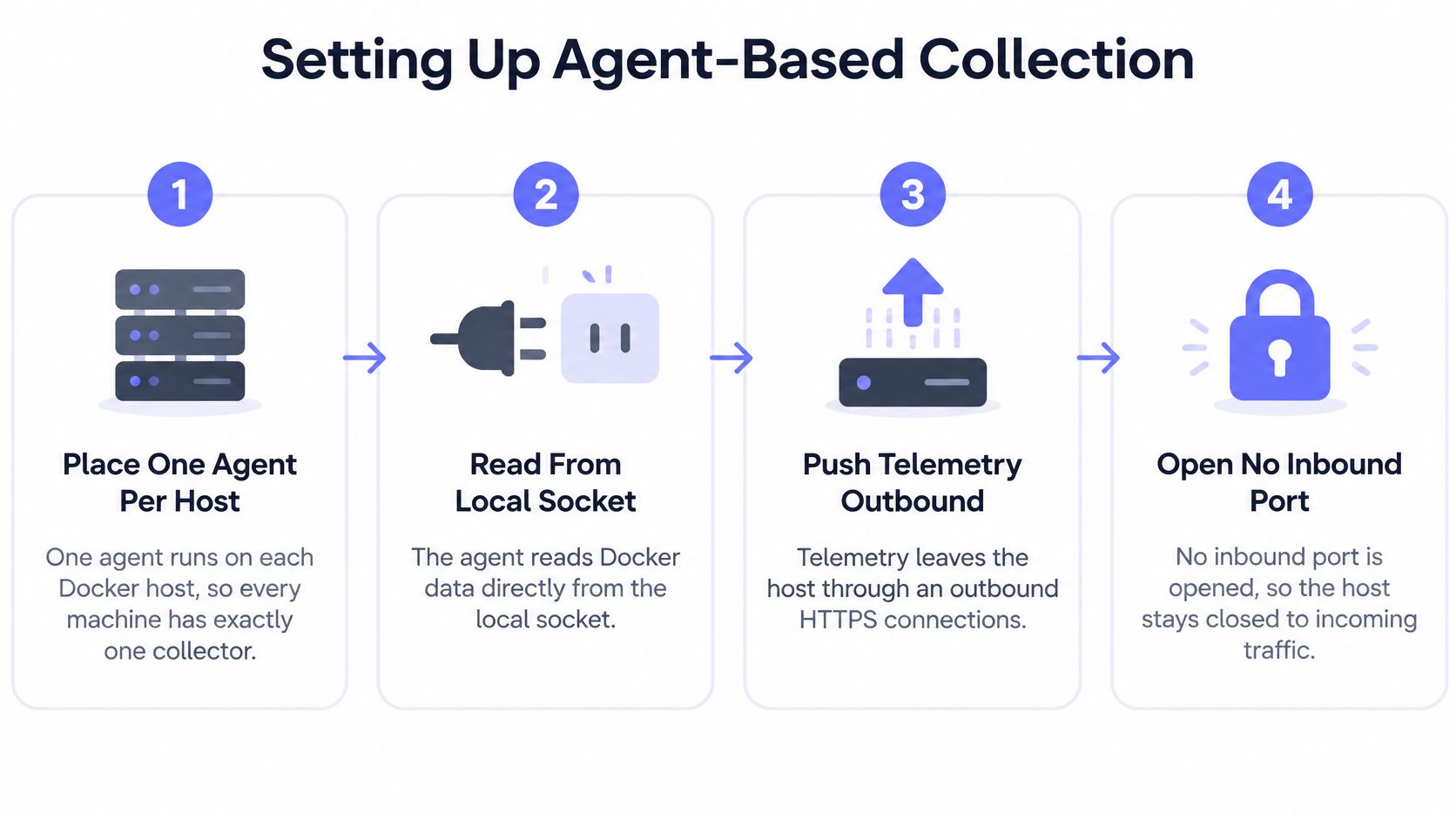
A host-local agent offers a straightforward architecture: read through the local Docker socket, then send telemetry outward over HTTPS. That avoids creating a remote daemon listener solely for monitoring, although the agent's local permissions still need the access controls established above.
Validate the complete collection path
- Install the collector on a pilot host. Compare its discovered inventory with the daemon's inventory, including stopped containers. A dashboard populated with running workloads alone can conceal incomplete discovery.
- Configure separate collection schedules. Keep inventory collection distinct from resource snapshots and event ingestion. Changes to one schedule should not unexpectedly increase every category of API traffic.
- Verify workload identity. Confirm that container IDs, names, image references, and relevant Compose project labels arrive intact. Operators need those fields to connect a resource sample to the workload they recognize.
- Check outbound delivery. Verify HTTPS delivery and confirm that installation hasn't introduced an inbound listener. Exercise a delivery failure so buffering and recovery behavior are visible before an incident.
- Benchmark realistic load. Measure collector CPU, collector memory, and daemon request latency at a production-like container count. A nearly empty test host won't establish whether collection remains affordable under fleet conditions.
- Tune against detection requirements. Shorten collection intervals only when the additional samples improve operational decisions. Lengthen expensive queries when their frequency adds load without useful context.
- Observe before paging. Gather a baseline across normal deployments and workload changes. Keep candidate rules visible without paging until their behavior is understood.
Monitoring overhead is a real engineering consideration. Research evaluating Docker monitoring systems examines resource consumption and execution-time overhead, supporting the need to benchmark collectors rather than assume collection is free.
Test discontinuities, not just steady state
Restart a test container, recreate it, and interrupt the collector's delivery path. Those exercises reveal whether the pipeline handles counter resets, identity changes, and missing samples correctly.
Startup values also need deliberate handling. An unavailable memory reading shouldn't become an apparent drop in consumption, and a recreated container shouldn't inherit a predecessor's cumulative counters.
Acceptance test: A collector isn't ready merely because graphs appear. It needs predictable behavior during restarts, replacement, and interrupted delivery.
The same checklist applies to a vendor agent or an open-source collector. Selection should depend on observable behavior, access requirements, and ownership cost rather than installation convenience alone.
Container Metrics to Collect and Dashboard
| Metric | Source Field | Derived Value | Starting Alert Threshold |
|---|---|---|---|
| CPU usage | cpu_stats, precpu_stats |
CPU utilization from sample deltas | Sustained workload-specific saturation |
| Memory usage | memory_stats.usage, memory_stats.limit |
Usage relative to limit, adjusted for available cache fields | Persistent pressure near the configured limit |
| Restart count | RestartCount |
Increase within an evaluation window | Repeated unexpected restarts |
| OOM kill | State.OOMKilled, State.ExitCode |
OOM state correlated with termination | Any unexpected occurrence |
| Health status | State.Health.Status |
Time spent unhealthy | Persistent unhealthy state |
| Network traffic | Network receive and transmit byte counters | Bytes per second | Sustained departure from workload baseline |
| Block I/O | blkio_stats byte counters |
Bytes per second | Sustained unusual activity with operational impact |
| Process count | pids_stats fields where available |
Current count relative to an available limit | Persistent approach to the configured limit |
| Reclaimable disk | /system/df category data |
Reclaimable capacity by category | Investigate alongside host capacity pressure |
These are starting rule shapes, not universal numeric thresholds. An idle service, a batch worker, and a database should not share the same resource expectations merely because they run in containers.
Derive rates without inventing activity
Network and block-I/O counters describe accumulated work. Comparing their raw values with an activity threshold produces alerts about container age rather than current demand.
Calculate the change between valid samples and divide by elapsed time. If the container restarts or its identity changes, establish a new baseline rather than interpreting a counter reset as negative traffic.
CPU calculations also require a documented convention. The collector should derive utilization from CPU sample deltas and label whether the dashboard displays host share or another CPU normalization; otherwise operators can compare values that look equivalent but aren't.
Make the memory denominator explicit
Memory usage without its limit lacks essential context. Cache handling also needs to remain consistent across collection and dashboards, especially when the relevant fields differ between hosts.
This distinction is developed further in the guide to memory usage monitoring. When a meaningful container limit isn't available, the dashboard should say so rather than presenting an apparently precise utilization ratio.
- Host overview: Show daemon collection status, freshness, workload counts, and capacity context.
- Container grid: Sort by unexpected restart activity, then expose health, memory pressure, and image identity.
- Incident timeline: Overlay lifecycle events on resource graphs so operators can inspect what preceded termination.
Exit status belongs beside the surrounding evidence, not in an isolated failure counter. A termination code alone shouldn't be treated as proof of an OOM incident when explicit OOM state and resource history are available.
Grafana or another panel-based dashboard can support this layout. The important design choice is keeping the operational question visible: which workload changed, what pressure preceded it, and whether the data is current.
Alert Rules for Real Container Failures
Consider a listener check that finds an unauthenticated daemon endpoint. The workload graphs might look normal, but the exposure itself warrants immediate action. Waiting for suspicious container activity would turn a preventive control into a delayed compromise detector.
The historical risk is concrete. During internet scanning from September through December 2019, Unit 42 identified approximately 5,000 exposed Docker daemons, with 10–15% accessible without authentication, as reported in its research on unsecured Docker daemons. Those figures are a dated baseline, not a current exposure estimate; present-day findings must come from listener and authorization checks.
Match the rule to the failure
- Unauthorized daemon exposure: Page immediately when a listener violates the established authentication policy. The alert should identify the host, address binding, transport, and failed security check.
- Restart loop with memory evidence: Page when repeated unexpected restarts coincide with OOM state. Attach preceding memory samples and deployment context instead of sending separate notifications for every restart.
- Persistent memory pressure: Warn while usage remains close to the workload's limit. Escalate when correlated failure evidence indicates that pressure has affected availability.
- Unreachable API: Require repeated failed liveness checks, then examine host reachability and collector delivery. A shared network failure should create a grouped incident rather than independent pages for every dependent container.
These are proposed operating rules, not accounts of specific production incidents. Their evaluation windows should be chosen from the pilot's observed startup behavior, deployment patterns, and response requirements.
Suppress expected work without hiding failures
Deployment suppression needs boundaries. Planned replacement can explain a transient state change, but it shouldn't excuse persistent failure after the deployment window closes.
Group notifications by host and service ownership, using Compose project metadata where appropriate. Preserve container-level evidence inside the grouped incident so deduplication doesn't erase the details needed for investigation.
A successful API response can indicate a security weakness rather than healthy observability.
Routing is part of the rule design. Each alert needs an owner, a recovery condition, and a useful next action; the practical mechanics are covered in this guide to setting up alerts.
Before enabling paging, operators should be able to explain why the rule fires, why it stays quiet during expected activity, and what evidence accompanies the notification.
Keeping Docker Events as Incident Evidence
docker events shouldn't be treated as a complete audit trail. A live stream records changes; an inspection response describes current state; durable evidence requires retained records that remain available after the collection path fails.

Docker Hub namespace audit records are a separate facility, documented through the Docker Hub audit-log API. They shouldn't be confused with a host daemon's lifecycle stream or assumed to explain local runtime failures.
Retain a correlated evidence record
A restart event doesn't establish whether the cause was resource pressure, replacement, host interruption, or operator action. The retained record should make those explanations testable.
- Runtime context: Preserve timestamps, container identity, exit state, and health results.
- Resource context: Associate preceding memory pressure and relevant CPU or I/O activity.
- Change context: Retain image digests, deployment metadata, daemon log references, and host signals.
For example, a hypothetical post-deployment incident might contain repeated restarts, rising memory consumption, and a changed image digest. Presented together, those observations support an investigation of the replacement workload; separate restart notifications merely describe symptoms.
Design for a broken monitoring pipeline
Send events into a durable queue or local journal before relying on downstream processing. Record ingestion progress, detect uncertain coverage after reconnects, and replay retained data where the collection design permits it.
A timestamp discontinuity warrants investigation, but an idle event stream alone doesn't prove data loss. Gap detection should combine connection history, checkpoints, and collection health rather than infer failure from silence.
Keep high-cardinality evidence in an appropriate event store, and reserve bounded labels for metric aggregation. Deduplicate routine orchestrated churn without deleting the underlying records.
Events detect change well. They still need independent availability checks because an absence of events doesn't establish that a workload is serving requests.
Pilot on One Host Before Choosing Build or Buy
A limited pilot gives the team evidence about access, collection cost, and incident usefulness before a fleet-wide commitment. The first decision isn't which dashboard to purchase; it's whether the complete monitoring path behaves correctly under failure.
- Enable basic checks on a non-production host using the dedicated monitoring identity. Validate daemon responsiveness and inventory completeness.
- Add statistics and event ingestion. Exercise a restart and a replacement, then inspect the resulting evidence.
- Run the exposure checks. Confirm that the pilot hasn't introduced an unauthorized listener or broader access.
- Benchmark realistic density. Compare collection overhead and delivery behavior with the team's operational requirements.
- Review rollout readiness. Expand only after ownership, recovery behavior, and alert routing are clear.
Choose based on operational ownership
Prometheus remains a reasonable choice for teams that already operate it well. In 2025, 67% of surveyed organizations reported using Prometheus in production in some capacity, according to Grafana Labs' Observability Survey. That adoption figure establishes familiarity, not suitability for every team.
| Approach | Team Ownership | Decision Criterion |
|---|---|---|
| Prometheus, exporters, Grafana, and Alertmanager | Collection, storage, dashboards, routing, upgrades, and recovery | Existing skills and capacity to maintain the stack |
| Managed agent-based platform | Host access, installation, policy validation, and workload expectations | Reduced backend ownership with acceptable collection behavior |
| Custom API collector | Compatibility, derivations, retention, alerting, and ongoing maintenance | Requirements that justify maintaining custom software |
A comparison of API monitoring tools can help narrow the shortlist, but product selection shouldn't bypass the pilot. A managed dashboard doesn't remove responsibility for daemon authorization, and a self-hosted stack doesn't automatically preserve useful event evidence.
The strongest choice is the option the team can operate reliably, including during the outage it must explain.
Fivenines offers per-container insights through an open-source Linux agent that pushes telemetry over HTTPS, alongside infrastructure dashboards and alert routing. Teams evaluating Docker API monitoring can visit Fivenines and use the host-level pilot above to assess collection, visibility, and operational fit before expanding deployment.