Linux Network Traffic Monitor: A Practical Guide

Users report that the application is slow, the host's network interface looks busy, and the on-call engineer has a terminal full of counters that don't explain who caused the traffic. A backup container could be competing with an API, a dependency could be responding slowly, or the host could be dropping packets before the application sees them.
A useful Linux network traffic monitor answers a specific question without making the incident worse. The practical approach starts with interface and socket evidence, follows ownership into containers and cgroups, and preserves enough history to explain the next incident without recording every packet.
Table of Contents
- Which Linux Network Traffic Monitor Fits the Question
- How to Inspect Live Traffic on a Host
- How to Attribute Traffic to a Container
- Store History, Validate the Monitor, and Set Alerts
- Visualize Flows and Connect a Fleet Dashboard
Which Linux Network Traffic Monitor Fits the Question
The first decision on a saturated host isn't which package to install. It's which question needs an answer: Is the interface saturated, which workload is responsible, or why is a particular connection failing? Those questions require different evidence.
Interface counters are the cheapest starting point. ip -s link and /proc/net/dev expose bytes, packets, errors, and drops without inspecting application payloads. They belong on every server's routine monitoring path, but an interface total can't establish which tenant generated it.
Packet capture provides much richer evidence at a higher collection cost. A Linux traffic-capture study published by Springer describes near-complete real-time capture at Gigabit line speed; a 1 Gbit/s link represents approximately 125 megabytes per second of raw traffic. Capturing successfully and retaining sensibly are different engineering problems.
Linux traffic monitors by the question they answer
| Tool | Question it answers | Collection cost | Blind spot |
|---|---|---|---|
ip -s link or /proc/net/dev |
Bytes, packets, errors, drops on an interface | Very low, suitable for every host | No process, container, or conversation |
ss |
Sockets, listeners, retransmits, RTT, queues | Low | No byte rate per process and limited visibility into other namespaces |
iftop |
Top live flows on one interface | Moderate while it runs | No retained history or process owner |
nethogs |
Which process is sending or receiving now | Moderate while it runs | Often misses other network namespaces and short-lived containers |
tcpdump |
Packet behavior, flags, payloads, failed handshakes | Potentially high CPU, disk, and privacy cost | Ownership is incomplete and files grow quickly |
| eBPF counters or a metrics agent | Summarized rates, RTT, and cgroup totals over time | Low when aggregated in kernel; agent cost follows its collectors | Payload detail is absent; eBPF needs supported kernel hooks |
Choose evidence before collecting it
ss is the right next tool when connections are accumulating or the application appears blocked on a peer. Its TCP details can expose retransmissions, round-trip time, and congestion-window state. A growing receive queue can also suggest that the local application isn't consuming data promptly, rather than that the network needs more bandwidth.
iftop is useful when the question is which conversation dominates an interface. nethogs offers a process-oriented view, but its ranking needs confirmation before an operator assigns responsibility. Neither replaces a timestamped historical record.
Practical rule: Keep counters on the dashboard. Open a packet capture only when the unresolved question requires packet-level evidence.
A handshake failure, unexpected reset, or suspected retransmission sequence justifies a filtered tcpdump session. A bandwidth graph alone doesn't. Start with the matching tool in the table, then stop collecting once the evidence supports a concrete action.
How to Inspect Live Traffic on a Host
Consider a busy API host with rising response times. The investigation should stay focused on the service path, not expand immediately into every interface and connection on the machine.
The live checks below connect the host's traffic totals to its sockets and peers.
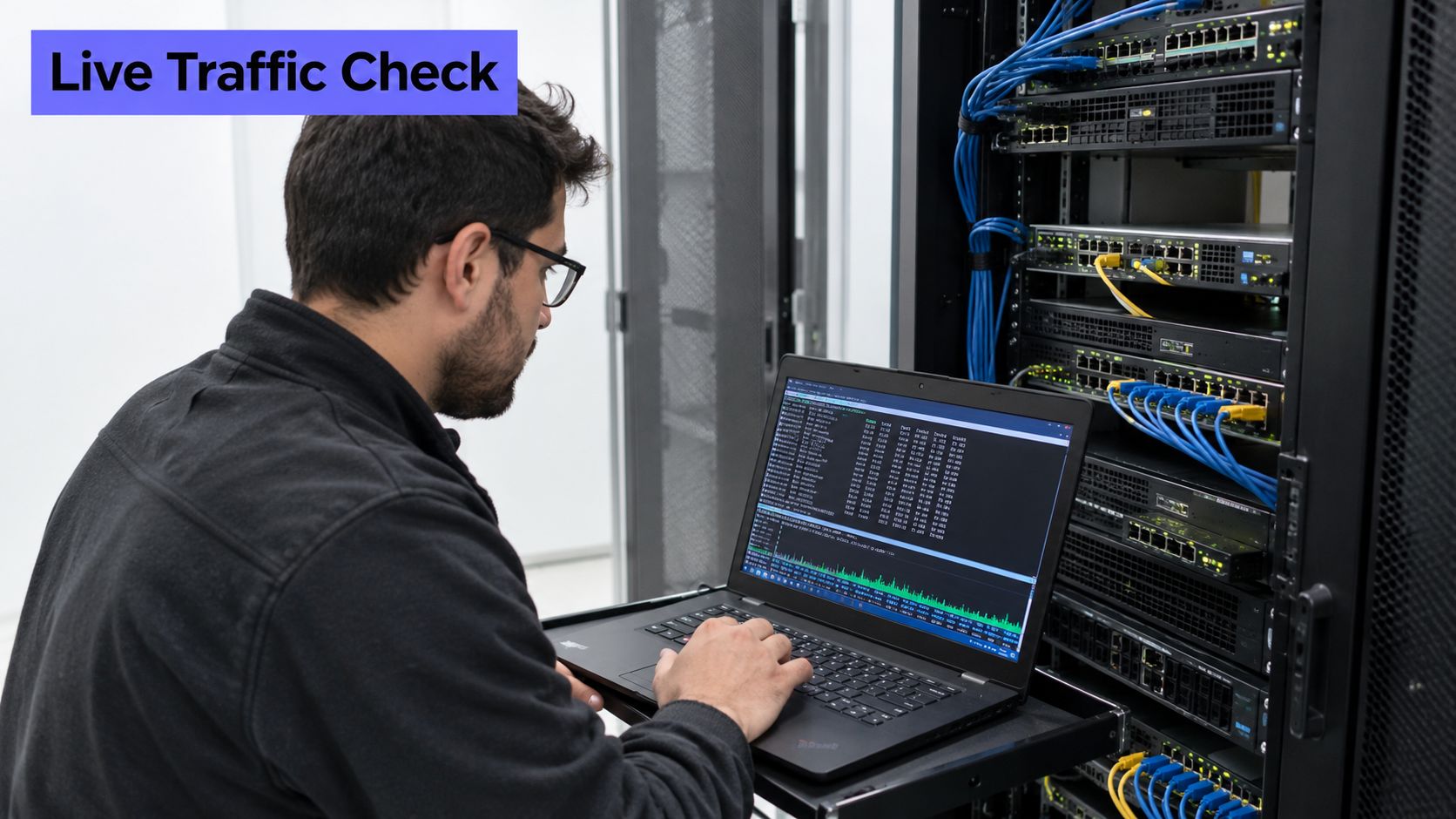
Establish the observation point
Confirm the interface. Run
ip -br addr, thenip route get PEER_ADDRESS, substituting the actual peer address locally. Confirm whether the service path uses a physical NIC, bond, bridge, or virtual interface. An active bridge and its underlying NIC can describe overlapping traffic, so their totals shouldn't be added blindly.Measure counter deltas. Run
ip -s link show dev INTERFACE, record the timestamp, and repeat after a known interval. Calculate bits per second as the byte delta multiplied by eight, divided by elapsed seconds. Keep RX and TX separate, and record error and drop deltas independently. The throughput measurement guide provides additional context for interpreting measured transfer rates.Inspect connection state. Run
ss -sfor an overview, thenss -tnp '( sport = :SERVICE_PORT or dport = :SERVICE_PORT )'. Add TCP details withss -tinpusing the same filter. Save the PID, process name, queue sizes,rtt,cwnd, and retransmission information where available. Process ownership may require extra permissions; an empty owner field isn't proof that no process exists.
The distinction between a cumulative counter and a rate matters. A large lifetime drop count may describe an old event, while a small but steadily increasing count may explain the current symptom. Preserve timestamps so the network sample can be aligned with application latency.
Narrow the investigation
Rank live conversations. Run
iftop -n -i INTERFACE -f 'port SERVICE_PORT'for a short observation period. Note the dominant peers, traffic direction, and whether the ranking stays stable. A large inbound response from a dependency means something different from a large outbound upload.Compare process ownership. Run
nethogs INTERFACEand compare the process ranking with the PID reported byss. A mismatch warrants checking namespace visibility, permissions, and collection timing. It doesn't automatically mean either tool has a broken counter.Capture only the unresolved exchange. Use
tcpdump -nn -i INTERFACE -c PACKET_LIMIT -w incident.pcap 'host PEER_ADDRESS and port SERVICE_PORT', replacing the uppercase placeholders locally. Add an elapsed-time limit through the approved shell tooling, because a packet-count cap alone may leave a quiet capture running. Read the file offline withtcpdump -nn -r incident.pcap, restrict access, and remove it after review.
A terminal demonstration can help operators recognize the difference between a traffic-rate display and packet-level inspection.
Stop before capture when counters, sockets, and process ownership already explain the symptom. A backup upload with a matching process and a saturated transmit path doesn't need payload collection to justify rescheduling or throttling.
Capacity decisions still need repeated observations. The Internet traffic measurement document emphasizes timestamped, repeated measurements and busy-period analysis; a link averaging 40% utilization can still experience 95th- or 99th-percentile bursts associated with queueing and loss. An instantaneous iftop screen isn't a capacity verdict.
How to Attribute Traffic to a Container
An interface spike is an observation, not an ownership record. On a multi-tenant host, operators need to establish which workload generated the traffic and whether neighboring workloads suffered.
The LinuxSecurity guide to network-monitoring gaps explains why an address alone is incomplete evidence and recommends correlating sockets with processes, users, namespaces, and cgroups. That correlation matters especially when containers can disappear before an administrator reaches the host.
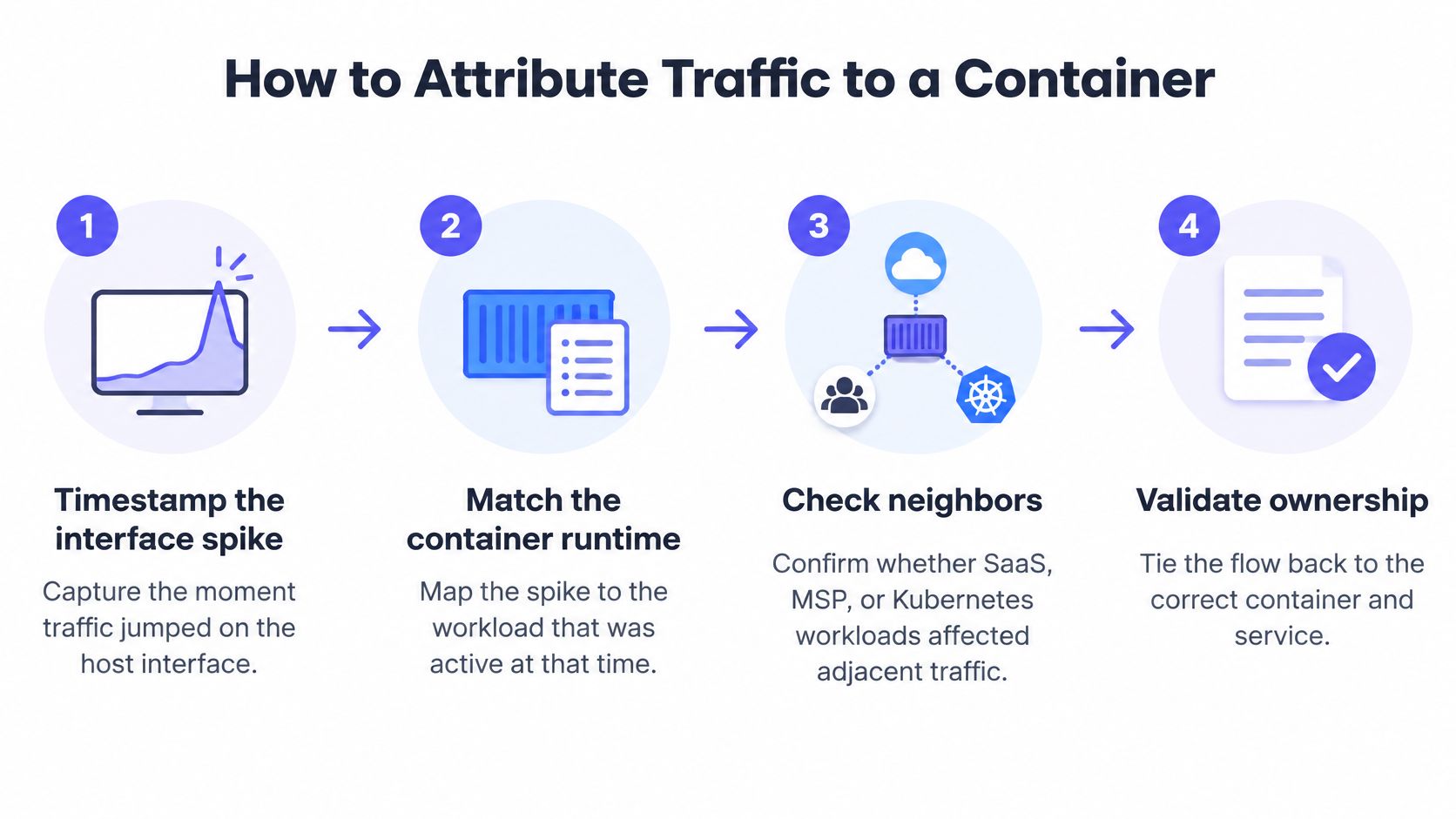
The attribution chain connects the observed spike to workload identity, then checks the effect on adjacent services.
Follow the socket into the workload
Timestamp the interface spike. Preserve the host, interface, observation interval, and RX or TX direction. Without a common time window, a busy container found later may be unrelated to the incident.
Record socket identity. From
ss -tnp, retain the local and remote endpoints, PID, and executable name. Inspect the command line and user withps -p PID -o pid,user,args. An overlay or translated address may identify a node or gateway rather than the originating pod, so endpoint matching alone isn't enough.Resolve the cgroup. Read
cat /proc/PID/cgroup, then match the path against runtime metadata. For Docker,docker inspect CONTAINERcan confirm the container identity and host PID; Kubernetes environments typically require the CRI runtime's inspection tools and pod metadata. A cgroup path is a useful join key, but its layout differs between runtimes and cgroup versions.Enter the correct network namespace. When the socket isn't visible from the host namespace, use an authorized command such as
nsenter -t PID -n ss -tnp. Host-levelnethogsoutput isn't an exhaustive inventory of traffic in other namespaces. Packet capture inside the namespace can clarify the exchange, but still doesn't independently prove the application owner.Retain identity before exit. Save the container ID, pod or service name, namespace, user, cgroup path, and observation time while the process exists. PIDs are reusable, and container names can be reused too. Runtime events should accompany traffic records when workloads restart frequently.
The Docker API monitoring guide is useful when runtime metadata needs to become a repeatable collection process rather than a manual incident step. Runtime access should be narrowly controlled, since broad container-management permissions can grant much more power than monitoring requires.
Separate responsibility from impact
A workload can generate most of the bytes without causing the outage. Compare its activity with neighboring services' latency, retransmissions, queue growth, and completed requests during the same interval.
eBPF instrumentation can improve attribution by correlating supported socket or packet metadata with workload identity without inspecting payloads. Hook choice matters: not every networking context retains the originating process or cgroup, particularly after forwarding or asynchronous processing.
A useful ownership record survives the process that generated it.
Store a compact row containing timestamp, host, interface, direction, flow endpoints, PID, user, cgroup, container ID, and service identity. Attach byte or packet deltas only when the collector measures them; an ss snapshot isn't a per-container bandwidth measurement.
Store History, Validate the Monitor, and Set Alerts
The operational choice isn't a live terminal versus permanent packet capture. A more useful design retains broad, inexpensive evidence and collects expensive detail only when an incident requires it.
The Linux traffic-monitoring guide supports matching collection depth to the diagnostic question. Compact counter history, summarized workload activity, and triggered captures serve different purposes and shouldn't share a single retention policy.
Keep evidence in separate tiers
- Interface history: Retain timestamped bytes, packets, errors, and drops long enough to compare recurring busy periods. Preserve interface identity and reset information so a replacement device does not inherit another device's history without notice.
- Workload detail: Retain process, flow, and cgroup summaries for a shorter investigation period. Keep stable service labels alongside ephemeral container identifiers.
- Incident captures: Collect narrowly filtered packet evidence after an anomaly has been confirmed. Set packet and elapsed-time limits, restrict access, and delete captures after review under the organization's retention policy.
This layered record supports both immediate diagnosis and later review without treating every packet as permanent evidence.
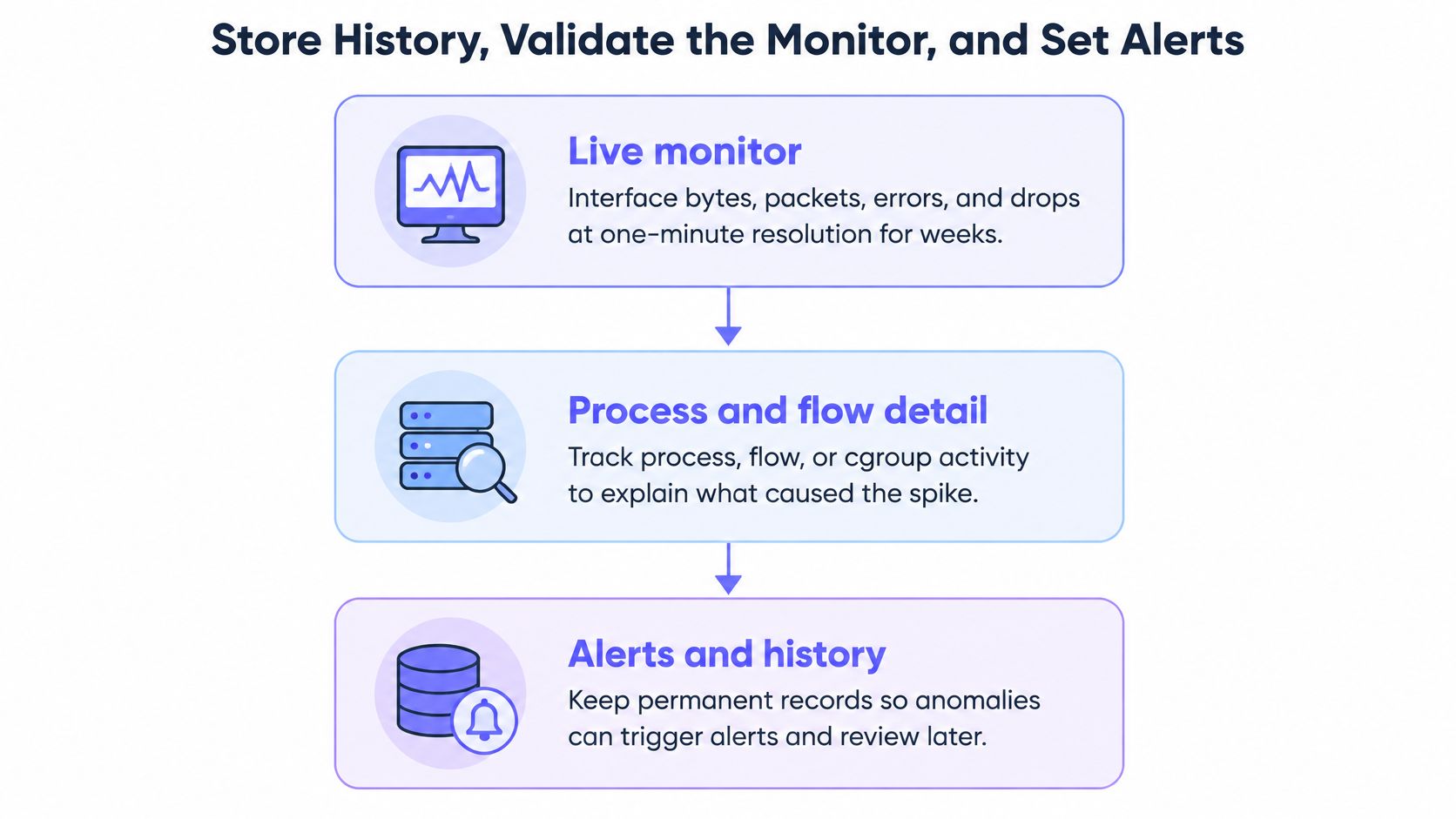
Counter samples need a dependable collection cadence, but retention and resolution should follow operational requirements rather than a universal default. A recurring short burst may require finer sampling than a slow capacity trend. The trend analysis guide helps connect these historical measurements to recurring behavior.
Benchmark collection overhead
When aggregate telemetry is sufficient, eBPF can count bytes and packets in per-CPU maps, aggregate distributions inside the kernel, and export summaries at intervals. Sampling can reduce event volume further, provided the dashboard identifies sampled measurements accurately.
An evaluated eBPF latency-monitoring implementation published by Springer handled more than one million packets per second, over 10 Gbit/s, on a single core while maintaining accurate round-trip-time measurements. That result describes the evaluated implementation, not a throughput guarantee for every eBPF agent.
Before rollout, replay identical traffic under these conditions:
- No monitor: Establish application throughput, CPU consumption, and packet-loss behavior without collection.
- Sampled aggregation: Enable the intended eBPF probes and export path, including the labels planned for production.
- Full capture: Measure the cost of packet copying, writing, and storage under the same workload.
Keep payload parsing and per-packet user-space delivery away from hot-path telemetry. Unbounded labels, such as every source port combined with every ephemeral container, can exhaust map capacity or overload the downstream metrics system. Bound attribution dimensions, aggregate locally, and verify kernel and driver support on the actual host image.
Test the monitor rather than trusting the graph
Use tc and netem on an isolated test path to introduce known delay, loss, or bandwidth restrictions. Record the existing qdisc configuration first, prepare cleanup, and keep an independent management path available. Confirm that the expected signal appears within the configured collection interval.
A controlled eBPF QUIC performance experiment reported that 50 ms RTT reduced measured throughput by 52.3%, while 5% packet loss reduced it by 46.0%. Those outcomes illustrate why throughput degradation can't be attributed to loss alone.
Inspect tc -s qdisc show dev INTERFACE, protocol counters, application throughput, and collector CPU together. Kernel and application measurements won't always count identical traffic boundaries, but unexplained divergence deserves investigation.
Validation check: A graph that changes during fault injection is useful only if the collector itself isn't causing the observed loss.
First alert rules for Linux network traffic
The following rules are starting conditions to tune against service behavior, not universal paging thresholds.
| Signal | Window | Page when | Do not confuse it with |
|---|---|---|---|
| Interface utilization | Rolling busy-period comparison | Utilization remains above the normal busy-hour range and service performance degrades | A brief iftop spike |
| RX or TX drops and errors | Consecutive collection intervals | Positive deltas persist after a clean baseline and affect the service | An interface reset that zeroes counters |
| TCP retransmits | Sustained comparison with host baseline | The retransmission rate rises well above normal alongside latency or failure symptoms | Ordinary new connections |
| Dependency RTT | Dependency-specific baseline window | RTT rises materially while completed throughput falls | Packet loss by itself |
| DNS or connect failures | Consecutive application observation windows | Failures exceed normal behavior and retries don't restore service | Application CPU saturation |
Use reset-aware rate calculations, and treat missing telemetry separately from zero traffic. A restarted agent, renamed interface, or failed scrape shouldn't appear as a recovered network.
Pages should include the host, interface, affected workload when known, baseline deviation, and service symptom. Bandwidth, dependency latency, and connection failures belong beside each other because the operator needs an actionable diagnosis, not an isolated red graph.
Visualize Flows and Connect a Fleet Dashboard
Terminal tools answer questions about the host currently under investigation. A fleet dashboard should answer a different question: where else is the same condition occurring, and when did it begin?
The dashboard shouldn't merely reproduce terminal output. It should preserve stable labels, make related service symptoms visible, and provide enough context for an operator to decide which host deserves a closer inspection.
A shared view helps operators compare traffic behavior with the rest of the infrastructure.

Connect collection to operational decisions
An existing Prometheus deployment with maintained exporters, useful dashboards, and reliable alert routing may already provide the required historical record. It doesn't need replacement for an additional interface panel. A hosted agent-based service is another option when the team prefers not to operate the collection and dashboard stack itself.
A controlled fleet rollout should follow a clear sequence:
- Install through the approved deployment path: Start on a representative host, review agent privileges, and confirm outbound HTTPS delivery. An outbound-push design avoids opening an inbound monitoring port or providing a remote command path.
- Verify the actual telemetry: Confirm interface bytes, packets, errors, and drops, then check which container attribution fields are available. Inspect timestamps, units, collection cadence, and labels before treating a panel as incident evidence.
- Group by useful identities: Keep host and interface labels consistent, then group workload measurements by service and container. Preserve the distinction between a measured flow, a process total, and an interface total.
The metrics and dashboards guide provides a useful basis for organizing panels around operational questions. A dashboard should make the affected service easy to find, not require the responder to remember a container identifier.
Build panels that support a response
Place busy-period utilization, per-container totals, and drop trends beside CPU, memory, disk activity, network-device health, and uptime. Include retransmissions and dependency RTT where the selected collectors support them. An unavailable measurement should be visibly unavailable, not displayed as a reassuring zero.
Use HTTPS, TCP, ICMP, and DNS uptime checks to distinguish host traffic from externally observable service health. Confirm failures before paging, and route alerts through the team's established destination, whether that's Slack, Microsoft Teams, Telegram, Discord, email, SMS, Pushover, or a webhook.
The handoff must remain explicit. A sustained tenant upload can trigger workload investigation, a failing external check can trigger service response, and an unexplained reset sequence can justify packet inspection. A one-off packet mystery still belongs in tcpdump, not in an expanding dashboard project.
Deploy the chosen agent, validate its measurements against the host's counters, and load the baseline-driven alert rules. Keep the incident toolkit available for the questions summarized telemetry can't resolve.
Fivenines offers Linux server metrics, per-container insights, network-device health, and uptime checks in a shared dashboard, with an open-source agent that pushes telemetry over HTTPS. Visit Fivenines to install the agent on a representative host, verify interface and workload visibility, and configure the alert rules before extending monitoring across the fleet.