Monitoring Schedule Guide: How to Set Check Frequencies

The most popular advice on a monitoring schedule is still "check more often." That advice treats polling frequency as the whole design. It isn't. A one-minute probe that pages on a single bad sample will wake someone for a blip, while a slower check with a confirmation rule and a quiet route can catch the same outage without the noise.
A useful schedule is three linked settings, and each one has a price. Collection interval decides when the system is observed, and it costs request volume, storage, and load on the target. Confirmation rule decides when an observation counts as a problem, and it costs minutes of extra detection time. Notification route decides who is told, and how loudly, and a page costs far more attention than a ticket. Set all three from the cost of a real failure, not from a default interval copied onto every service.
Table of Contents
- Recommended Check Intervals by Service Criticality
- What a Monitoring Schedule Decides Beyond Fixed Intervals
- Where Detection Time Goes Between a Failure and a Page
- Confirmation Rules That Stop Pages on Single Blips
- Staggering Probes Across Regions and Time
- Worked Schedules for Four Real Setups
- Audit Evidence Your Monitoring Schedule Must Keep
- Set Your Monitoring Schedule This Week
Recommended Check Intervals by Service Criticality
Copy this table first, then map your own estate onto it. Each row sets a check interval, a confirmation rule, and a notification route. Those three settings are independent, and the rest of this guide unpacks how to price them.
| Service tier | Typical examples | Check interval | Confirmation before paging | Notification route |
|---|---|---|---|---|
| Revenue-critical | Checkout, login, payment API | 30-60 seconds from 3 or more regions | 2 consecutive failures from 2 regions | Page on-call immediately |
| Customer-facing | Marketing site, customer portal | 1 minute from 2 regions | 2 of 3 checks | Page on-call |
| Internal tools | Staging, admin panels | 5 minutes from 1 region | 3 consecutive failures | Chat channel only |
| Capacity trends | Disk growth, memory pressure | 1-5 minutes collected | Alert on a 15-60 minute trend | Ticket for next business day |
| Scheduled jobs | Backups, cron tasks | Deadline: expected finish plus a 10-15 minute grace | 1 missed run | Page for backups, ticket for reports |
| Static inventory | SSL certificates, domain expiry | Daily | Single check | Ticket at 30 days remaining |
Revenue-critical paths such as checkout, login, and payment APIs lose money by the minute, so they get the fastest probes and an immediate page only after two regions agree. Customer-facing sites still page on-call, but a 2-of-3 rule absorbs a single regional hiccup. Internal tools and staging can wait five minutes and land in chat, because a false page there trains people to ignore the actual incidents.
Capacity trends are collected often enough to see a slope, then alerted on a 15 to 60 minute trend as a next-business-day ticket. Scheduled jobs are not polled on a clock at all. They are checked against a deadline, expected finish plus a 10 to 15 minute grace, and a missed backup pages after one miss. Static inventory, certificates and domains, is a daily check ticketed at 30 days remaining.
Presence isn't the gap. In 2024, 54% of organizations had deployed infrastructure monitoring, according to New Relic's 2024 Observability Forecast. Many organizations already run checks. What they lack is a tier for each one.
Fill the table in three passes. List every service, job, and certificate. Assign a tier by what an hour of failure costs in revenue, users, or a missed SLA monitoring target. Copy the matching row, then adjust only where a dependency changes the blast radius. The same pass is a good moment to run the sending domain for status notifications through an email blacklist checker so a page or ticket never goes missing unnoticed.
What a Monitoring Schedule Decides Beyond Fixed Intervals
A fire drill on the first Monday of each month checks, on a calendar, whether people still remember the exits. A smoke alarm watches the air the whole time and reacts when conditions change. Both are schedules. Only one of them cares about the current state of the building.
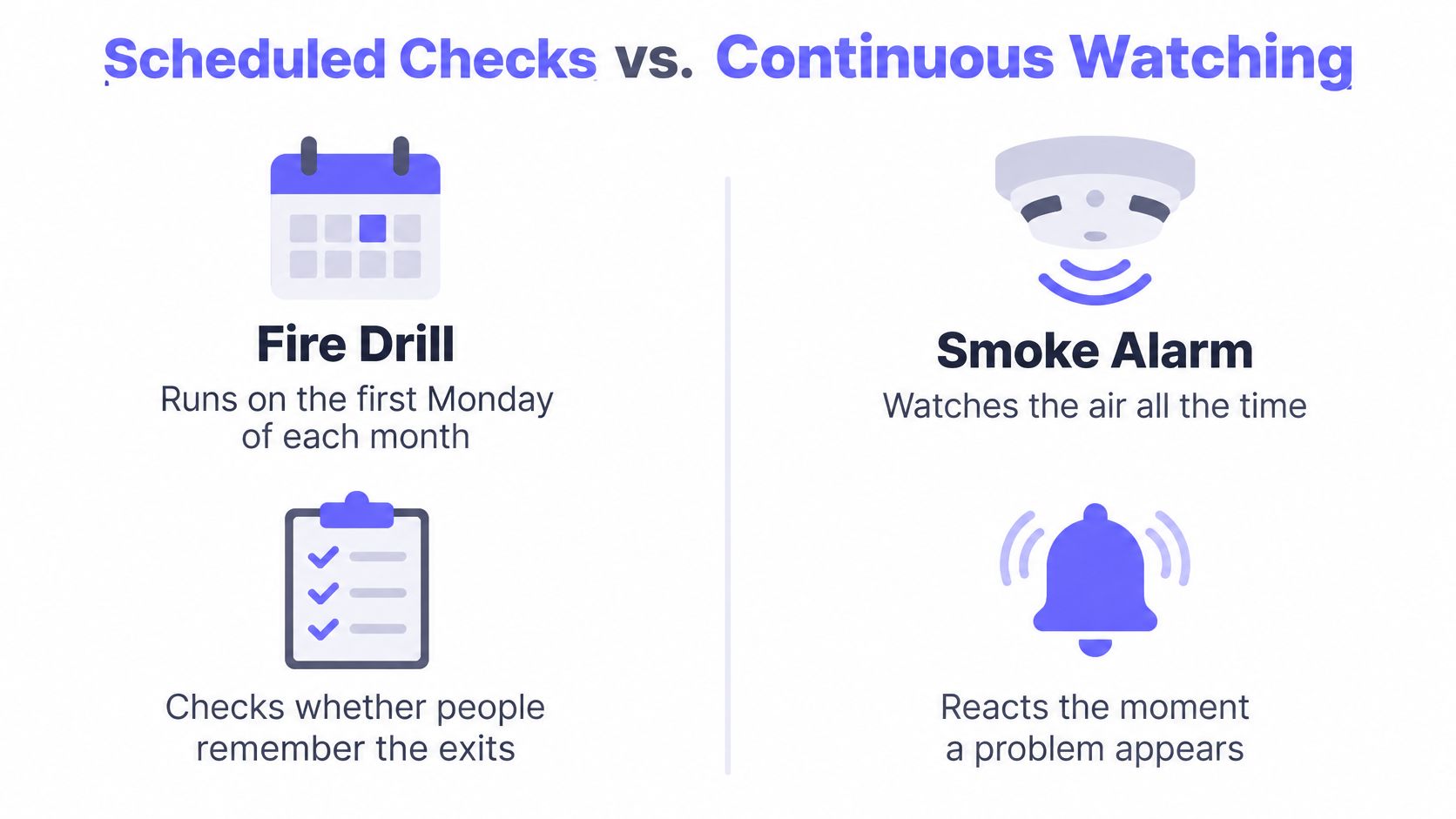
A monitoring schedule is the set of decisions that set when a system is observed, when an observation counts as a problem, and when a human is told. The calendar half of that idea is older than software.
NASA's reliability-centered-maintenance guidance draws the line between calendar-based work and condition-based monitoring. Traditional preventive maintenance runs inspections, adjustments, cleaning, lubrication, replacement, calibration, or repairs at predefined intervals, regardless of an asset's actual condition. NASA notes that this approach can be driven by the minimum "safe" interval between tasks, which may result in unnecessary maintenance. Condition-based maintenance instead evaluates performance data against baselines and schedules intervention when indicators show deterioration or an approaching failure.
Calendar checks versus condition triggers
A daily manual look at free disk is calendar-based. It runs whether the disk moved 1% or 20%. A trend alert on growth rate is condition-based. It stays quiet while the slope is normal and fires when the slope says the volume will fill. NASA describes condition monitoring as a way to forecast the work, so parts and operating plans exist before a catastrophic or functional failure.
Mature infrastructure schedules keep both. Scheduled health checks hold a known baseline, the way a synthetic monitoring probe hits a login path on a timer. Telemetry-driven triggers catch drift between those checks. The objective is to line frequency and response timing up with operational risk, asset condition, and what the failure actually costs.
Practical rule: If the check would still run on a perfectly healthy system, it is calendar-based. If it only acts when a baseline moves, it is condition-based. Most production schedules need both.
Three levers carry that choice. Collection interval sets how fresh the observation is. Confirmation rule sets how much evidence turns an observation into an incident. Notification route sets who hears it, and whether they hear a page, a chat message, or a ticket.
Where Detection Time Goes Between a Failure and a Page
A failure doesn't become a page in one step. The target stops responding, the next scrape or probe observes it, rule evaluation turns that observation into an alert, and only then does the notification travel to a person. Each hop has its own clock.
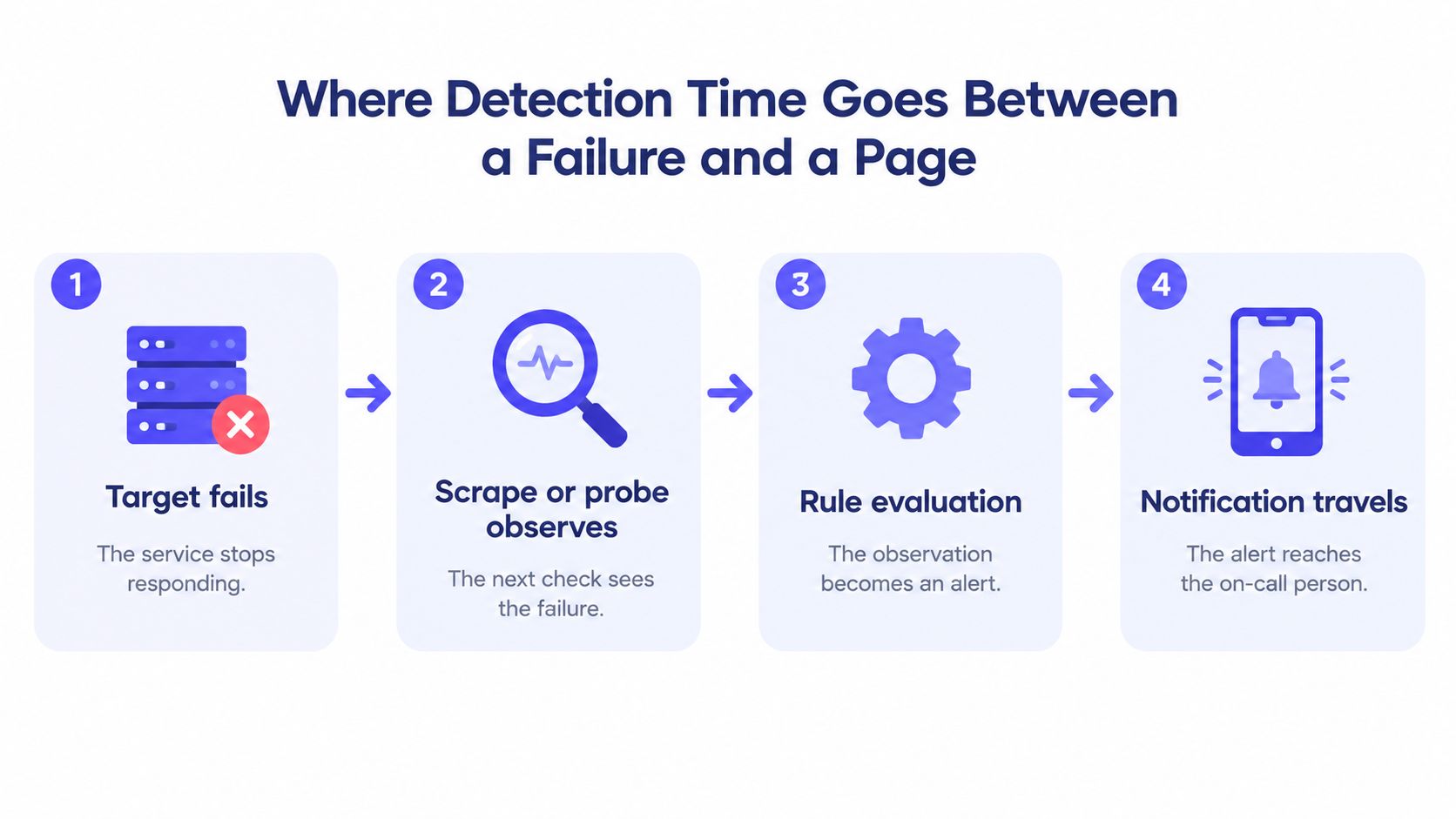
Prometheus documentation shows a representative setup with a 15-second scrape interval and a 15-second rule-evaluation interval. Scraping obtains fresh target data. Evaluation processes rules that create derived series and alerts. Those jobs don't share a timer, and treating them as one interval hides where the delay sits.
The latency arithmetic
Say a checkout API dies one second after a scrape. The failure sits unseen until the next scrape, up to 15 seconds later. The rule that would fire on it may have just run, so it waits up to another 15 seconds. The earliest rule-driven response is generally bounded by roughly one scrape interval plus one evaluation interval, about 30 seconds in that example, before notification processing and network delivery. Automated incident detection can't beat that floor unless one of those two intervals gets shorter.
Short intervals improve time-to-detect. They also raise request volume, storage churn, and load on the target. Long intervals cut that cost, then delay detection and smear short-lived events into a single sample so a 20-second stall never appears.
Speed follows the signal
Don't put one interval on the whole estate.
- Availability, queue saturation, and error rate change in seconds and carry the outage. Give them the fastest scrape and the fastest evaluation.
- Capacity trends such as disk and memory move over minutes. A slower series is enough to see the slope.
- Static inventory, certificates, domains, and installed package versions, changes on a human timetable. A daily or hourly series won't hide a real event.
Sampling rate is a separate choice from probe frequency. Sample agent metrics for disk and memory every 15 to 60 seconds. Run one-minute probes for availability. Keep five-minute summaries for static inventory. Storage and request volume then grow only where detection needs them.
Late data creates a different miss. A rule that evaluates "now" can look at an empty window and stay green. Prometheus exposes a rule-query offset so the rule evaluates an earlier timestamp, which cuts false negatives caused by metrics that haven't arrived yet. Set that offset from the slowest scraper you run, not from a hope that every target is on time.
Confirmation Rules That Stop Pages on Single Blips
A faster interval doesn't help if one bad sample pages someone. Confirmation is the setting that prices noise against delay, and it is not the same thing as how often you poll.
AWS CloudWatch alarm evaluation defines an alarm with three numbers: a period, the number of evaluation periods, and the number of breaching datapoints required to enter ALARM. An M-of-N policy can require, for example, 4 breaching points out of the latest 5, and those points need not be consecutive.
What one minute of period actually costs
With one-minute periods and a 4-of-5 policy, the evaluation window spans five minutes. A sustained fault may need several minutes of evidence before it pages. A 1-of-1 policy can react in about a minute, and it is exposed to a transient spike, packet loss, or one bad sample.
CloudWatch evaluates alarms with periods of one minute or longer every minute. Periods of 10, 20, or 30 seconds are evaluated every 10 seconds. Document period, evaluation cadence, and confirmation threshold together. Responders can then tell persistence from a sampling artifact without guessing which clock fired.
| Policy | Sustained outage paged after | Single blip pages? | Best fit |
|---|---|---|---|
| 1 of 1 | About 1 minute | Yes | Hard-down signals where a false alarm is cheap |
| 2 of 2 consecutive | About 2 minutes | No | Revenue-critical endpoints checked from 2 regions |
| 2 of 3 | About 2 minutes | No | Customer-facing endpoints |
| 3 consecutive | About 3 minutes | No | Internal tools |
| 3 of 5 (M-of-N, not consecutive) | About 3 minutes | No | Services with intermittent packet loss |
| 4 of 5 (CloudWatch example) | About 4 minutes | No | Noisy utilization metrics on critical hosts |
| 5 of 5 | About 5 minutes | No | Low-stakes checks; may miss flapping |
Read the "paged after" column as the earliest page for a fault that stays broken, at one-minute checks. A 3-of-5 rule can fire at minute three if the first three samples breach, even though the window is five minutes long. A 5-of-5 rule waits the full window and will miss a service that flaps in and out.
Short periods and low confirmation counts belong on safety-critical availability checks. Longer windows, or M-of-N, belong on noisy utilization metrics.
Keep retries and escalation off this table. Retry a failed probe at short spacing, about 10 seconds, before you count it as one failure. Escalate to a secondary responder if a page stays unacknowledged for 10 minutes. Mixing a retry into the M count makes the policy look stricter than it is, and mixing escalation into it pages a second person for a fault the first person already has.
Staggering Probes Across Regions and Time
One probe, one path. When that path fails, the site looks down, and the team is paged for an outage only one region can see. The service is fine. The route to it isn't.

That single-path page is why frequency advice falls apart in production. Grafana's write-up of a 2025 survey of 1,255 observability practitioners identifies alert fatigue, not lack of telemetry, as the leading obstacle to faster incident response, ranking nearly twice as high as the next concern. More checks, badly placed, add pages without adding signal.
Place the probes before you speed them up
- Region count. Run revenue-critical endpoints from at least two or three regions. Confirm a failure only when more than one region agrees. A customer-facing site can live with two. Internal tools can live with one.
- Start offset. If 40 monitors all fire at the top of the minute, the probes and the target see one synchronized spike, and a brief stall marks every monitor failed together. Spread start times evenly across the interval. A five-minute check on monitor number 7 of 40 starts about 52 seconds past the minute, not at :00.
- Jitter. Add a small random offset, a few seconds, so clocks don't drift back into alignment after a restart.
- Adaptive window. Tighten checks during a deploy or a known business peak, then return to the baseline interval when that window closes. A payment endpoint wants frequent multi-region checks and agreement before a page. A backup job wants a deadline check, not a faster poll. The same split applies to an AWS site monitoring setup, where one region's network blip shouldn't equal a regional outage.
Checking more often doesn't automatically improve reliability. A poorly designed frequency raises noise, and people who are paged for noise answer the next real page more slowly. Design for actionable signal per page, not for raw check count.
For each monitor, write down four placement facts before you enable it: region count, start offset, jitter range, and the tighter window that applies during deploys.
Worked Schedules for Four Real Setups
A monitoring schedule has three settings: how often to collect data, how to confirm a failure, and where to send the alert. Each costs something in check volume or operational noise. The right balance depends on what the monitor protects.
| Setup | Check rule | Monthly volume | Alert policy |
|---|---|---|---|
| Payment API | 1-minute checks from 3 regions | 129,600 checks | 2 consecutive failures from 2 regions, then page |
| Shared hosting fleet, 40 servers | 1-minute agent metrics per server | 1,728,000 samples | Trend alerts for capacity; page only when a host stops reporting |
| MSP with 60 client sites | 5-minute checks from 2 regions per site | 1,036,800 checks | Paging follows each client's contracted severity |
| Nightly backup job | One deadline check per night | 30 checks | Page after 1 missed run |
Rerun the arithmetic on your own estate
Checks per month equal 43,200 divided by the interval in minutes, times regions, times monitors. At one region and a one-minute interval, that is 43,200 checks. Three regions raise the payment API total to 129,600. The hosting fleet's one-minute samples across 40 servers total 1,728,000. For the MSP, a five-minute interval gives 8,640 checks per region and site; across two regions and 60 sites, the total is 1,036,800. The backup uses a deadline check instead: about 30 checks per month, with a page after one missed run because no second sample is scheduled.
Volume alone does not tell you whether a schedule is good. The fleet generates roughly thirteen times the payment API's check volume, yet its policy should keep pages rare by reserving them for a host that stops reporting. The backup generates little traffic, but a missed run warrants an immediate page. Judge each setup by the operational cost of its collection interval, confirmation rule, and notification route, not by check count alone.
NASA documentation citing Electric Power Research Institute findings reports annual maintenance costs of approximately $11 to $13 per horsepower under preventive maintenance and $7 to $9 per horsepower under predictive maintenance. Those figures describe equipment, not software monitoring. The operational lesson is to collect condition data while systems remain online, trend it, and schedule work when it has the least effect on planned activity. Recurring telemetry paired with event-driven alerts can identify a developing problem before a periodic review does.
Audit Evidence Your Monitoring Schedule Must Keep
A green dashboard proves that a probe ran. It does not establish when someone knew about a failure, who received the alert, or whether a required notice went out on time. Keep evidence for all three settings: the collection interval, the confirmation rule, and the notification route. Each affects what an audit can establish.
Under EU operational-resilience guidance summarized by ISACA, affected financial organizations must continuously monitor ICT systems, define alert thresholds, and maintain incident-detection and response processes. A major incident may require an initial DORA notification within four hours of classification and no later than 24 hours after detection. NIS2-related guidance describes early-warning and incident-notification windows of 24 and 72 hours. Keep timestamps that show when the failure was detected, confirmed, escalated, and reported. Without them, you cannot demonstrate that the schedule met those windows.
What to retain for every incident
- Check timestamps for each result, including the first failure and the sample that confirmed it.
- Monitor owner, recorded as a person rather than only a shared inbox.
- Threshold and interval changes, with dates, so the applied settings can be reconstructed.
- Maintenance windows, to distinguish planned silence from missed detection.
- Escalation attempts and acknowledgements, with timestamps for both.
- Post-incident notes recording whether the reporting window was met.
An MSP or third-party operator needs separate records for each client and jurisdiction. A shared notification policy can obscure which contract's clock is running. Keep the schedule, notification route, and evidence organized so an alert for one customer does not disappear in another customer's ticket queue.
Continuous checks alone do not demonstrate compliance. The record should show who receives alerts, how the system confirms a failure, and whether the process is tested. A later question about an incident cannot be answered from memory. Preserve the actual changes, timestamps, and acknowledgements needed to reconstruct what happened.
Run a quarterly drill using a past incident and the current schedule. Time the first failure, confirmation, acknowledgement, and the notice that would have been filed. If the timestamps miss the window, adjust the route before the next real event.
Set Your Monitoring Schedule This Week
A schedule that lives in a wiki and not on the monitors will drift within a month. Roll the tiers out in one pass, then prove them with a timed failure.
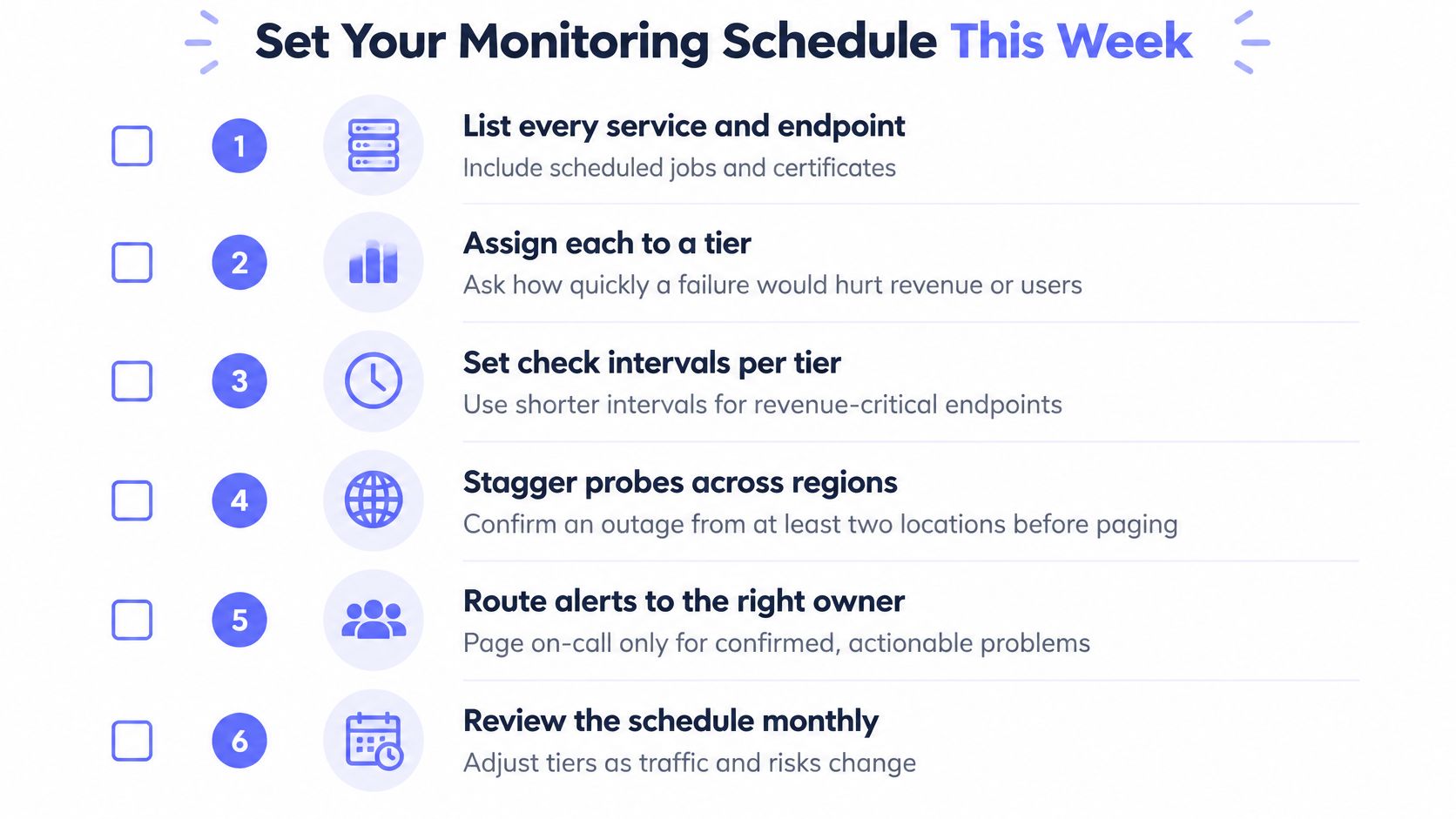
- List every service and endpoint, including scheduled jobs and certificates. A backup that isn't on the list can't have a deadline.
- Assign a tier by asking what a failure costs per hour of revenue, users, or contracted severity. Cost picks the row, not the team's habit.
- Set the collection interval for that tier, then check that scrape plus evaluation still lands inside the detection target. If it doesn't, shorten the interval before you loosen the page.
- Pick a confirmation policy per tier. Start at the stricter count for any service that paged on noise last month.
- Spread probe start times, and add at least one extra region on revenue-critical checks so one path can't page the company.
- Record owner, interval, confirmation rule, and notification route for every monitor, and date each change. Prometheus with Alertmanager, UptimeRobot, and Fivenines can store those as separate fields rather than one polling number. Write them down either way.
Then run a one-hour drill. Simulate one failure on a revenue-critical check, time the first alert, and confirm the page reached a person who can act. Success is fewer pages per week, faster confirmed incidents, and a record that shows both the detection and the route.
Fivenines unifies Linux server metrics, website uptime, and cron job heartbeats on one schedule, with multi-region checks and failure confirmation before a page. Intervals, workflow gates by time of day, and alert routes to chat, SMS, or webhooks are separate settings, which is exactly how a monitoring schedule should be priced. See how that fits your tiers at Fivenines.