Proxmox Review: Is It the Right Choice in 2026?


Proxmox has surpassed one million reported hosts and now includes an import wizard for VMware ESXi guests, making it a viable production-grade alternative in 2026. It isn't automatically the safest choice, though, because backup recovery, snapshot behavior, and upgrade compatibility still demand serious operational discipline.
A familiar situation plays out across small infrastructure teams. Licensing costs keep climbing, administrators are tired of maintaining separate management layers, and a VMware environment that once felt permanent now requires a fresh business case. The team can install Proxmox quickly, create a virtual machine, and admire the clean web interface. The harder questions arrive later, during a restore, a storage migration, or an upgrade involving legacy containers.
This proxmox review focuses on those less visible costs. Proxmox VE has matured into a broad platform for virtual machines, LXC containers, clustering, storage, networking, backups, and administration. It can reduce platform dependency, but it doesn't remove the need for engineering judgment. A production deployment succeeds when the team measures recovery and migration behavior before an incident exposes the gaps.
Table of Contents
- Why Infrastructure Teams Are Reconsidering Virtualization
- Proxmox VE Architecture and Evolution
- Setting Up Proxmox VE for Production Use
- Understanding Storage, Networking, and Clustering
- The Backup and Recovery Reality Check
- Comparing Proxmox to VMware and Hyper-V
- Who Should Adopt Proxmox and What to Watch For
Why Infrastructure Teams Are Reconsidering Virtualization
A small operations team usually doesn't abandon a commercial hypervisor because administrators dislike its interface. The trigger is more practical. Finance questions the renewal, procurement sees less flexibility, and engineers discover that the surrounding tooling has grown into a collection of tightly connected products. The team needs virtualization, but it also needs a platform that fits its hardware, automation habits, and risk tolerance.
That pressure makes open-source virtualization attractive. Proxmox VE combines KVM virtual machines and LXC containers behind a web-based administrative layer, rather than requiring separate products for the basic virtualization and container workloads. Teams evaluating the underlying concepts can also use this practical explanation of virtualization with Finchum Fixes IT to clarify how abstraction, consolidation, and isolation fit together.

The strongest Proxmox candidates aren't necessarily the organizations with the smallest servers. They're teams that can own more of the operational design themselves. A capable Linux administrator can inspect the host, automate through the API, choose a storage layout, and build monitoring around the actual failure modes rather than waiting for a vendor workflow to dictate every decision.
Practical rule: Treat lower licensing dependency as a transfer of responsibility, not as the elimination of responsibility.
Proxmox also fits environments that value hardware choice and workload variety. A solo operator may want lightweight LXC services beside full VMs. An MSP may need repeatable cluster patterns across clients. A SaaS team may prefer direct control over backup repositories, storage pools, and recovery testing. Those advantages matter only when the team accepts the associated work, including capacity planning, lifecycle testing, and incident procedures.
The question isn't whether Proxmox can run production workloads. It can. The question is whether the organization has enough Linux, storage, networking, and recovery expertise to operate the platform deliberately once a single node becomes a shared, multi-tenant system.
Proxmox VE Architecture and Evolution
Proxmox VE's current all-in-one design comes from incremental expansion, not a recent attempt to combine unrelated tools. The project marked ten years since the public release of version 0.9 on April 15, 2018, as recorded in Proxmox's historical account. Its first stable 1.0 release followed in 2008, introducing live migration and graphical backup management through vzdump. Those early features established an operational focus that still shapes the platform, which grew from a KVM and OpenVZ management interface into a broader virtualization environment.
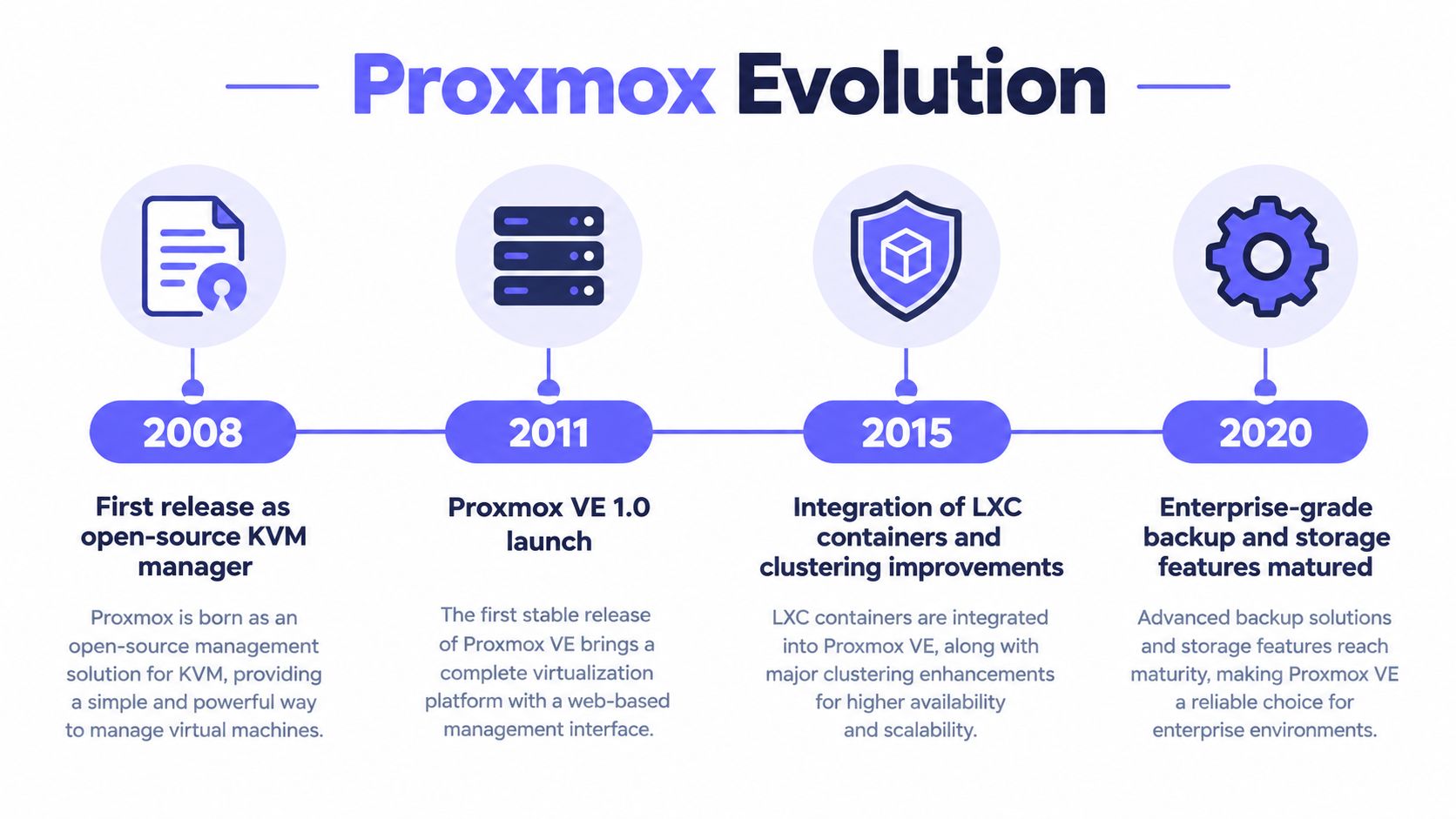
The 2.0 generation added a REST API, Corosync-based clustering, GUI backup and restore, live snapshots, and a new web interface framework. In 2014, ZFS and Ceph expanded the available storage designs. Proxmox VE 4.0 replaced OpenVZ with LXC and added a high-availability manager. For operations teams, the important point is how these components developed together. Containers, clustering, storage, and administration are integrated into the platform rather than being separate additions around a narrow hypervisor core.
A platform with measurable reach
At its 2018 anniversary, Proxmox reported approximately 200,000 hosts across more than 142 countries, with the interface translated into 19 languages. Its 2024 Proxmox VE 8.2 announcement reported more than one million hosts, customers in more than 142 countries, and a graphical interface available in over 29 languages. The later figure is at least five times the earlier company-reported total, but it is not an independently audited market census. (Proxmox VE 8.2 release announcement)
The 8.2 release also indicates the project's direction. It used Debian 12.5, Linux kernel 6.8, QEMU 8.1, LXC 6.0, and Ceph 18.2, while adding VMware ESXi guest importing, automated bare-metal installation, backup fleecing, and an nftables-based firewall technology preview.
Operational maturity still depends on what administrators can observe and test. Teams should pair Proxmox with a suitable KVM virtual machine monitoring approach and measure backup recovery times, snapshot impact, and upgrade compatibility before expanding from one node to a clustered or multi-tenant environment.
Proxmox has a long development history and a substantial installed base. Feature availability does not guarantee identical polish across enterprise workflows. The architecture is credible, but each team still needs to validate storage behavior, recovery procedures, hardware compatibility, and lifecycle changes under its own workload.
Setting Up Proxmox VE for Production Use
A production installation starts with hardware and failure-domain decisions, not the first click in the installer. The team should document which nodes provide compute, which systems hold guest data, how management and guest traffic are separated, and what happens if a node disappears. Proxmox's web interface makes administration accessible, but it can't compensate for an ambiguous design.
The initial deployment can use automated bare-metal installation, a capability highlighted in the Proxmox VE 8.2 release material. Existing VMware environments also have a practical migration path through the ESXi guest import wizard introduced in that release. Importing a guest is only the beginning, though. The team still needs to validate drivers, boot behavior, guest tools, network naming, application performance, and rollback procedures.
Configuration choices that prevent rework
A first production pass should establish a small set of conventions:
- Network bridges: Define which bridge carries guest traffic and which carries management or cluster communication. Avoid allowing an experimental bridge layout to become the default template for every future guest.
- Storage pools: Create pools around workload behavior, not just available capacity. Database guests, general application servers, and backup targets may have different latency and snapshot needs.
- Permissions: Use role-based access and separate administrative identities. Multi-tenant operations need clear boundaries between guest console access, storage visibility, and cluster administration.
- Templates: Standardize cloud-init or operating-system templates, guest agents, naming, tags, and backup policy before the fleet grows.
- Cluster membership: Add nodes only after time synchronization, name resolution, networking, and quorum behavior have been tested under failure.
The interface is functional rather than luxurious. Administrators can manage virtual machines, containers, storage, tasks, consoles, firewall rules, and backups from the browser, while the REST API supports automation. Teams moving from VMware should expect a different mental model, particularly around cluster configuration and storage administration. Operational teams can supplement the built-in views with Proxmox virtual machine monitoring guidance and their existing observability stack.
A short demonstration can help new administrators understand the workflow before production work begins:
The setup is approachable, but the safe rollout still requires staged migration. Start with a non-critical guest, capture baseline CPU, memory, disk, and network behavior, perform a backup and restore, and then test a live migration if shared storage is involved. The web UI shortens the path to a working environment. It doesn't shorten the time needed to prove that the environment can recover.
Understanding Storage, Networking, and Clustering
Storage selection determines much of the Proxmox operating experience. The platform can work with local disks, ZFS, LVM-thin, NFS, iSCSI, Ceph RBD, and other Debian-compatible back ends. That flexibility is useful, but it moves an important design decision into the administrator's hands: the correct backend depends on latency, redundancy, migration requirements, operational skill, and failure recovery.
Local storage keeps the design simple and can deliver predictable performance, but it complicates migration and node failure. ZFS adds checksumming and storage management features, while LVM-thin is often a straightforward choice for thin provisioning and storage-native operations. NFS and iSCSI can provide shared access through existing storage systems. Ceph RBD supports distributed storage, but a Ceph design brings its own capacity, network, monitoring, and recovery responsibilities.
Snapshot behavior changes the recommendation
The storage wiki makes an operational distinction that surface-level benchmarks often miss. Internal QCOW2 snapshots can block a running VM, and the behavior can become especially slow on NFS. Operations involving multi-hundred-gigabyte or tebibyte-scale disks may take minutes or, in extreme cases, hours. (Proxmox storage documentation)
That doesn't make QCOW2 or NFS unusable. It means snapshot frequency and workload write patterns must influence the architecture. Storage-native snapshots or designs using ZFS, LVM-thin, or Ceph are more appropriate when frequent snapshotting forms part of the recovery workflow. A realistic test should create, delete, and roll back snapshots while the guest performs concurrent I/O. Idle benchmarks won't reveal the interruption that a busy database or tenant workload experiences.
| Backend | Snapshot Support | Best Use Case | Migration Friendly |
|---|---|---|---|
| Local disks | Depends on the local storage design | Standalone nodes and simple deployments | Limited |
| ZFS | Storage-native snapshots | Local redundancy and snapshot-heavy workloads | Limited unless paired with shared design |
| LVM-thin | Storage-native thin snapshots | Efficient local VM provisioning | Limited |
| NFS | Backend and image-dependent | Existing shared file storage | Generally suitable for shared access |
| iSCSI | Backend and volume-dependent | Shared block storage environments | Suitable with careful configuration |
| Ceph RBD | Distributed, storage-native operations | Clustered storage and shared workloads | Strong, with Ceph operational overhead |
Networking has the same trade-off. A cluster needs reliable communication for Corosync, while guests need stable bridges and enough capacity for application traffic, storage, migration, and backup. A link that performs well for ordinary guest traffic may become a bottleneck when several migrations and backup jobs compete with it.
Administrators should monitor storage capacity, latency, pool state, and guest I/O rather than watching only host CPU. A focused disk space monitoring workflow can help expose a full thin pool or storage fault before guests start failing. Corosync-based clustering and the high-availability manager provide useful coordination, but they don't turn poor network design or insufficient storage capacity into a resilient architecture.
The Backup and Recovery Reality Check
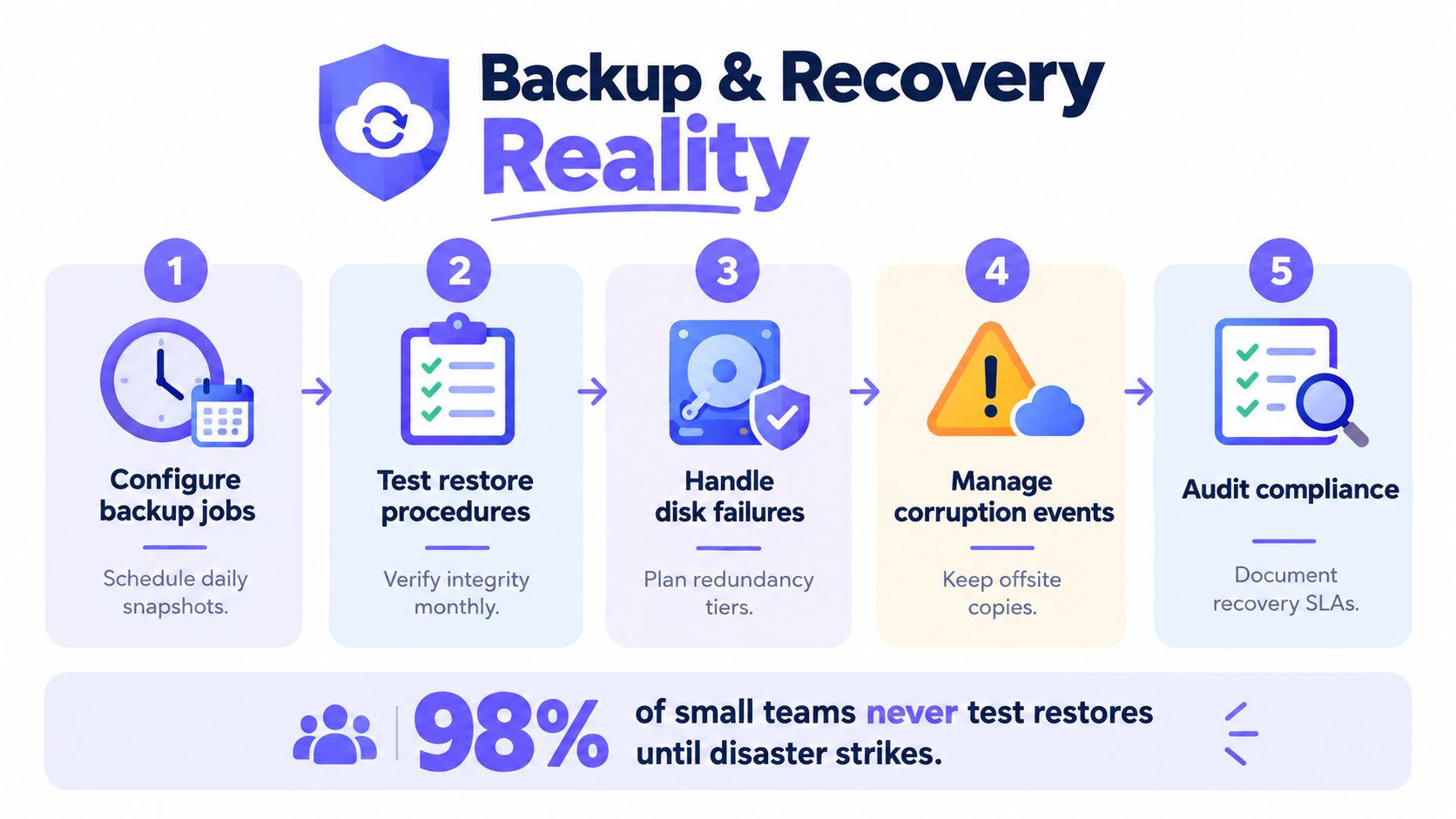
A completed backup job proves that a job completed. It doesn't prove that an application can restart, that the repository can be reached during a host failure, or that the restore will meet the business recovery objective.
Proxmox separates guest protection from the snapshot implementation of the underlying VM storage. Its live-backup mechanism offers snapshot-like behavior across supported storage types, including NFS, iSCSI, and Ceph RBD, without requiring the backend to provide its own snapshots. Standard Proxmox VE backups include guest configuration and guest data, while Proxmox Backup Server stores deduplicated chunks and transfers only changed data during later jobs. (NetApp's Proxmox overview)
Recovery needs its own test plan
Deduplication and changed-data transfer can reduce network traffic and backup runtime for frequently changing VM fleets. They don't remove failure-domain planning. Backup storage should live on a dedicated or off-site system, and the team should verify restores rather than treating repository health as proof of recoverability.
A useful test plan measures different failure paths:
- VM restore: Record restore time, boot success, guest-agent behavior, and application availability.
- LXC restore: Confirm that container networking, mounts, initialization, and service dependencies return correctly.
- Concurrent recovery: Restore several guests together to expose storage and network contention.
- Encrypted and deduplicated data: Verify that keys, metadata, and repository access remain available independently of the failed host.
- Host-independent recovery: Rebuild or use another Proxmox node and prove that the recovery procedure doesn't depend on the original system.
A Proxmox Support Forum report describes repeatable restore speeds of approximately 2.5 to 3 GB/s from Proxmox Backup Server to Proxmox VE, with CPU utilization not saturated and the bottleneck still unidentified. (Proxmox restore reports) That observation is useful as a test reference, not as a universal promise. Storage backend, repository layout, encryption, network path, guest size, concurrency, and destination hardware can all change the result.
Independent user-review evidence also flags backup processes as slow or inefficient, which reinforces the need to publish local measurements instead of borrowing expectations from another environment. The important output isn't “backup succeeded.” It is the changed-data volume, backup-window duration, restore throughput, recovery time objective, and percentage of restore tests that reach application validation.
Recovery rule: Every production backup policy should name the person, system, alternate host, repository, and measured procedure that will perform the restore.
A low licensing bill can mislead a multi-tenant operator. The platform may be inexpensive to deploy, but recovery risk remains an engineering cost. MSPs, hosting providers, and SaaS teams should schedule restore drills, retain independent copies, document application consistency, and alert when backups become stale. A retention policy should also define how long data remains available and which copies survive a compromised or unavailable primary environment. Teams can use this practical data retention policy resource when formalizing those decisions.
Comparing Proxmox to VMware and Hyper-V
A VMware replacement can look successful after the guest machines boot. The harder test comes later, when the team must reproduce backup integrations, monitoring, resource policies, storage behavior, security controls, and recovery procedures across a cluster. Proxmox is most compelling when the organization wants platform control and can provide the Linux, storage, and automation expertise that commercial ecosystems package into products and support processes.
VMware remains attractive for environments built around mature enterprise workflows, specialized storage, partner tooling, and established administrator experience. Hyper-V fits organizations where Microsoft identity, Windows Server operations, and existing Microsoft management practices shape daily work. The lower platform cost of Proxmox does not remove migration effort or operational risk.
| Decision area | Proxmox VE | VMware | Hyper-V |
|---|---|---|---|
| Platform model | Open-source virtualization with optional commercial support | Commercial ecosystem with established enterprise tooling | Microsoft-centered virtualization stack |
| Management style | Web interface, command line, and REST API | Mature centralized management model | Strong fit with Microsoft administration |
| Containers | Native LXC support | Requires a different container or Kubernetes approach | Usually paired with separate container tooling |
| Migration path | ESXi guest import tooling is available in the 8.2 generation | Existing VMware workflows remain familiar | Migration depends heavily on guest and management design |
| Storage operations | Broad backend choice, with more hands-on design | Strong abstraction and mature advanced storage workflows | Closely aligned with Microsoft and supported storage designs |
| Best operational fit | Cost-conscious teams with Linux and storage expertise | Complex environments needing established ecosystem depth | Microsoft-heavy environments with compatible skills and tooling |
Because the 8.2 generation shipped an ESXi import wizard alongside automated bare-metal installation, migration from VMware is now a supported product path rather than only a community workaround. The import handles guest images, not the surrounding backup and monitoring integrations. Teams should inventory those dependencies before approving a move.
Where the trade-off becomes visible
Proxmox gives administrators direct control and does not require a separate management appliance for core cluster capabilities. That can reduce platform sprawl, but it also leaves more decisions with the operations team, particularly around shared storage, Ceph, permissions, upgrade sequencing, and automation.
Snapshot behavior deserves a practical test before migration. Snapshot creation may be quick, while deleting or consolidating snapshots can create storage and latency pressure, depending on the backend and guest workload. In a multi-tenant cluster, that contention can affect neighboring guests. A pilot should measure snapshot creation, rollback, deletion, and application response under concurrent activity rather than treating snapshots as a feature checkbox.
VMware's advantage is the ecosystem around advanced storage, centralized workflows, partner integrations, and enterprise support expectations. Hyper-V benefits from alignment with Microsoft skills and existing Windows infrastructure. Neither alternative is automatically cheaper or safer after migration, retraining, monitoring changes, and recovery validation are included.
The decision should follow the failure the organization is trying to avoid. If licensing dependence is the primary concern and the team can operate Linux infrastructure, Proxmox merits a controlled pilot. If the business relies on specialized VMware capabilities or round-the-clock vendor response, migration may create more operational exposure than it removes.
Who Should Adopt Proxmox and What to Watch For
Proxmox is a strong candidate for solo operators, homelab builders, MSPs, hosting providers, and production teams that want to reduce dependence on a proprietary virtualization stack. It works particularly well when administrators are comfortable combining a web interface with Linux troubleshooting, storage design, API automation, and direct failure testing.
The platform is less suitable when the team expects every enterprise workflow to be wizard-driven or when a specialized vendor ecosystem is a hard requirement. A deployment can run reliably for a long time and still fail the organization if administrators don't understand quorum, storage recovery, guest compatibility, or backup independence.
The upgrade checklist matters more than the release notes
Recent Proxmox VE 9 coverage identifies the removal of cgroup v1 as a material compatibility change. Legacy LXC workloads using systemd versions below 230 may not boot, with CentOS 7, Ubuntu 16.04, and Debian 8 cited as examples. Kernel upgrades can also change network-interface names, potentially breaking configurations and firewall rules that refer to previous names. (Proxmox VE 9 upgrade guidance)
Before upgrading, administrators should create an inventory that includes:
- Guest operating systems: Flag old Linux distributions, unsupported initialization systems, and custom boot behavior.
- LXC dependencies: Identify containers that rely on legacy cgroup behavior or host-level mounts.
- Network identity: Record interface names, bridges, VLAN references, firewall rules, and automation assumptions.
- Storage drivers: Check ZFS, Ceph, iSCSI, NFS, GPU, and other workload-specific dependencies.
- Kernel customization: Document modules, parameters, passthrough settings, and out-of-tree drivers.
- Recovery access: Test an out-of-band console and keep a rollback path that doesn't depend on the upgraded network.
Upgrade rule: A successful test-cluster upgrade is evidence of compatibility only when it includes the oldest guest, the most customized host, and the real recovery procedure.
The final verdict is conditional but favorable. Proxmox is a serious production platform, not merely a low-cost lab experiment. Its reported reach, integrated architecture, migration tooling, and broad storage options make it a credible choice. The hidden costs appear in the operational details: slow or disruptive snapshot designs, unmeasured restores, legacy containers, renamed interfaces, and clusters that were built without clear failure domains.
Teams should pilot Proxmox with production-shaped workloads rather than a simple guest-count exercise. Measure snapshot rollback under I/O, restore guests to independent hardware, test node and quorum failures, and upgrade the oldest supported workload before committing to a broad migration. If those tests pass and the team can own the operational model, Proxmox can provide flexibility without requiring blind trust in its free availability.
Fivenines provides monitoring for Proxmox nodes, clusters, quorum, virtual machines, LXC containers, storage pools, guest backups, and per-guest resource thresholds, with alert routing through common collaboration channels. Review the platform at Fivenines and use the results of the backup, storage, and upgrade tests to build more visible day-to-day operations.