How to Set Up Virtual Server Monitoring

In a 2025 Red Hat survey of 1,010 IT decision-makers and virtualization practitioners in the United States, the United Kingdom, and English-speaking Asia-Pacific, 71% of organizations said more than half of their IT infrastructure was virtualized (Red Hat's State of Virtualization report). That scale changes the monitoring problem: a physical host can look normal while a guest is slow, a failover VM is doing its job, or shared storage is dragging down unrelated workloads.
Good virtual server monitoring connects what users experience to what the guest, hypervisor, storage path, and network can reveal. It also helps operators make cost decisions without mistaking deliberate resilience for waste, and collect enough evidence to diagnose incidents without turning telemetry into another source of load.
Table of Contents
- Why Host Charts Miss Virtual Server Trouble
- Metrics That Describe a Virtual Server
- How to Install Agents and Uptime Checks
- Signals for VMs Containers and Hypervisors
- Tips for Alerts That Stay Actionable
- Choose Retain Resize Schedule or Retire
Why Host Charts Miss Virtual Server Trouble
A physical host chart can't establish whether a virtual server is healthy. Virtual machines and containers can be created, resized, live-migrated, paused, or abandoned while the host inventory barely changes, so a host-level view can miss both changing workload behavior and missing services.
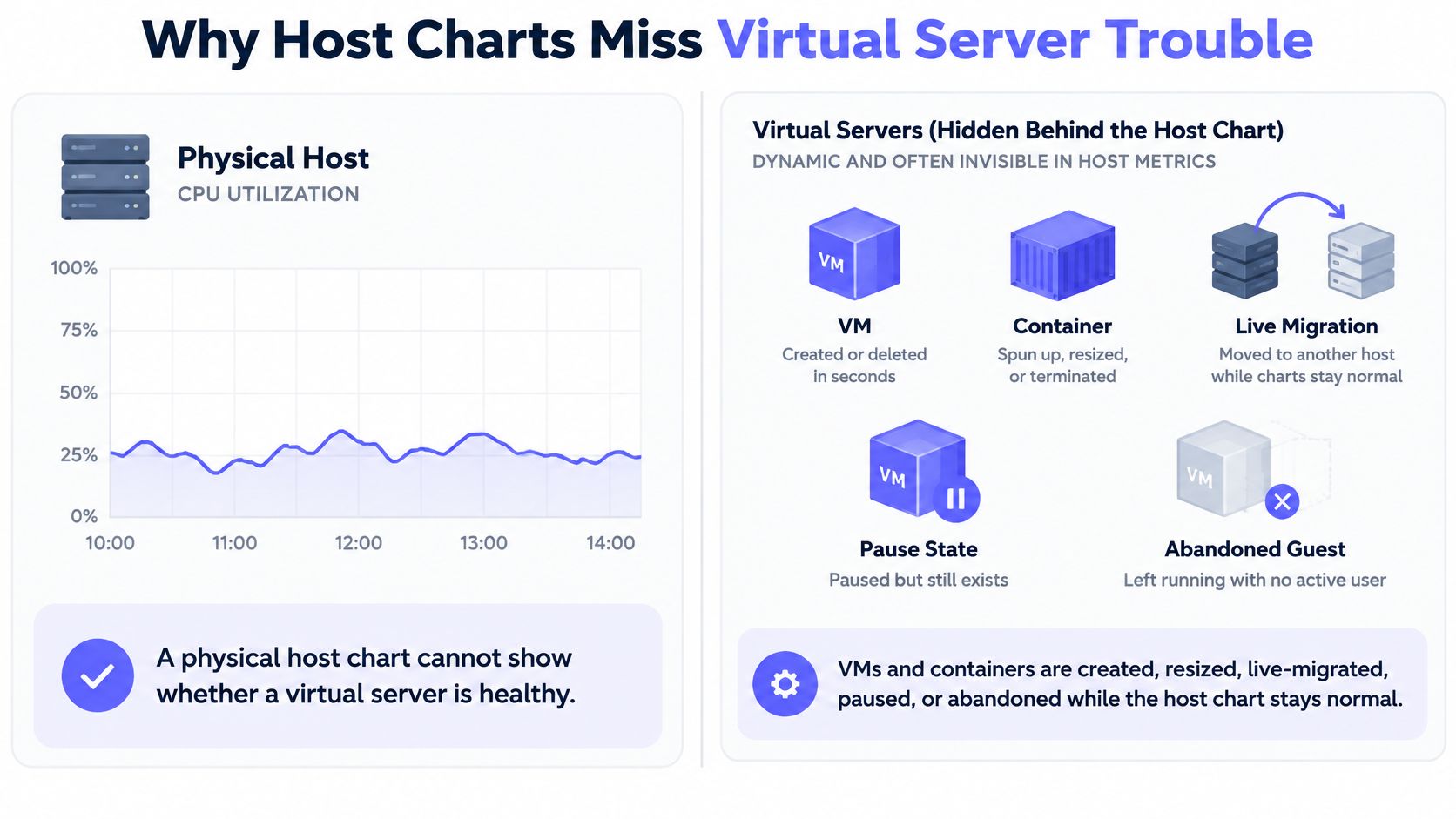
Consider three ordinary incidents. A SaaS API's guest reports rising request latency while the hypervisor's CPU chart looks idle. An MSP's failover node sits near zero CPU because it's waiting to take over when needed. On a hosting node, one noisy neighbor saturates shared storage and slows several guests, even though each guest's CPU chart looks unremarkable.
Each case needs a different response. The API needs performance signals tied to the guest and its dependencies, the failover node needs context about its role, and the storage incident needs host or datastore visibility. The operator needs a starter metric set, an outbound agent paired with outside uptime checks, platform-specific signals, and an escalation path that preserves the relationship between symptom and cause.
Visibility has to exist at both guest and host layers, or reported capacity will diverge from what users feel.
Metrics That Describe a Virtual Server
| Signal | Layer | Healthy cue | Alert when |
|---|---|---|---|
| CPU steal and runnable processes | Guest, compared with host | Steal near zero and a short run queue | Sustained steal accompanies rising application latency |
| Memory pressure, balloon, and swap | Guest and hypervisor | No swap and no aggressive balloon reclaim under load | Swap activity or balloon reclaim occurs while the service slows |
| Disk latency and queue depth | Guest and storage path | Latency stays near the known-good baseline | Queue depth and latency spike while CPU still looks idle |
| Network throughput and packet loss | Guest, vNIC, and virtual switch | Throughput is near the same-platform baseline and loss is near zero | Loss, retransmits, or throughput falls far below the reproduced baseline |
| Outside uptime | Probe, not the guest | HTTPS, TCP, ICMP, or DNS succeeds | Failure is confirmed from a second region before paging |
| Guest or container state | Hypervisor or orchestrator | Running and recently reporting | Paused, crashed, or agent silent while the host is up |
The table separates the four resource dimensions that matter: CPU, memory, storage, and network. A practical method is to baseline representative bare-metal or known-good VM workloads, repeat the same tests at normal and peak load, and compare results over time against host capacity. The peer-reviewed benchmarking study on virtualized workloads found that performance varied by workload and configuration. Some virtualized read tests reached 86% to 93% of bare-metal performance, while some write tests exceeded it, illustrating why no single virtualization penalty applies everywhere.
Use repeatable tools for comparison: CPU benchmarks for processor workloads, STREAM for memory bandwidth, IOzone for disk throughput, and Netperf for network throughput. Run them on the target hypervisor and virtual hardware, with the storage tier and workload the service uses. In the study's tested environment, high-speed network file or web-serving workloads did not exceed roughly 25% of bare-metal performance. Treat that as an environment-specific result to reproduce, not a universal limit.
For CPU diagnosis, utilization alone won't tell whether an application is busy or waiting. Sustained steal time alongside rising application latency points to contention outside the guest; high guest CPU without steal suggests the workload itself may be saturated. For memory, pressure, ballooning, and swap are more useful than a free-memory figure in isolation. Storage latency and queue depth can reveal an overloaded path even when CPU remains idle, while packet loss and retransmits can make a healthy-looking guest unreachable or sluggish.
Make baselines representative
An outside uptime check complements internal metrics. Test HTTPS, TCP, ICMP, or DNS from outside the guest so a silent agent doesn't conceal a connection failure. Keep the external check tied to a real service, and include response time and availability rather than treating a simple successful connection as a complete health signal.
Four common mistakes undermine diagnosis: benchmarking idle VMs, averaging away burst latency, comparing unlike virtual hardware, and trusting guest-only visibility. Alert on saturation and degradation, not a lone utilization reading. For operators who need to interpret memory pressure without relying on free RAM alone, this guide to memory usage monitoring adds useful context.
How to Install Agents and Uptime Checks
Decide what runs continuously before installing anything. Keep low-cost host and guest metrics on all the time; reserve event-triggered detail and short-lived, high-resolution capture for cases where an alert warrants closer inspection. That keeps the first deployment from collecting expensive detail on every guest by default.
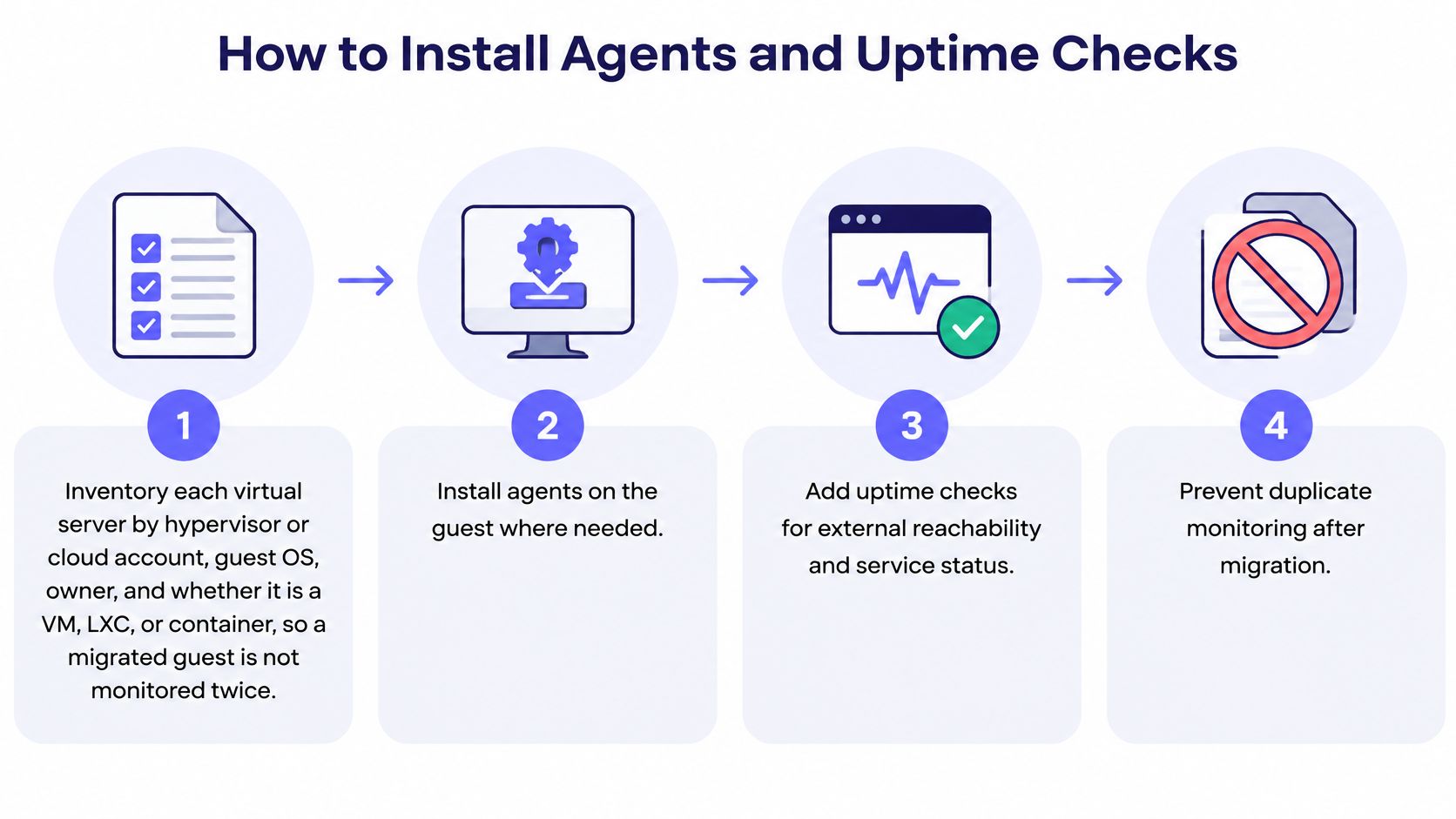
Inventory the estate. Record each server's hypervisor or cloud account, guest OS, owner, and type: VM, LXC, or container. This makes it easier to spot ownership gaps and prevents a migrated guest from being monitored twice. The slip is treating host inventory as guest inventory; keep the relationship between node and guest explicit.
Install a lightweight outbound agent. On Linux, use an open-source agent that pushes over HTTPS, avoiding an inbound port or remote command path. On Windows, use an agent that can be installed with a single PowerShell command. Do not open broad inbound access just to collect routine metrics.
Confirm the first payload. Check that the initial report includes CPU, memory, disk, network, processes, and services. Start with that basic view before enabling deeper collectors. If essential signals are missing, fix the agent or permissions first rather than adding unrelated modules.
Enable only relevant service modules. Add PostgreSQL, MySQL, Redis, Nginx, systemd, Docker, or ZFS monitoring only on hosts where those services exist. Enabling every module across the fleet adds noise and collection work without improving coverage.
Check named systemd units. Point systemd monitoring at the units that matter to that host, so a failed service triggers a service-specific alert instead of a generic host-down page. A broad host check alone can't tell an operator which unit needs attention.
Create external uptime checks. Probe HTTPS, TCP, ICMP, and DNS from outside the guest, and track response time, availability, and SSL expiry. An in-guest agent can be healthy while users can't reach the service, so external checks should test the path users rely on.
Confirm reachability before paging. Require a second probe region to confirm a failure before the check pages someone. A single probe can encounter a local network problem that doesn't affect the service globally.
Collect ingress and egress telemetry. Record VM identity, vNIC, port group, source and destination, protocol, bytes, packets, and rejected connections, with synchronized timestamps. The NIST guidance for security in virtualized environments recommends monitoring VM state and traffic and placing security monitoring outside the guest where possible. It also cautions that promiscuous mode should be limited to the required VM port group, not enabled across the entire virtual switch. Monitoring only incoming or only outgoing traffic leaves a gap, and an attacker may disable an in-guest agent.
Test under representative load. Validate performance and detection with a traffic generator that approximates production behavior, including peak conditions. An idle-VM test won't show whether collection or inspection changes performance when the workload is busy.
Correlate the security layers. Collect guest metrics and logs, then monitor hypervisor health, administrative interfaces, virtual switches, and VM traffic. Correlate anomalies across those layers and document deviations for investigation. Collecting hypervisor logs without watching for integrity changes, or generating alerts without a baseline, weakens the value of the data.
The next step is to add the signals that guest agents can't see alone on each platform. Teams planning service checks can also use this practical guide to server monitoring and uptime.
Signals for VMs Containers and Hypervisors
A guest agent tells the operator what the operating system can observe. The platform adds context about where the guest runs, what it shares, and which events can affect several workloads at once.
| Platform | Extra signal | Setup rule | Alert rule |
|---|---|---|---|
| Proxmox VE | Cluster quorum, node availability, LXC containers, storage pools | One agent per node; discovered guests stay under that node | One incident per node, not per guest |
| VMware or type-1 hypervisor | Host contention, storage latency, vSwitch port-group errors | Watch guest and host together during live migration | Correlate before paging the guest |
| Public-cloud VM | Steal, disk, and network against the bought instance type and storage tier | Baseline on the same virtual hardware | Never compare unlike instance types |
| Docker or container host | Host saturation apart from per-container CPU, memory, and restart count | Add a backing database, queue, or GPU only when it runs on that node | Alert on restart loops, not one spike |
| MSP or hosting fleet | Client-owned servers and storage pools | Group servers and checks by client | Separate alert stream per client |
Map the signal to the platform
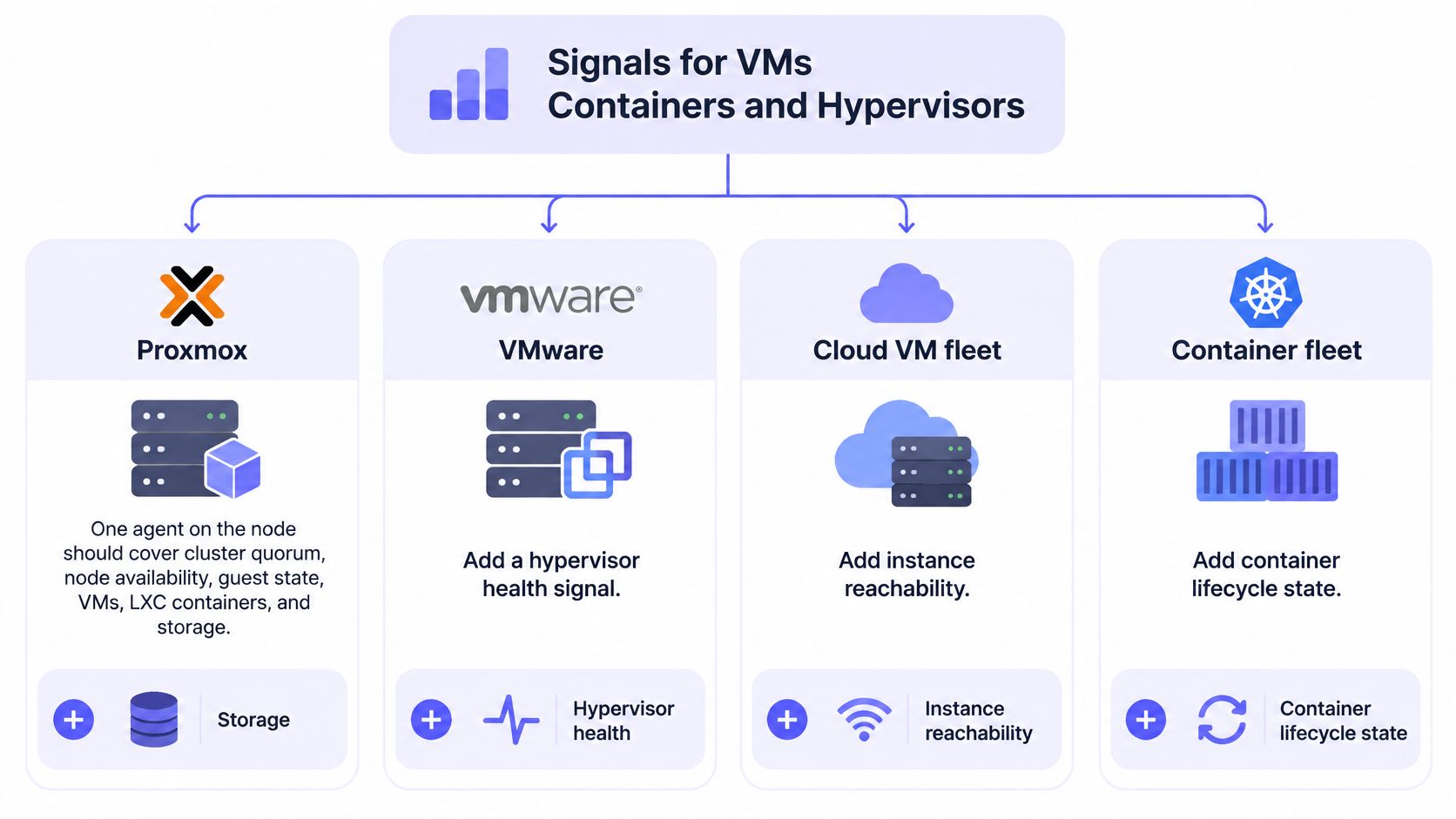
On Proxmox VE, a single node agent should cover cluster quorum, node availability, guest state, VMs, LXC containers, and storage pools. If a quorum problem affects the node, discovered guests should remain grouped under that node so one fault doesn't create a page for every guest. A team monitoring KVM or Hyper-V can use the same principle: one node agent covers the host, its guests, and its storage pools, while platform contention and storage latency provide the extra evidence.
On VMware or another type-1 hypervisor, watch host contention, storage latency, and vSwitch port-group errors alongside the guest. A live migration can move the workload, and the symptom, away from the host an operator first inspected. Correlate both sides before assigning the incident to the guest.
For a public-cloud VM, compare steal, disk, and network behavior with the instance type and storage tier purchased. A baseline from different virtual hardware can give a misleading comparison, so establish the reference on the same configuration before considering a rightsizing change.
On a Docker or other container host, separate overall host saturation from each container's CPU, memory, and restart count. Add the database, queue, or GPU only when it runs on that node; alert on a restart loop rather than treating a single spike as a service failure.
For an MSP or hosting fleet, group systems and checks by client. If one client's storage pool becomes noisy, the incident should stay in that client's alert stream rather than blending into another customer's infrastructure. The KVM virtual-machine monitoring guide offers a useful reference for applying host and guest visibility to a KVM fleet.
Tips for Alerts That Stay Actionable
Every alert has a cost: collection uses resources, and noisy notifications consume operator attention. Collect enough evidence to diagnose a failure, but avoid gathering high-cardinality or high-resolution data continuously when a lighter signal will do. More detail is not automatically better monitoring.
Use three collection tiers
- Tier 1, continuous: Gather low-cost host and guest metrics. Keep this layer light enough to run without distorting the workload.
- Tier 2, event-triggered: When a baseline signal degrades, temporarily collect process, syscall, or eBPF samples to narrow the cause. Low sampling rates can miss brief events; high rates add overhead.
- Tier 3, short-lived capture: During an incident, collect high-resolution data for a defined period, then stop. Set retention to match the time needed for troubleshooting and review.
Control metric cardinality so detailed labels do not multiply into an unmanageable number of time series. On multi-tenant systems, keep each client's process data private.
Route a symptom, not a raw counter
A useful alert connects a service symptom to evidence an operator can act on. If application latency rises, correlate it with CPU steal, disk latency, packet loss, and relevant host or network signals before assigning the problem to a guest. Route by client and severity, then use delays, retries, and escalation rules to avoid paging on a transient blip.
A notification should identify the affected guest, its host, the observed failure, and the next diagnostic step. Slack, Microsoft Teams, email, SMS, and webhooks are delivery channels; they do not make a vague alert actionable. Fivenines supports alert workflows with routing, delays, retries, and escalations. These practical alert setup guidelines can help teams define those rules. For further reading, see alert fatigue insights for IT providers.
Adaptive telemetry beats a louder dashboard.
A quiet VM still needs an operational decision. Low CPU may mean unused capacity, or it may be resilience the service depends on. Compare the cost of keeping it with the reliability it provides before deciding whether to retain, resize, schedule, or retire it.
Choose Retain Resize Schedule or Retire
| Pattern | Evidence to require | Action |
|---|---|---|
| Always-on service | SLO, steady traffic, and an owner | Retain and alert on saturation, not average CPU |
| Nightly or seasonal batch | Known schedule plus disk or network bursts | Schedule checks around the window; don't delete |
| Failover or spare | Low CPU but a required restart time and dependency | Keep and tag as unused resilience |
| Memory-heavy, CPU-light | High resident memory, low steal, stable latency | Resize CPU only; leave memory |
| No use for 14 or more days | No CPU, disk, or network activity, no owner, no dependency | Snapshot, retire, and keep a rollback |
Low utilization alone doesn't prove waste. A batch worker may only wake during its scheduled window; a failover node may be intentionally idle; and a memory-heavy cache can serve a useful role without demanding much CPU. The 2025 FinOps report identifies waste reduction and workload optimization as leading priorities for cloud-finance teams. Google Cloud guidance recommends treating idle VMs and related resources with no use for 14 days as candidates for review, not automatic deletion.
Before removing a guest, confirm who owns it, what depends on it, how quickly it must restart, and whether a snapshot or rollback preserves recovery options. Retirement is a controlled change: record the decision, verify the dependencies, and keep a clear recovery path.
For teams that want to avoid assembling separate tools, Fivenines brings server metrics, multi-region uptime checks, cron monitoring, and network visibility into one platform. Its uptime checks run HTTPS, TCP, ICMP, and DNS probes from four regions. Proxmox VMs and LXC containers discovered through the API are included with the node running the agent, rather than counted as separate monitors. Each added monitor, such as an agent-running server, uptime check, task, or network device, counts once against the plan's monitor limit.
Apply the decision table to one client or one cluster this week. Confirm owners and dependencies, identify a candidate for resizing or scheduling, and document the rollback before expanding the review to the rest of the fleet.
A retailer guide to recalled product disposal addresses a different kind of removal process and does not apply to virtual server retirement.
Fivenines combines server metrics, Proxmox visibility, network monitoring, cron tracking, and external uptime checks to connect virtual-server health with user-facing availability. Start with one cluster or client, establish the signals and alert rules that matter, and visit Fivenines to see how it can fit your monitoring workflow.