NVIDIA GPU Monitoring Beside Your Host Metrics
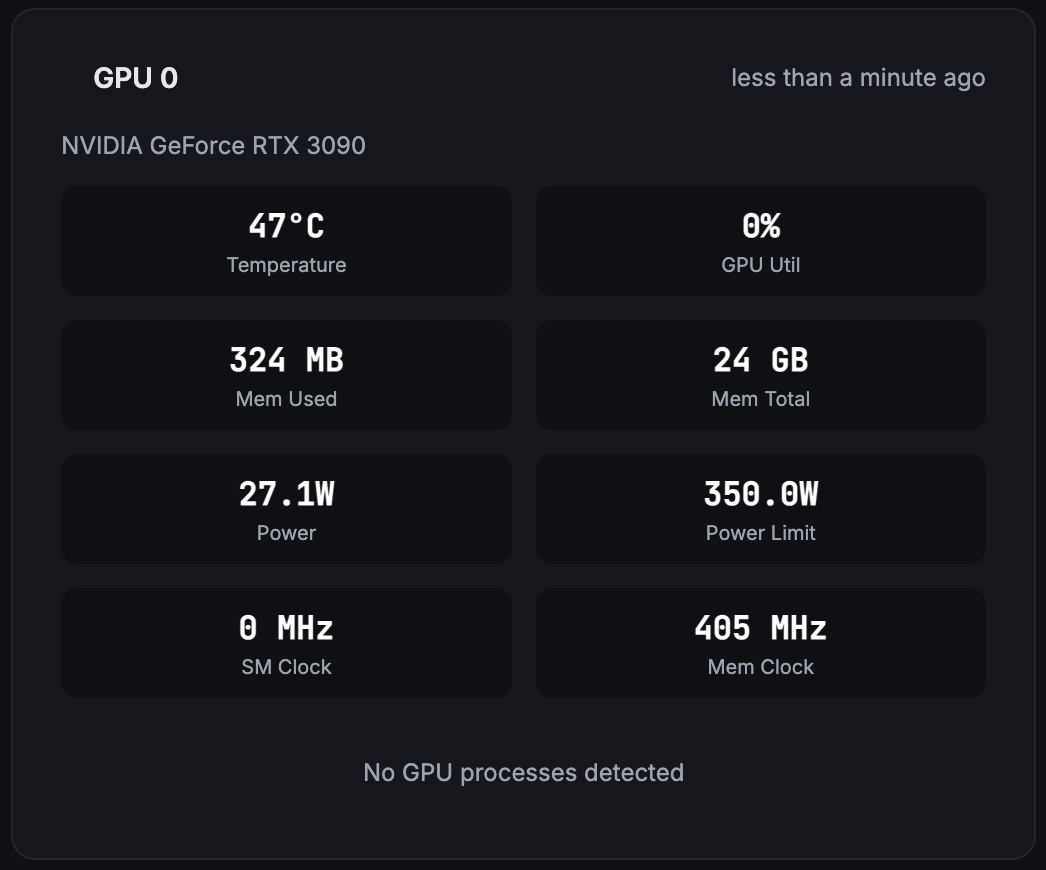
Track GPU utilization, VRAM, temperature and power alongside CPU, memory and host health. The Fivenines agent collects NVIDIA metrics through NVML on Linux, with a default 60-second interval and hosted history.
Built for teams monitoring production infrastructure
14-day trial · No credit card · NVIDIA driver required
-
Utilization & Memory
GPU utilization percentage, VRAM used vs. total, and per-GPU tracking so you know exactly which card is busy and which is idle.
-
Temperature & Power
Temperature in °C, power draw against the reported power limit, and fan speed where the hardware exposes it.
-
Multi-GPU & Processes
Per-GPU metrics for multi-GPU servers, per-process VRAM usage, and SM and memory clocks where the GPU and driver expose them.
Deep dive
Check the Driver, Then Connect the Agent
Start with a Linux host, a supported NVIDIA driver and a GPU visible to the agent through NVML. The standard Linux agent package bundles the NVML binding; GPU collection must be enabled, and the agent's service account needs access to the device. Detection works when those prerequisites are met.
No separate DCGM exporter or Prometheus server is required for these metrics. Available readings depend on the GPU, driver and virtualization mode: a GPU-level reading the hardware does not expose is left out, not recorded as zero.
Deep dive
Alerts for GPU Temperature, Load and Power
Create a GPU health workflow for temperature, GPU utilization, memory-controller activity or power draw as a percentage of the reported limit. It checks the host's reporting GPUs and identifies the most extreme GPU when a threshold is crossed.
VRAM used and total are separate capacity metrics. Memory-controller utilization measures activity, not how full VRAM is. Set thresholds against your hardware limits and workload baseline; one temperature or utilization threshold does not fit every server.
Route notifications through the integrations available on your plan. Add host availability and application checks as well: normal GPU readings alone do not prove that an inference server or training job is healthy.
Deep dive
Keep GPU History Beside Host Metrics
Compare GPU load, VRAM use and temperature over time, then inspect the CPU, memory and container signals on the same host. Every plan keeps 24 months of history; the 60-second default is how often readings are collected, not how long they are kept.
nvidia-smi can loop and write readings to a file. Fivenines adds hosted charts and workflow notifications across your servers, so your team can investigate after the terminal session has ended.
Where GPU Monitoring Helps
Training and Rendering Nodes
Compare utilization and VRAM across runs. Investigate idle periods using job logs and host metrics before deciding whether a workload failed or simply completed.
Inference Servers
Watch VRAM pressure, temperature and power alongside service availability. GPU metrics complement application monitoring; they do not measure model response latency.
GPU Hosting and Homelabs
Inspect each visible GPU by host, index and name. For Proxmox or KVM passthrough, run the agent in the guest with access to the assigned GPU and its driver.
How It Compares
| Approach | Best fit | What you manage |
|---|---|---|
| nvidia-smi / nvtop | Inspect a GPU or process from a terminal | Local sessions; nvidia-smi can log readings to a file |
| DCGM Exporter + Prometheus | NVIDIA data center telemetry in an existing metrics stack | Exporter deployment, metrics storage, dashboards and alert rules |
| Fivenines | Hosted NVIDIA GPU and server monitoring | An agent on each monitored host, driver access and your alert rules |
Deep dive
Need a Command-Line Starting Point?
For Linux VRAM checks, nvtop and nvidia-smi examples, read our Linux GPU monitoring guide.
Compare local utilities, self-hosted stacks and hosted platforms in our GPU monitoring software comparison.
Frequently Asked Questions
Which GPUs can Fivenines monitor? +
Does GPU monitoring work on Windows? +
What must be installed before GPU monitoring works? +
Can I monitor multiple GPUs and GPU passthrough? +
What GPU alerts can I configure? +
Does Fivenines replace nvidia-smi or DCGM? +
Explore next
Related Features
Server Alerts
Build threshold workflows and route notifications to your team.
Explore ->Custom Dashboards
Combine GPU temperature, utilization and memory charts with host metrics.
Explore ->Proxmox Monitoring
Monitor hypervisor health alongside guests with assigned GPUs.
Explore ->Docker Monitoring
Inspect container CPU, memory and status alongside host GPU metrics.
Explore ->Bring your NVIDIA GPU servers into one view
14-day trial. No credit card required.
No credit card · NVIDIA driver required · Cancel anytime