Linux Server Monitoring With History and Alerts
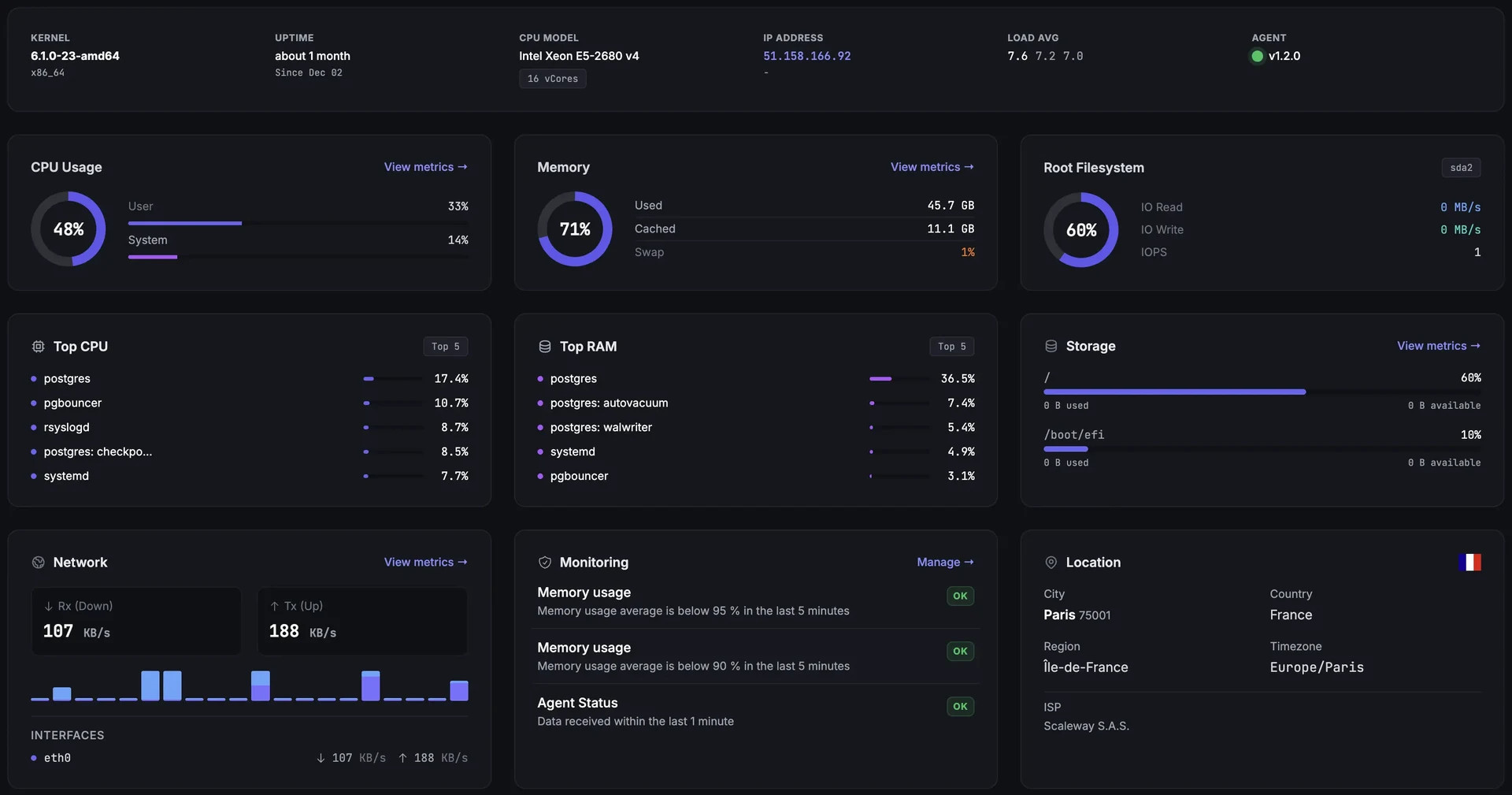
See CPU, memory, disks, network and processes across your Linux servers. Fivenines combines an open-source agent with hosted dashboards and alert workflows, so your team can investigate a slow host and keep the history after the SSH session ends.
Built for teams monitoring production infrastructure
14-day trial · No credit card · Hosted monitoring
-
One view across hosts
Compare host resource use, inspect processes and review history from a shared dashboard. Install the agent on each Linux host you want to monitor.
-
Thresholds and host availability
Configure Instance Metric thresholds and a separate Instance Status trigger for an agent that stops reporting. Add notification destinations, rechecks and recovery handling to your workflows.
-
Review the agent before rollout
The agent source is public. Choose a standard service installation or a user-level installation, and check the permissions required by each optional collector.
What You Can Monitor on a Linux Server
CPU and processes
CPU utilization, load averages and process resource use. Read load alongside CPU and I/O: load average is not a CPU utilization percentage.
Memory and storage
RAM, swap, filesystem space and disk I/O. Compare resource pressure with your workload and history before choosing alert thresholds.
Network and host availability
Interface traffic and counters, listening ports and agent reporting status. External uptime checks complement these host readings with a view from outside your server.
Deep dive
Turn Linux Metrics Into Actionable Alerts
Use the metrics available in the workflow builder to define thresholds and evaluation windows. For example, monitor sustained CPU activity or low filesystem space, then send the incident to the people responsible for that host. Tune thresholds to the workload and test both firing and recovery.
A quiet metric is not proof that a host or service is healthy. Configure an Instance Status trigger for missing agent reports, and use an appropriate service or uptime check for availability. Metric thresholds alone do not replace these checks.
Notifications support email, Slack, Microsoft Teams, Telegram, Discord, Pushover, PagerDuty and webhooks, depending on plan. Review server alerts and workflows for routing and notification options.
Deep dive
Keep History Without Operating a Metrics Backend
Fivenines hosts the dashboards and storage. Collection defaults to 60 seconds, with 24 months of retention on every plan. Use that history to compare resource use before and after a deployment or review recurring capacity pressure.
Optional collectors add Docker, Proxmox, databases, NVIDIA GPUs and other services. Enable the modules you need and supply their prerequisites, such as a database monitoring account, an API token or local device access. Their presence on the host does not guarantee complete collection.
Installed package inventory can also feed vulnerability scanning. Coverage depends on advisory data for the distribution and release; a missing feed does not establish that a server has no vulnerabilities.
Choose the Right Linux Monitoring Approach
Terminal tools for immediate diagnosis
Use top, free, vmstat, iostat and ss to inspect a host over SSH. Add scheduling, storage and notification handling when you need continuing coverage.
A stack you operate
Prometheus with node_exporter and Alertmanager, or a monitoring suite such as Zabbix, gives you control over deployment and configuration. Your team owns its storage, upgrades and availability.
Hosted monitoring with Fivenines
Install the agent and configure dashboards and workflows while Fivenines operates the backend. This requires outbound access to the service; it is not a self-hosted control plane or a drop-in import of existing Prometheus rules.
Install and Verify One Host First
Create a host or enrollment token in Fivenines and use the command shown by the setup wizard. This example uses a placeholder: replace YOUR_ENROLLMENT_TOKEN with your token.
wget -T 3 -q -O fivenines_setup.sh https://releases.fivenines.io/latest/fivenines_setup.sh && sudo sh fivenines_setup.sh YOUR_ENROLLMENT_TOKENThe standard installer needs sudo and runs the service as the dedicated fivenines user. A separate user-level installer works without sudo, with reduced access. Linux builds target amd64 and arm64 with glibc or musl; the standard installer supports systemd, OpenRC and UNRAID.
Check the host's first report, timestamps and metric coverage before deploying to the rest of the fleet. Enable optional modules individually and resolve their permission or connection requirements. The agent sends data over outbound HTTPS and does not expose a remote shell.
Review the actual installation permissions: the standard systemd unit includes journal group access, and optional integrations can need additional rights such as constrained sudo rules or Docker socket access. A dedicated user does not mean the service has no privileged access.
Frequently Asked Questions
Is the Linux monitoring agent open source? +
How much overhead does the agent add? +
Can I monitor multiple Linux servers in one account? +
Which Linux systems and distributions can I monitor? +
Does the agent need root or an inbound port? +
What Linux metrics are collected, and how often? +
Can I alert when a Linux server stops reporting? +
How does Fivenines differ from terminal tools or a self-hosted stack? +
Deep dive
Linux Monitoring Guides
How to monitor a Linux server: command-line checks, interpretation and a path to ongoing monitoring.
Compare Linux server monitoring tools: choose between hosted services and stacks your team operates.
Explore next
Related Features
Windows Server Monitoring
Monitor Linux and Windows hosts in the same account.
Explore ->Docker Monitoring
Add container metrics and state alongside host readings.
Explore ->Proxmox Monitoring
Inspect cluster, guest and storage state with the Proxmox integration.
Explore ->Server Alerts
Configure notification destinations and workflows for your hosts.
Explore ->See how Fivenines compares to other tools
Read our guide to the best infrastructure monitoring tools in 2026.
Start with one Linux server
14-day trial. No credit card required.
Configure one host before expanding your rollout