Network Device & SNMP Monitoring
Track switch ports, router traffic and device reachability alongside your Linux and Windows servers. Fivenines polls SNMP v2c/v3 devices through an agent on your network and keeps the monitoring dashboard hosted for you.
Built for teams monitoring production infrastructure
No credit card · SNMP polled by an agent on your network
How It Works
Step 1
Prepare a collector
Install the Fivenines agent and net-snmp client tools on a host that can reach your devices.
Step 2
Add a device
Enter its IP and SNMP v2c or v3 credentials, then assign that polling host.
Step 3
Check the interfaces
The collector reads system information and interface tables. Confirm the ports and counters you need are available.
Step 4
Configure alerts
Use workflows for unreachable devices, interfaces that go down and network metric thresholds.
-
Interface history, port by port
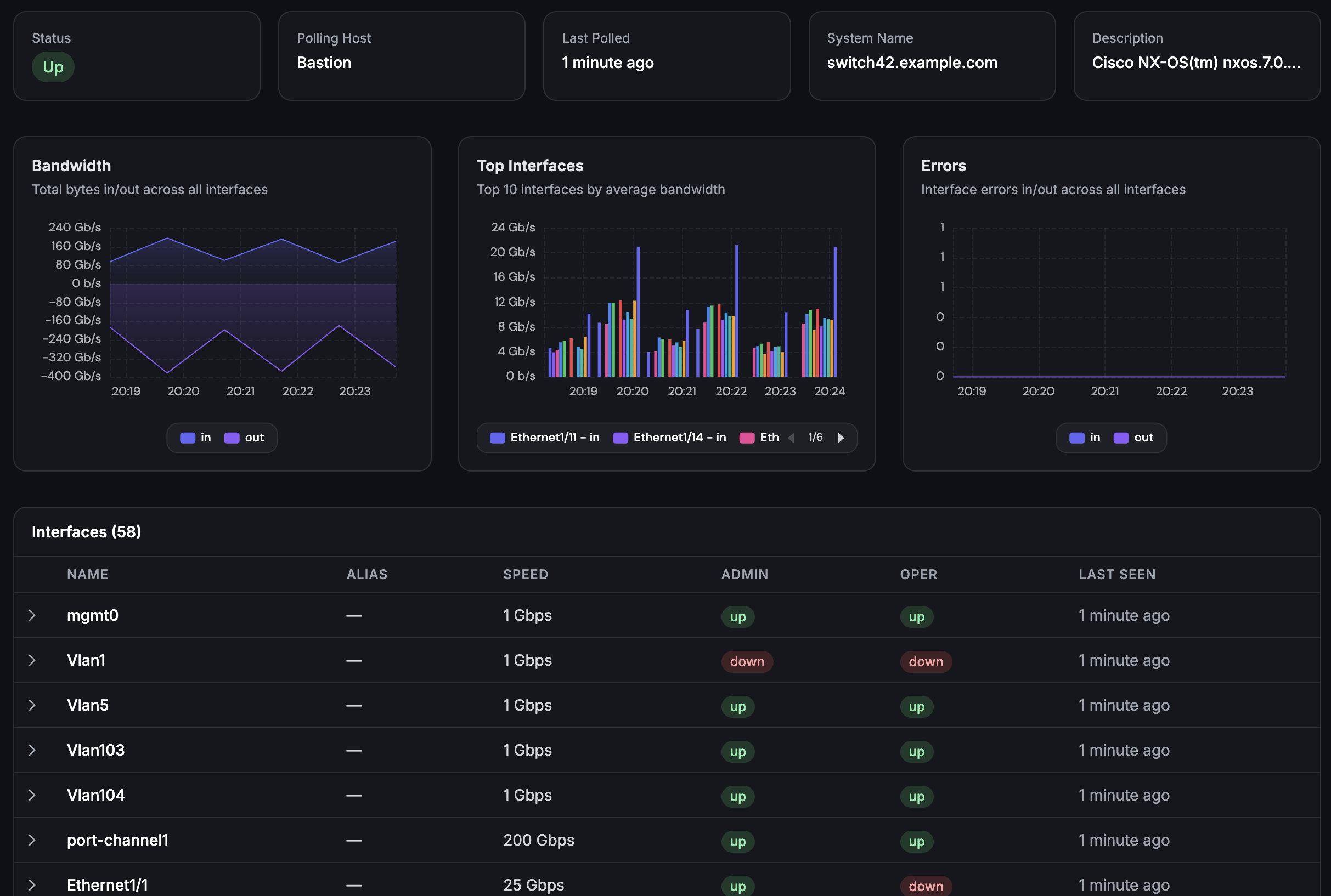
Inbound and outbound traffic, packets, errors and discards for each interface the device reports, kept as history, plus each port's current link state. Find the saturated uplink or the port logging errors.
-
Network and servers on one dashboard
Chart switch ports next to the servers behind them on a custom dashboard, and see both sides of an incident without switching tools.
-
A ready-made reachability alert
The SNMP Device Unreachable workflow template opens an incident after three failed polls in a row and closes it when the device answers again. Maintenance mode pauses its alerts.
Deep dive
A local collector, a hosted dashboard
Your polling host needs both the Fivenines agent and the net-snmp client tools snmpget and snmpbulkwalk. The tools are installed separately from the agent. Give this host network access to the devices and credentials permitted to read the required OIDs.
The new-device form defaults to a 60-second polling interval, and you can configure 10 to 3,600 seconds per device.
For SNMP v3, choose the security level your device supports. Authentication options are SHA-1 or MD5; privacy options are AES-128 or DES. Choose authentication plus privacy when encrypted SNMP communication is required.
Fivenines hosts the dashboard, storage and alerting, so the polling host is the only part of SNMP monitoring you run yourself.
SNMP monitoring on paid plans, from €19/month
Starter includes 15 monitors. Each server, network device, uptime check or cron task counts as one monitor. Your polling host counts too. 14-day free trial.
Channel availability varies by plan - see pricing.
Frequently Asked Questions
Which SNMP versions does Fivenines support? +
Do I need a collector on my network? +
How often are SNMP metrics collected? +
Which devices and metrics can I monitor? +
Does Fivenines discover devices or receive SNMP traps? +
How do network devices count toward my plan? +
Explore next
Related Features
Linux Server Monitoring
Monitor the servers and polling hosts behind your network devices.
Explore ->Custom Dashboards
Compare network device metrics with server and uptime data.
Explore ->Monitoring Workflows
Configure alerts for device reachability, interfaces going down and metric thresholds.
Explore ->See how Fivenines compares to other tools
Read our guide to the best infrastructure monitoring tools in 2026.
Try SNMP monitoring on your own devices
14-day trial. No credit card required.
Cancel anytime · Start with one device and its polling host